The Tech Edvocate

Top Menu

  • Advertisement
  • Apps
  • Home Page
  • Home Page Five (No Sidebar)
  • Home Page Four
  • Home Page Three
  • Home Page Two
  • Home Tech2
  • Icons [No Sidebar]
  • Left Sidbear Page
  • Lynch Educational Consulting
  • My Account
  • My Speaking Page
  • Newsletter Sign Up Confirmation
  • Newsletter Unsubscription
  • Our Brands
  • Page Example
  • Privacy Policy
  • Protected Content
  • Register
  • Request a Product Review
  • Shop
  • Shortcodes Examples
  • Signup
  • Start Here
    • Governance
    • Careers
    • Contact Us
  • Terms and Conditions
  • The Edvocate
  • The Tech Edvocate Product Guide
  • Topics
  • Write For Us
  • Advertise

Main Menu

  • Start Here
    • Our Brands
    • Governance
      • Lynch Educational Consulting, LLC.
      • Dr. Lynch’s Personal Website
      • Careers
    • Write For Us
    • The Tech Edvocate Product Guide
    • Contact Us
    • Books
    • Edupedia
    • Post a Job
    • The Edvocate Podcast
    • Terms and Conditions
    • Privacy Policy
  • Topics
    • Assistive Technology
    • Child Development Tech
    • Early Childhood & K-12 EdTech
    • EdTech Futures
    • EdTech News
    • EdTech Policy & Reform
    • EdTech Startups & Businesses
    • Higher Education EdTech
    • Online Learning & eLearning
    • Parent & Family Tech
    • Personalized Learning
    • Product Reviews
  • Advertise
  • Tech Edvocate Awards
  • The Edvocate
  • Pedagogue
  • School Ratings

logo

The Tech Edvocate

  • Start Here
    • Our Brands
    • Governance
      • Lynch Educational Consulting, LLC.
      • Dr. Lynch’s Personal Website
        • My Speaking Page
      • Careers
    • Write For Us
    • The Tech Edvocate Product Guide
    • Contact Us
    • Books
    • Edupedia
    • Post a Job
    • The Edvocate Podcast
    • Terms and Conditions
    • Privacy Policy
  • Topics
    • Assistive Technology
    • Child Development Tech
    • Early Childhood & K-12 EdTech
    • EdTech Futures
    • EdTech News
    • EdTech Policy & Reform
    • EdTech Startups & Businesses
    • Higher Education EdTech
    • Online Learning & eLearning
    • Parent & Family Tech
    • Personalized Learning
    • Product Reviews
  • Advertise
  • Tech Edvocate Awards
  • The Edvocate
  • Pedagogue
  • School Ratings
  • 100 Best Apps for Spaced Repetition

  • 100 Best Apps for Building a Second Brain

  • 100 Best Apps for Second Brain

  • A Casino Bonus Is Not Its Cash Value: How to Read Reviews Clearly

  • 100 Best Apps for Zettelkasten

  • 100 Best Apps for Bullet Journaling

  • 100 Best Apps for Getting Things Done

  • 100 Best Apps for GTD Method

  • 100 Best Apps for Overcoming Writer’s Block

  • 100 Best Apps for Beating Procrastination

Digital & Mobile Technology
Home›Digital & Mobile Technology›How to Remove Password Protection From a PDF

How to Remove Password Protection From a PDF
By Matthew Lynch
June 12, 2023
0
Spread the love

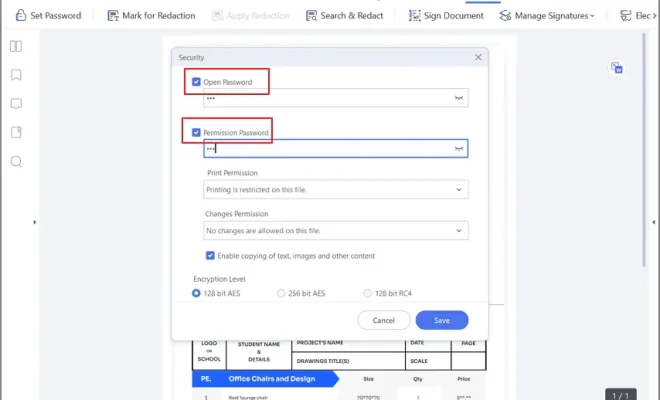
PDF files have become an essential work tool in today’s world. It is a reliable and secure way of storing documents. However, sometimes, we may forget or lose the password that we set for a PDF file. In such a case, we are unable to access the document. The password protection may have been set for security reasons, but if we need to unlock the PDF file, we can remove the password protection. Here’s how to remove password protection from a PDF file:

Step 1: Use a PDF password remover tool

The easiest way to remove password protection from a PDF file is to use one of the many PDF password remover tools available online. Some of these tools are free, and some require payment. You can choose the one that you prefer. One of the most popular and reliable tools is Adobe Acrobat, which offers powerful password removal features.

Step 2: Upload the PDF file

Once you have chosen a password remover tool, upload the PDF file that you want to remove the password from. Make sure that the tool allows you to upload your file.

Step 3: Enter the password

If the PDF file is password-protected, then the tool will ask you to enter the password before proceeding. Enter the password and continue.

Step 4: Remove password protection

After entering the password, the password remover tool will remove the password from the PDF file. It may take a few seconds to a minute or two, depending on the size of the file.

Step 5: Download the PDF file

After the password has been removed, you can download the PDF file and save it on your computer. The PDF file will now be accessible without a password.

In conclusion, removing password protection from a PDF file is a straightforward process that requires a few simple steps. If you forget or lose the password, you can use a PDF password remover tool to remove the password protection. However, it is essential to keep in mind that removing password protection from a PDF file makes it vulnerable to unauthorized access. Therefore, it is crucial to ensure that you password protect sensitive PDF files to maintain their confidentiality and security.


Previous Article

The Best Web Browsers for the iPad

Next Article

How to Create a Batch File in ...

Matthew Lynch

Related articles More from author

  • Digital & Mobile Technology

    How to Enable Handoff on Your Mac

    July 31, 2023
    By Matthew Lynch
  • Digital & Mobile Technology

    How to Build a New PC For Linux

    May 19, 2023
    By Matthew Lynch
  • Digital & Mobile Technology

    How to Use Text to Speech on Discord

    June 12, 2023
    By Matthew Lynch
  • Digital & Mobile Technology

    Pros and Cons of Prepaid Cell Phone Plans

    June 14, 2023
    By Matthew Lynch
  • Digital & Mobile Technology

    Write an article about What Is Spec Work and Should Designers Agree to It?

    June 4, 2023
    By Matthew Lynch
  • Digital & Mobile Technology

    Error Code 0xc00000e9: What It Means and How to Fix It

    June 4, 2023
    By Matthew Lynch

Search

Login & Registration

  • Log in
  • Entries feed
  • Comments feed
  • WordPress.org

Newsletter

Signup for The Tech Edvocate Newsletter and have the latest in EdTech news and opinion delivered to your email address!

About Us

Since technology is not going anywhere and does more good than harm, adapting is the best course of action. That is where The Tech Edvocate comes in. We plan to cover the PreK-12 and Higher Education EdTech sectors and provide our readers with the latest news and opinion on the subject. From time to time, I will invite other voices to weigh in on important issues in EdTech. We hope to provide a well-rounded, multi-faceted look at the past, present, the future of EdTech in the US and internationally.

We started this journey back in June 2016, and we plan to continue it for many more years to come. I hope that you will join us in this discussion of the past, present and future of EdTech and lend your own insight to the issues that are discussed.

Newsletter

Signup for The Tech Edvocate Newsletter and have the latest in EdTech news and opinion delivered to your email address!

Contact Us

The Tech Edvocate
910 Goddin Street
Richmond, VA 23231
(601) 630-5238
[email protected]

Copyright © 2026 Matthew Lynch. All rights reserved.