The Tech Edvocate

Top Menu

  • Advertisement
  • Apps
  • Home Page
  • Home Page Five (No Sidebar)
  • Home Page Four
  • Home Page Three
  • Home Page Two
  • Home Tech2
  • Icons [No Sidebar]
  • Left Sidbear Page
  • Lynch Educational Consulting
  • My Account
  • My Speaking Page
  • Newsletter Sign Up Confirmation
  • Newsletter Unsubscription
  • Our Brands
  • Page Example
  • Privacy Policy
  • Protected Content
  • Register
  • Request a Product Review
  • Shop
  • Shortcodes Examples
  • Signup
  • Start Here
    • Governance
    • Careers
    • Contact Us
  • Terms and Conditions
  • The Edvocate
  • The Tech Edvocate Product Guide
  • Topics
  • Write For Us
  • Advertise

Main Menu

  • Start Here
    • Our Brands
    • Governance
      • Lynch Educational Consulting, LLC.
      • Dr. Lynch’s Personal Website
      • Careers
    • Write For Us
    • The Tech Edvocate Product Guide
    • Contact Us
    • Books
    • Edupedia
    • Post a Job
    • The Edvocate Podcast
    • Terms and Conditions
    • Privacy Policy
  • Topics
    • Assistive Technology
    • Child Development Tech
    • Early Childhood & K-12 EdTech
    • EdTech Futures
    • EdTech News
    • EdTech Policy & Reform
    • EdTech Startups & Businesses
    • Higher Education EdTech
    • Online Learning & eLearning
    • Parent & Family Tech
    • Personalized Learning
    • Product Reviews
  • Advertise
  • Tech Edvocate Awards
  • The Edvocate
  • Pedagogue
  • School Ratings

logo

The Tech Edvocate

  • Start Here
    • Our Brands
    • Governance
      • Lynch Educational Consulting, LLC.
      • Dr. Lynch’s Personal Website
        • My Speaking Page
      • Careers
    • Write For Us
    • The Tech Edvocate Product Guide
    • Contact Us
    • Books
    • Edupedia
    • Post a Job
    • The Edvocate Podcast
    • Terms and Conditions
    • Privacy Policy
  • Topics
    • Assistive Technology
    • Child Development Tech
    • Early Childhood & K-12 EdTech
    • EdTech Futures
    • EdTech News
    • EdTech Policy & Reform
    • EdTech Startups & Businesses
    • Higher Education EdTech
    • Online Learning & eLearning
    • Parent & Family Tech
    • Personalized Learning
    • Product Reviews
  • Advertise
  • Tech Edvocate Awards
  • The Edvocate
  • Pedagogue
  • School Ratings
  • Zola Suite pricing 2026

  • How to become Airbnb Superhost

  • Yelp Elite status how to get

  • Rocket Matter vs CosmoLex comparison

  • Lawyaw vs Documate which is better

  • How to use Yelp for marketing

  • How many templates in Lawyaw

  • Can TripAdvisor reviews be edited

  • How to manage documents in Zola Suite

  • Filevine vs Litify features

Learning Strategies, Tactics, and Methods
Home›Learning Strategies, Tactics, and Methods›How to Read Binary

How to Read Binary

By Matthew Lynch
June 1, 2023
0
Spread the love

Binary is a language consisting of only two numbers – 0 and 1. These two numbers are used to represent the data in computers and other digital devices. Reading binary can seem like a daunting task at first, but with some practice and understanding of the basics, it becomes easy. In this article, we will discuss how to read binary.

Understanding the Basics of Binary

Before we dive into how to read binary, it is important to understand the basics of binary. A binary digit is known as a bit. Bits are the smallest unit of information in a computer. A group of eight bits is called a byte. Bytes can represent numbers, letters, symbols, or codes used in computer systems.

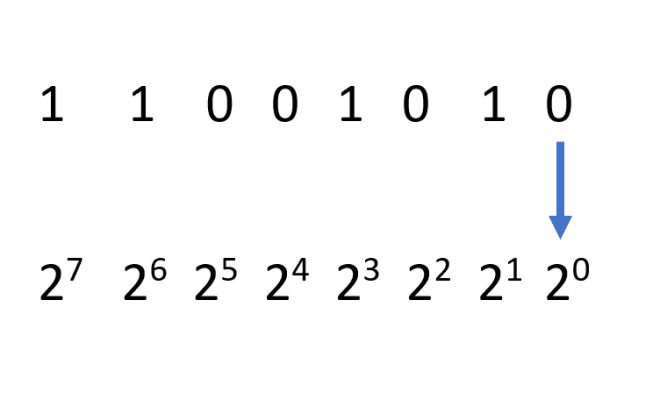
Binary numbers are read from right to left, where the rightmost bit is known as the least significant bit (LSB), and the leftmost bit is known as the most significant bit (MSB). Each number is represented by using powers of two. The first digit on the right represents two to the power of zero, the second digit represents two to the power of one, the third digit represents two to the power of two, and so on.

Reading Binary Numbers

To read a binary number, start by identifying the MSB, which is the digit on the far left. Then, add up the values of each digit that has a value of one. The sum of those values is the decimal equivalent of the binary number. For example, consider the binary number 10110.

1 0 1 1 0

2^4 2^3 2^2 2^1 2^0

16 0 4 2 0

To read this number, start with the MSB, which is 1. Multiply this by 2 to the power of 4, which is 16. The next digit is 0, so move on to the next digit. The third digit is 1, so multiply this by 2 to the power of 2, which is 4. The next digit is 1, so multiply this by 2 to the power of 1, which is 2. Finally, the last digit is 0, so skip this. Add up all the values, 16+4+2, and you get 22. Therefore, the binary number 10110 represents the decimal number 22.

Reading Binary Codes

Binary codes are used in computer systems to represent different characters and symbols. ASCII (American Standard Code for Information Interchange) is the most widely used binary code in computers. In ASCII, each character is assigned a unique binary code.

To read a binary code, you need to refer to the ASCII table, which lists all the characters and their corresponding binary codes. For example, the binary code 01000001 represents the letter “A”. To find this out, you can refer to an ASCII table, which shows that the binary code 01000001 corresponds to the letter “A”.

Conclusion

Reading binary might seem like a daunting task at first, but with some practice, it becomes easy. By understanding the basics of binary, such as bits and bytes, and knowing how to read binary numbers and codes, you can easily convert between binary and decimal numbers and interpret binary codes. With the increasing use of computers and digital devices, being able to read binary is becoming an essential skill.


Previous Article

How to Make and Add Your Own ...

Next Article

How to Add Text to Photos on ...

Matthew Lynch

Related articles More from author

  • Learning Strategies, Tactics, and Methods

    Practical Tips To Motivate People To Learn

    March 19, 2023
    By Matthew Lynch
  • Digital Age TeachersLearning Strategies, Tactics, and MethodsNew Teachers

    The Rules of Online Feedback Teachers Need to Master

    July 7, 2022
    By Matthew Lynch
  • Learning Strategies, Tactics, and Methods

    How To Use Interactive Video-Based Learning To Enhance Your Training’s Impact

    March 24, 2023
    By Matthew Lynch
  • Learning Strategies, Tactics, and Methods

    Competency-Based Learning: Key Concepts

    March 20, 2023
    By Matthew Lynch
  • Learning Strategies, Tactics, and Methods

    Advantages Of Moodle

    March 22, 2023
    By Matthew Lynch
  • Learning Strategies, Tactics, and Methods

    Student Tracking Record To Improve Learning

    March 24, 2023
    By Matthew Lynch

Search

Login & Registration

  • Log in
  • Entries feed
  • Comments feed
  • WordPress.org

Newsletter

Signup for The Tech Edvocate Newsletter and have the latest in EdTech news and opinion delivered to your email address!

About Us

Since technology is not going anywhere and does more good than harm, adapting is the best course of action. That is where The Tech Edvocate comes in. We plan to cover the PreK-12 and Higher Education EdTech sectors and provide our readers with the latest news and opinion on the subject. From time to time, I will invite other voices to weigh in on important issues in EdTech. We hope to provide a well-rounded, multi-faceted look at the past, present, the future of EdTech in the US and internationally.

We started this journey back in June 2016, and we plan to continue it for many more years to come. I hope that you will join us in this discussion of the past, present and future of EdTech and lend your own insight to the issues that are discussed.

Newsletter

Signup for The Tech Edvocate Newsletter and have the latest in EdTech news and opinion delivered to your email address!

Contact Us

The Tech Edvocate
910 Goddin Street
Richmond, VA 23231
(601) 630-5238
[email protected]

Copyright © 2026 Matthew Lynch. All rights reserved.