The Tech Edvocate

Top Menu

  • Advertisement
  • Apps
  • Home Page
  • Home Page Five (No Sidebar)
  • Home Page Four
  • Home Page Three
  • Home Page Two
  • Home Tech2
  • Icons [No Sidebar]
  • Left Sidbear Page
  • Lynch Educational Consulting
  • My Account
  • My Speaking Page
  • Newsletter Sign Up Confirmation
  • Newsletter Unsubscription
  • Our Brands
  • Page Example
  • Privacy Policy
  • Protected Content
  • Register
  • Request a Product Review
  • Shop
  • Shortcodes Examples
  • Signup
  • Start Here
    • Governance
    • Careers
    • Contact Us
  • Terms and Conditions
  • The Edvocate
  • The Tech Edvocate Product Guide
  • Topics
  • Write For Us
  • Advertise

Main Menu

  • Start Here
    • Our Brands
    • Governance
      • Lynch Educational Consulting, LLC.
      • Dr. Lynch’s Personal Website
      • Careers
    • Write For Us
    • The Tech Edvocate Product Guide
    • Contact Us
    • Books
    • Edupedia
    • Post a Job
    • The Edvocate Podcast
    • Terms and Conditions
    • Privacy Policy
  • Topics
    • Assistive Technology
    • Child Development Tech
    • Early Childhood & K-12 EdTech
    • EdTech Futures
    • EdTech News
    • EdTech Policy & Reform
    • EdTech Startups & Businesses
    • Higher Education EdTech
    • Online Learning & eLearning
    • Parent & Family Tech
    • Personalized Learning
    • Product Reviews
  • Advertise
  • Tech Edvocate Awards
  • The Edvocate
  • Pedagogue
  • School Ratings

logo

The Tech Edvocate

  • Start Here
    • Our Brands
    • Governance
      • Lynch Educational Consulting, LLC.
      • Dr. Lynch’s Personal Website
        • My Speaking Page
      • Careers
    • Write For Us
    • The Tech Edvocate Product Guide
    • Contact Us
    • Books
    • Edupedia
    • Post a Job
    • The Edvocate Podcast
    • Terms and Conditions
    • Privacy Policy
  • Topics
    • Assistive Technology
    • Child Development Tech
    • Early Childhood & K-12 EdTech
    • EdTech Futures
    • EdTech News
    • EdTech Policy & Reform
    • EdTech Startups & Businesses
    • Higher Education EdTech
    • Online Learning & eLearning
    • Parent & Family Tech
    • Personalized Learning
    • Product Reviews
  • Advertise
  • Tech Edvocate Awards
  • The Edvocate
  • Pedagogue
  • School Ratings
  • Kā māksla un mehānika veido spēļu automātu portfeļa atšķirības

  • How Sequel Slots Retain Familiar Features While Updating Play

  • Filtre poskytovateľov a rozpoznateľnosť herných kolekcií v kasínach

  • Razvoj iskanja in filtrov v vse obsežnejših katalogih kazino iger

  • Cinematic Intros Meet Familiar Reel Based Slot Play

  • Eventyrmotiver giver bonussekvenser retning og sammenhæng

  • Sådan former lydoplevelsen forskellige casinospil

  • Kameraføring former oplevelsen af roulette og blackjack på stream

  • Fra enkle browserbaserede casinospil til digitale formater med flere muligheder

  • Fra oldtidens fortællinger til nutidens spiltemaer

Digital & Mobile Technology
Home›Digital & Mobile Technology›How to Play Heardle, the Beat the Intro Wordle Clone

How to Play Heardle, the Beat the Intro Wordle Clone
By Matthew Lynch
July 31, 2023
0
Spread the love

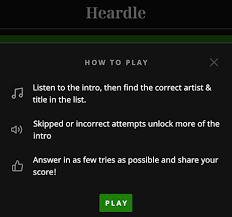
Heardle is a fun and addictive word game that challenges players to guess the name of a song before the beat drops. Similar to the popular game Beat the Intro, Heardle requires players to identify familiar pop songs based on short audio snippets. The game can be played solo or with friends, and is easily accessible on mobile devices.

To start playing Heardle, simply download the app from the App Store or Google Play Store and launch the game. You will then be prompted to create an account or sign in with an existing one. Once you are logged in, you will be taken to the home screen where you can choose between different game modes such as Classic, Challenge, or Quick Play.

In Classic mode, players are given a selection of songs to choose from and must correctly identify the name of the song based on a 15-second audio clip. The faster you guess the song and earn points, the higher your score will be. In Challenge mode, players are given a set of increasingly difficult rounds to complete, with the ultimate goal of beating all the levels and unlocking new content.

But how do you play Heardle? The game works by presenting a series of audio snippets from popular songs, which players must identify by typing in the correct name or the artist. While the audio snippets are playing, you will see a word puzzle on the screen that represents the name of the song. The puzzle will have some missing letters, and your task is to fill in the blanks using the letters provided. The more letters you guess correctly, the easier it will be to guess the name of the song.

If you’re struggling to guess the name of the song, don’t worry! Heardle offers several helpful hints to help you out. You can use a “reveal” which will display a letter from the song’s title, or “remove” which will eliminate one of the incorrect letters. However, keep in mind that each hint will cost you points, so use them wisely.

Once the audio snippet is finished, you will have a limited amount of time to submit your answer before moving on to the next round. The game becomes more challenging as you progress, with fast-paced audio clips and more difficult word puzzles.

In summary, Heardle is a fun and challenging word game that is easy to pick up and play. With a variety of game modes and a vast range of songs to choose from, there’s something for everyone to enjoy. So if you’re a fan of music and word games, give Heardle a try and see if you have what it takes to beat the intro!


Previous Article

RDP vs. VPNs: What’s the Difference?

Next Article

6 Useful Features in One UI 5.1 ...

Matthew Lynch

Related articles More from author

  • Digital & Mobile Technology

    How to Use the Windows Startup Folder: Everything You Need to Know

    August 5, 2023
    By Matthew Lynch
  • Digital & Mobile Technology

    How to Set a Default Printer in Windows 11

    July 4, 2023
    By Matthew Lynch
  • Digital & Mobile Technology

    Different Ways to Restart Your Windows Computer

    June 8, 2023
    By Matthew Lynch
  • Digital & Mobile Technology

    How to Cartoonify Your Photos With GIMP

    August 1, 2023
    By Matthew Lynch
  • Digital & Mobile Technology

    DIY 3D Scanners You Can Build at Home

    June 15, 2023
    By Matthew Lynch
  • Digital & Mobile Technology

    Google Docs vs Word: Which Option Is Best for You?

    June 10, 2023
    By Matthew Lynch

Search

Login & Registration

  • Log in
  • Entries feed
  • Comments feed
  • WordPress.org

Newsletter

Signup for The Tech Edvocate Newsletter and have the latest in EdTech news and opinion delivered to your email address!

About Us

Since technology is not going anywhere and does more good than harm, adapting is the best course of action. That is where The Tech Edvocate comes in. We plan to cover the PreK-12 and Higher Education EdTech sectors and provide our readers with the latest news and opinion on the subject. From time to time, I will invite other voices to weigh in on important issues in EdTech. We hope to provide a well-rounded, multi-faceted look at the past, present, the future of EdTech in the US and internationally.

We started this journey back in June 2016, and we plan to continue it for many more years to come. I hope that you will join us in this discussion of the past, present and future of EdTech and lend your own insight to the issues that are discussed.

Newsletter

Signup for The Tech Edvocate Newsletter and have the latest in EdTech news and opinion delivered to your email address!

Contact Us

The Tech Edvocate
910 Goddin Street
Richmond, VA 23231
(601) 630-5238
[email protected]

Copyright © 2026 Matthew Lynch. All rights reserved.