The Tech Edvocate

Top Menu

  • Advertisement
  • Apps
  • Home Page
  • Home Page Five (No Sidebar)
  • Home Page Four
  • Home Page Three
  • Home Page Two
  • Home Tech2
  • Icons [No Sidebar]
  • Left Sidbear Page
  • Lynch Educational Consulting
  • My Account
  • My Speaking Page
  • Newsletter Sign Up Confirmation
  • Newsletter Unsubscription
  • Our Brands
  • Page Example
  • Privacy Policy
  • Protected Content
  • Register
  • Request a Product Review
  • Shop
  • Shortcodes Examples
  • Signup
  • Start Here
    • Governance
    • Careers
    • Contact Us
  • Terms and Conditions
  • The Edvocate
  • The Tech Edvocate Product Guide
  • Topics
  • Write For Us
  • Advertise

Main Menu

  • Start Here
    • Our Brands
    • Governance
      • Lynch Educational Consulting, LLC.
      • Dr. Lynch’s Personal Website
      • Careers
    • Write For Us
    • The Tech Edvocate Product Guide
    • Contact Us
    • Books
    • Edupedia
    • Post a Job
    • The Edvocate Podcast
    • Terms and Conditions
    • Privacy Policy
  • Topics
    • Assistive Technology
    • Child Development Tech
    • Early Childhood & K-12 EdTech
    • EdTech Futures
    • EdTech News
    • EdTech Policy & Reform
    • EdTech Startups & Businesses
    • Higher Education EdTech
    • Online Learning & eLearning
    • Parent & Family Tech
    • Personalized Learning
    • Product Reviews
  • Advertise
  • Tech Edvocate Awards
  • The Edvocate
  • Pedagogue
  • School Ratings

logo

The Tech Edvocate

  • Start Here
    • Our Brands
    • Governance
      • Lynch Educational Consulting, LLC.
      • Dr. Lynch’s Personal Website
        • My Speaking Page
      • Careers
    • Write For Us
    • The Tech Edvocate Product Guide
    • Contact Us
    • Books
    • Edupedia
    • Post a Job
    • The Edvocate Podcast
    • Terms and Conditions
    • Privacy Policy
  • Topics
    • Assistive Technology
    • Child Development Tech
    • Early Childhood & K-12 EdTech
    • EdTech Futures
    • EdTech News
    • EdTech Policy & Reform
    • EdTech Startups & Businesses
    • Higher Education EdTech
    • Online Learning & eLearning
    • Parent & Family Tech
    • Personalized Learning
    • Product Reviews
  • Advertise
  • Tech Edvocate Awards
  • The Edvocate
  • Pedagogue
  • School Ratings
  • This One Autonomous Pharmacy Kiosk Fills Prescriptions in Under 30 Seconds

  • These 4 Game-Changing New Infosec Products Are Revolutionizing AI Security

  • 9 Critical Mistakes That Crushed Failed Proptech Startups

  • Why Your Next Nvidia Gaming Investment Might Be a Tricky Bet

  • Capcom’s Catastrophic Data Breach: What 11 Million Users Need To Do Now

  • Is the AI Bubble About to Burst? Finance Titans Clash Over Unprecedented Market Risk

  • Urgent: Rogue AI Bots Are Infiltrating Your Bank Account Right Now

  • Explosive Inquiry: Senators Demand Answers From Google Over AI in Classrooms

  • Unbelievable: White House Abandons Legal Fight, Unleashing Millions in Student Loan Forgiveness

  • Urgent: Ransomware Attacks Explode 50% — AI is the New Weapon, And It’s Targeting YOU

Digital & Mobile Technology
Home›Digital & Mobile Technology›How to Pause Execution in a Node.js Program

How to Pause Execution in a Node.js Program
By Matthew Lynch
June 12, 2023
0
Spread the love

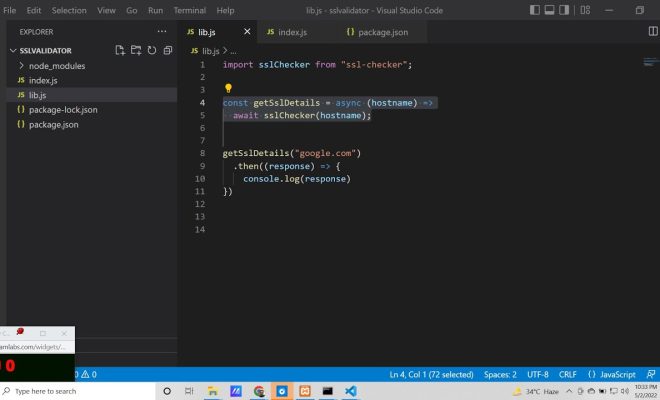
Node.js is an incredible platform for building scalable and high-performance web applications, APIs, and microservices. JavaScript, the programming language used, has become hugely popular for web development due to its versatility and ease of use. However, sometimes you may need to pause the execution of your Node.js program to better understand how it works and troubleshoot issues that may arise.

In this article, we will discuss how to pause execution in a Node.js program using different techniques.

1. Debugger

Node.js comes with a built-in debugger that you can use to pause execution and inspect the state of your program. To start debugging, you will need to run your Node.js program with the –inspect option. This will start a debugger listening on a specific port (by default, 9229).

$ node –inspect your_script.js

Once your program is running, open your web browser and navigate to chrome://inspect. Click the “Open dedicated DevTools for Node” link to start the debugger.

Now, you can add breakpoints in your code by clicking on the line number in the source code. When your program reaches a breakpoint, it will pause execution, and you can inspect variables, call functions, and step through the code using the debugger controls.

2. Console.log()

If you don’t want to use a debugger, you can pause execution in your Node.js program using the console.log() method. This method will write a message to the console, and you can use it to check the state of your program at specific points.

For example, if you have a for loop that you suspect is causing performance issues, you can add a console.log() statement inside the loop to check its progress.

for (let i = 0; i < 10; i++) {
console.log(`i: ${i}`);
}

When you run your program, you will see the messages printed to the console, allowing you to see the state of the program at each iteration of the loop.

3. Async/await

In asynchronous programming in Node.js, it’s common to use callbacks or promises to handle asynchronous operations. However, these can become difficult to debug, especially when there are many nested callbacks.

To make debugging easier, you can use the async/await syntax, which enables you to write asynchronous code that looks like synchronous code. With async/await, you can pause execution by using the await keyword, which will wait for the resolution of the promise.

async function myFunction() {
const result = await somePromise();
console.log(result);
}

When the program reaches the await keyword, it will pause execution until the promise resolves or rejects. This makes it easier to follow the logic of your code and debug any issues that may occur.

Conclusion

Pausing execution in a Node.js program is a crucial skill for any developer. With the debugger, console.log(), and async/await, you can gain better insights into how your program works and troubleshoot any issues that may arise. Whether you are building a complex web application or a simple script, understanding how to pause execution will help you become a more efficient and effective developer.


Previous Article

The 10 Best Chromium Browser Alternatives Better ...

Next Article

The Best Chrome Extensions to Brighten Up ...

Matthew Lynch

Related articles More from author

  • Digital & Mobile Technology

    Best Laptop Cases and Sleeves of 2023

    June 2, 2023
    By Matthew Lynch
  • Digital & Mobile Technology

    How to Set Up BitLocker Encryption on Windows

    May 8, 2023
    By Matthew Lynch
  • Digital & Mobile Technology

    How to Mirror an Image in Microsoft Word

    June 12, 2023
    By Matthew Lynch
  • Digital & Mobile Technology

    How to Set Up Google Assistant on Android and iOS

    June 23, 2023
    By Matthew Lynch
  • Digital & Mobile Technology

    Best WW2 Strategy Games to Immerse Yourself in War

    June 23, 2023
    By Matthew Lynch
  • Digital & Mobile Technology

    How to Create and Use Location-Based Reminders on Android

    May 27, 2023
    By Matthew Lynch

Search

Login & Registration

  • Log in
  • Entries feed
  • Comments feed
  • WordPress.org

Newsletter

Signup for The Tech Edvocate Newsletter and have the latest in EdTech news and opinion delivered to your email address!

About Us

Since technology is not going anywhere and does more good than harm, adapting is the best course of action. That is where The Tech Edvocate comes in. We plan to cover the PreK-12 and Higher Education EdTech sectors and provide our readers with the latest news and opinion on the subject. From time to time, I will invite other voices to weigh in on important issues in EdTech. We hope to provide a well-rounded, multi-faceted look at the past, present, the future of EdTech in the US and internationally.

We started this journey back in June 2016, and we plan to continue it for many more years to come. I hope that you will join us in this discussion of the past, present and future of EdTech and lend your own insight to the issues that are discussed.

Newsletter

Signup for The Tech Edvocate Newsletter and have the latest in EdTech news and opinion delivered to your email address!

Contact Us

The Tech Edvocate
910 Goddin Street
Richmond, VA 23231
(601) 630-5238
[email protected]

Copyright © 2026 Matthew Lynch. All rights reserved.