
The Tech Edvocate

Top Menu

  • Advertisement
  • Apps
  • Home Page
  • Home Page Five (No Sidebar)
  • Home Page Four
  • Home Page Three
  • Home Page Two
  • Home Tech2
  • Icons [No Sidebar]
  • Left Sidbear Page
  • Lynch Educational Consulting
  • My Account
  • My Speaking Page
  • Newsletter Sign Up Confirmation
  • Newsletter Unsubscription
  • Our Brands
  • Page Example
  • Privacy Policy
  • Protected Content
  • Register
  • Request a Product Review
  • Shop
  • Shortcodes Examples
  • Signup
  • Start Here
    • Governance
    • Careers
    • Contact Us
  • Terms and Conditions
  • The Edvocate
  • The Tech Edvocate Product Guide
  • Topics
  • Write For Us
  • Advertise

Main Menu

  • Start Here
    • Our Brands
    • Governance
      • Lynch Educational Consulting, LLC.
      • Dr. Lynch’s Personal Website
      • Careers
    • Write For Us
    • The Tech Edvocate Product Guide
    • Contact Us
    • Books
    • Edupedia
    • Post a Job
    • The Edvocate Podcast
    • Terms and Conditions
    • Privacy Policy
  • Topics
    • Assistive Technology
    • Child Development Tech
    • Early Childhood & K-12 EdTech
    • EdTech Futures
    • EdTech News
    • EdTech Policy & Reform
    • EdTech Startups & Businesses
    • Higher Education EdTech
    • Online Learning & eLearning
    • Parent & Family Tech
    • Personalized Learning
    • Product Reviews
  • Advertise
  • Tech Edvocate Awards
  • The Edvocate
  • Pedagogue
  • School Ratings

logo

The Tech Edvocate

  • Start Here
    • Our Brands
    • Governance
      • Lynch Educational Consulting, LLC.
      • Dr. Lynch’s Personal Website
        • My Speaking Page
      • Careers
    • Write For Us
    • The Tech Edvocate Product Guide
    • Contact Us
    • Books
    • Edupedia
    • Post a Job
    • The Edvocate Podcast
    • Terms and Conditions
    • Privacy Policy
  • Topics
    • Assistive Technology
    • Child Development Tech
    • Early Childhood & K-12 EdTech
    • EdTech Futures
    • EdTech News
    • EdTech Policy & Reform
    • EdTech Startups & Businesses
    • Higher Education EdTech
    • Online Learning & eLearning
    • Parent & Family Tech
    • Personalized Learning
    • Product Reviews
  • Advertise
  • Tech Edvocate Awards
  • The Edvocate
  • Pedagogue
  • School Ratings
  • This One Privacy Camera Feature Could Change Smart Homes Forever

  • Unprecedented: White House Mandates AI Security Incident Reporting After Troubling Breaches

  • The AI Storm Tracker Predicting Viral Narratives Just Landed $7 Million – Here’s Why It Matters

  • This State Just Unleashed AI to Prescribe Meds — Are We Ready for the Future of Medicine?

  • Outrageous: YouTuber Loses Decade of Work to Single YouTube Channel Ban

  • The CyberLeek Saga: What This New GTA 6 Footage Means For Rockstar

  • The Startling Truth About AI’s Medical Revolution You Need to Know

  • This Crucial Shift in AI in Higher Education Could Upend Your Future

  • Bizarre CloudConnect CRM Vulnerability: Why Thousands of Businesses Are Now Exposed

  • HomeSecure Breach: This is How 5 Million Mortgages Got Hacked

How To
Home›How To›How to Obtain a PayPal Debit Card

How to Obtain a PayPal Debit Card
By Matthew Lynch
March 24, 2024
0
Spread the love

Introduction:

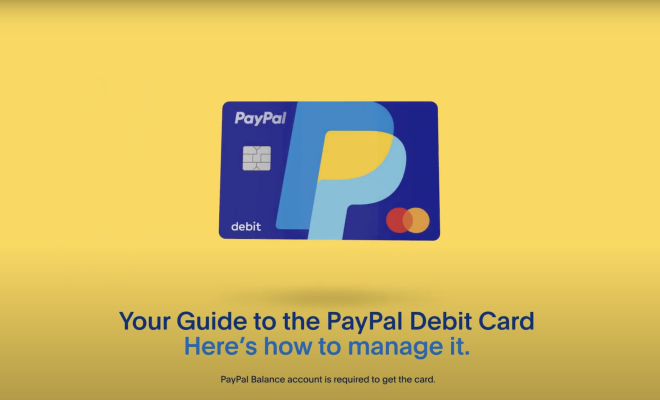
PayPal, as one of the world’s leading online payment systems, offers its users a convenient and secure way of managing their money. One of the useful products provided by PayPal is their debit card. This article will explain step-by-step how to obtain a PayPal debit card and start using it for all your financial needs.

Step 1: Set Up a PayPal Account

Before applying for a PayPal debit card, you need to have an active PayPal account. If you don’t already have one, simply visit the PayPal website or download the mobile app, click on “Sign Up,” and follow the instructions to create your account.

Step 2: Verify Your Account

Once you have created your PayPal account, you need to verify it. To do this, log in to your account and link your bank account or credit/debit cards. Confirm the details, and wait for two small deposits made by PayPal into your bank account within 1-2 working days. Once you receive these deposits, enter the amounts on your PayPal verification page.

Step 3: Apply for the PayPal Debit Card

Now that your account has been set up and verified, you can proceed with applying for the PayPal debit card. Log in to your PayPal account and head over to the “Products & Services” page. Look for the “Debit Card” option under “More Ways to Pay.”

Click on the option that says “Get The Card” or “Learn More.” You’ll be redirected to a new page where you’ll see an “Apply Now” button. Click on this button and fill out an application form with all required details.

Step 4: Wait for Approval

After submitting your application form, wait for approval from PayPal. The approval process can take up to a few business days. Once approved, you’ll receive an email notification confirming your application’s success.

Step 5: Activate Your PayPal Debit Card

Upon receiving your PayPal debit card in the mail, you need to activate it before you can use it. Log in to your PayPal account and head to the “Debit Card” section of your account. Click on “Activate Your Card” and follow the instructions provided.

Step 6: Set a PIN

Create a Personal Identification Number (PIN) for your debit card during the activation process or after activating it. This PIN will be required for ATM usage and purchases that require chip and PIN.

Conclusion:

Obtaining a PayPal debit card is a fairly simple and straightforward process. With a verified PayPal account, all you need to do is apply, wait for approval, activate your card, and set a PIN. Once you have completed these steps, you are ready to use your PayPal debit card for shopping, online transactions, and ATM withdrawals.


Previous Article

How to Contact Fitbit: 6 Steps

Next Article

4 Ways to Calculate Mortgage Interest

Matthew Lynch

Related articles More from author

  • How To

    How to Extract Oil from Walnuts

    October 21, 2023
    By Matthew Lynch
  • How To

    3 Ways to Take Turmeric Powder

    October 12, 2023
    By Matthew Lynch
  • How To

    3 Simple Ways to Respond to Someone Who Is Projecting

    December 7, 2023
    By Matthew Lynch
  • How To

    How to Set up a Crabitat: 15 Steps

    April 5, 2024
    By Matthew Lynch
  • How To

    How to Broil Salmon: 11 Steps

    November 7, 2023
    By Matthew Lynch
  • How To

    How to Wear a Pocket Watch: 14 Steps

    October 9, 2023
    By Matthew Lynch

Search

Login & Registration

  • Log in
  • Entries feed
  • Comments feed
  • WordPress.org

Newsletter

Signup for The Tech Edvocate Newsletter and have the latest in EdTech news and opinion delivered to your email address!

About Us

Since technology is not going anywhere and does more good than harm, adapting is the best course of action. That is where The Tech Edvocate comes in. We plan to cover the PreK-12 and Higher Education EdTech sectors and provide our readers with the latest news and opinion on the subject. From time to time, I will invite other voices to weigh in on important issues in EdTech. We hope to provide a well-rounded, multi-faceted look at the past, present, the future of EdTech in the US and internationally.

We started this journey back in June 2016, and we plan to continue it for many more years to come. I hope that you will join us in this discussion of the past, present and future of EdTech and lend your own insight to the issues that are discussed.

Newsletter

Signup for The Tech Edvocate Newsletter and have the latest in EdTech news and opinion delivered to your email address!

Contact Us

The Tech Edvocate
910 Goddin Street
Richmond, VA 23231
(601) 630-5238
[email protected]

Copyright © 2026 Matthew Lynch. All rights reserved.