The Tech Edvocate

Top Menu

  • Advertisement
  • Apps
  • Home Page
  • Home Page Five (No Sidebar)
  • Home Page Four
  • Home Page Three
  • Home Page Two
  • Home Tech2
  • Icons [No Sidebar]
  • Left Sidbear Page
  • Lynch Educational Consulting
  • My Account
  • My Speaking Page
  • Newsletter Sign Up Confirmation
  • Newsletter Unsubscription
  • Our Brands
  • Page Example
  • Privacy Policy
  • Protected Content
  • Register
  • Request a Product Review
  • Shop
  • Shortcodes Examples
  • Signup
  • Start Here
    • Governance
    • Careers
    • Contact Us
  • Terms and Conditions
  • The Edvocate
  • The Tech Edvocate Product Guide
  • Topics
  • Write For Us
  • Advertise

Main Menu

  • Start Here
    • Our Brands
    • Governance
      • Lynch Educational Consulting, LLC.
      • Dr. Lynch’s Personal Website
      • Careers
    • Write For Us
    • The Tech Edvocate Product Guide
    • Contact Us
    • Books
    • Edupedia
    • Post a Job
    • The Edvocate Podcast
    • Terms and Conditions
    • Privacy Policy
  • Topics
    • Assistive Technology
    • Child Development Tech
    • Early Childhood & K-12 EdTech
    • EdTech Futures
    • EdTech News
    • EdTech Policy & Reform
    • EdTech Startups & Businesses
    • Higher Education EdTech
    • Online Learning & eLearning
    • Parent & Family Tech
    • Personalized Learning
    • Product Reviews
  • Advertise
  • Tech Edvocate Awards
  • The Edvocate
  • Pedagogue
  • School Ratings

logo

The Tech Edvocate

  • Start Here
    • Our Brands
    • Governance
      • Lynch Educational Consulting, LLC.
      • Dr. Lynch’s Personal Website
        • My Speaking Page
      • Careers
    • Write For Us
    • The Tech Edvocate Product Guide
    • Contact Us
    • Books
    • Edupedia
    • Post a Job
    • The Edvocate Podcast
    • Terms and Conditions
    • Privacy Policy
  • Topics
    • Assistive Technology
    • Child Development Tech
    • Early Childhood & K-12 EdTech
    • EdTech Futures
    • EdTech News
    • EdTech Policy & Reform
    • EdTech Startups & Businesses
    • Higher Education EdTech
    • Online Learning & eLearning
    • Parent & Family Tech
    • Personalized Learning
    • Product Reviews
  • Advertise
  • Tech Edvocate Awards
  • The Edvocate
  • Pedagogue
  • School Ratings
  • Urgent Warning: How AI is Fueling Rampant Skincare Scams Right Now

  • Urgent: This Skincare Trend Is Exploiting Children — And It’s Spreading Fast

  • Seattle Times sues Microsoft and OpenAI, alleging they trained their AI on its journalism

  • Astonishing: Anthropic Axed $6 Billion Deal for Decart — Why?

  • Sega cancelled its “risky” Super Game project as it “would have to grow enormously to match the scale of the service” | GamesIndustry.biz

  • Devastating: Don’t Nod’s €8M Cash Crisis Threatens Studio Future

  • OpenAI Accused of Shocking Attempt to Hijack Euler Proof — The Truth Revealed

  • Meta Child Sexual Abuse Ads: A Disturbing Investigation Unveils Shocking Truths

  • Unveiling the Quiet Crisis: Why Two Mega-Districts Just Banned AI in Education

  • Unveiling the Controversial New Texas Curriculum: A Battle Over History and Identity

Tech Advice
Home›Tech Advice›How to mount your smartphone on a tripod (DIY)

How to mount your smartphone on a tripod (DIY)
By Matthew Lynch
July 13, 2023
0
Spread the love

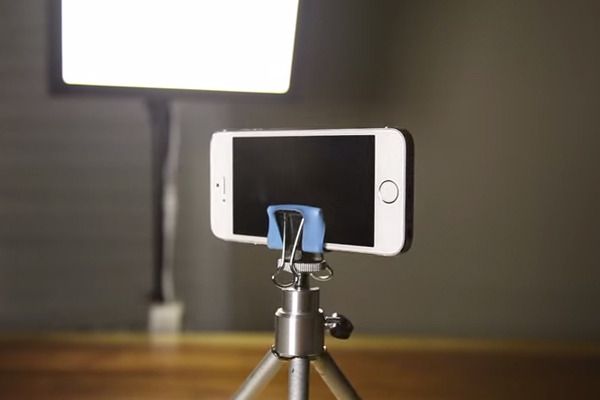
In the era of smartphones, capturing high-quality photos and videos has never been easier. But to take your photography and videography skills to the next level, a tripod can be an essential piece of equipment. This guide will teach you an easy and budget-friendly DIY method to mount your smartphone on a tripod without purchasing special adapters.

Materials needed:

1. Smartphone

2. Tripod

3. Rubber band (large enough to wrap around the phone)

4. Pen or pencil with a clip

Step-by-step guide:

1. Prepare your materials: Ensure that you have the necessary items listed above before you start this project. Choose a sturdy tripod that has adjustable legs for ease of use and stability.

2. Extend the tripod’s legs fully: Setting up your tripod is important for its stability and usability during your photo or video shoot. Extend the legs and make sure they are locked into place so that the tripod is secure.

3. Attach the pen or pencil with a clip to the tripod: Position the pen or pencil horizontally against one of the tripod’s top brackets, with the clip facing towards where your smartphone will be placed. Securely fasten the pen or pencil to the bracket using one or more rubber bands wrapped around both objects, putting tension only on the ends as much as possible.

4. Position your smartphone: Place your phone in landscape mode (horizontally) with its top edge resting against the clip of the pen or pencil. The bottom edge of your smartphone should be touching one of the other tripod brackets for additional support.

5. Secure your smartphone with rubber bands: Take one end of another rubber band and loop it around one side of your phone and under the part of the first band securing the pen/pencil, then stretch it across to loop onto the other side of your phone to hold it in place firmly.

6. Test for stability: Gently shake the tripod to ensure your phone is securely attached to the tripod and doesn’t move easily. Adjust the tightness of the rubber bands as needed if your phone seems wobbly or too loose.

7. Adjust the tripod for optimal shooting: Now that your smartphone is mounted on your tripod, you can adjust the legs and level of the tripod to achieve the desired angles and perspectives for your photos and videos.

Congratulations! You’ve now successfully mounted your smartphone on a tripod using a simple DIY method. With this setup, you can capture stable images and videos, experiment with time-lapse photography, or even use it for hands-free video calls and conference meetings. Happy shooting!


Previous Article

How to make your GIFs load fast ...

Next Article

How to Pick the Best Keyboard Case ...

Matthew Lynch

Related articles More from author

  • Tech Advice

    HDMI splitter vs. HDMI switch: They actually serve opposite purposes

    July 16, 2023
    By Matthew Lynch
  • Tech Advice

    Samsung Galaxy S22 Review: Pocket-Friendly Phone Has Great Cameras, Mediocre Battery Life

    July 17, 2023
    By Matthew Lynch
  • Tech Advice

    Sony UBP-X800 review: A 4K Blu-ray player alternative with a premium vibe

    July 14, 2023
    By Matthew Lynch
  • Tech Advice

    2024 Kia Telluride Gets New Running Lights

    August 22, 2023
    By Matthew Lynch
  • Tech Advice

    Bonavita Connoisseur review: Bonavita’s improved coffee maker is its best one yet

    July 11, 2023
    By Matthew Lynch
  • Tech Advice

    Lumosity vs. Elevate: Battle of the Brain-Training Apps

    July 24, 2023
    By Matthew Lynch

Search

Login & Registration

  • Log in
  • Entries feed
  • Comments feed
  • WordPress.org

Newsletter

Signup for The Tech Edvocate Newsletter and have the latest in EdTech news and opinion delivered to your email address!

About Us

Since technology is not going anywhere and does more good than harm, adapting is the best course of action. That is where The Tech Edvocate comes in. We plan to cover the PreK-12 and Higher Education EdTech sectors and provide our readers with the latest news and opinion on the subject. From time to time, I will invite other voices to weigh in on important issues in EdTech. We hope to provide a well-rounded, multi-faceted look at the past, present, the future of EdTech in the US and internationally.

We started this journey back in June 2016, and we plan to continue it for many more years to come. I hope that you will join us in this discussion of the past, present and future of EdTech and lend your own insight to the issues that are discussed.

Newsletter

Signup for The Tech Edvocate Newsletter and have the latest in EdTech news and opinion delivered to your email address!

Contact Us

The Tech Edvocate
910 Goddin Street
Richmond, VA 23231
(601) 630-5238
[email protected]

Copyright © 2026 Matthew Lynch. All rights reserved.