The Tech Edvocate

Top Menu

  • Advertisement
  • Apps
  • Home Page
  • Home Page Five (No Sidebar)
  • Home Page Four
  • Home Page Three
  • Home Page Two
  • Home Tech2
  • Icons [No Sidebar]
  • Left Sidbear Page
  • Lynch Educational Consulting
  • My Account
  • My Speaking Page
  • Newsletter Sign Up Confirmation
  • Newsletter Unsubscription
  • Our Brands
  • Page Example
  • Privacy Policy
  • Protected Content
  • Register
  • Request a Product Review
  • Shop
  • Shortcodes Examples
  • Signup
  • Start Here
    • Governance
    • Careers
    • Contact Us
  • Terms and Conditions
  • The Edvocate
  • The Tech Edvocate Product Guide
  • Topics
  • Write For Us
  • Advertise

Main Menu

  • Start Here
    • Our Brands
    • Governance
      • Lynch Educational Consulting, LLC.
      • Dr. Lynch’s Personal Website
      • Careers
    • Write For Us
    • The Tech Edvocate Product Guide
    • Contact Us
    • Books
    • Edupedia
    • Post a Job
    • The Edvocate Podcast
    • Terms and Conditions
    • Privacy Policy
  • Topics
    • Assistive Technology
    • Child Development Tech
    • Early Childhood & K-12 EdTech
    • EdTech Futures
    • EdTech News
    • EdTech Policy & Reform
    • EdTech Startups & Businesses
    • Higher Education EdTech
    • Online Learning & eLearning
    • Parent & Family Tech
    • Personalized Learning
    • Product Reviews
  • Advertise
  • Tech Edvocate Awards
  • The Edvocate
  • Pedagogue
  • School Ratings

logo

The Tech Edvocate

  • Start Here
    • Our Brands
    • Governance
      • Lynch Educational Consulting, LLC.
      • Dr. Lynch’s Personal Website
        • My Speaking Page
      • Careers
    • Write For Us
    • The Tech Edvocate Product Guide
    • Contact Us
    • Books
    • Edupedia
    • Post a Job
    • The Edvocate Podcast
    • Terms and Conditions
    • Privacy Policy
  • Topics
    • Assistive Technology
    • Child Development Tech
    • Early Childhood & K-12 EdTech
    • EdTech Futures
    • EdTech News
    • EdTech Policy & Reform
    • EdTech Startups & Businesses
    • Higher Education EdTech
    • Online Learning & eLearning
    • Parent & Family Tech
    • Personalized Learning
    • Product Reviews
  • Advertise
  • Tech Edvocate Awards
  • The Edvocate
  • Pedagogue
  • School Ratings
  • Philippines Sees 1% Drop in External Debt Amid Rising Fuel Prices and Global Economic Tensions

  • Stability in Fuel Prices Amid Global Turmoil: What You Need to Know

  • Nifty 50 Plummets Amid Escalating Middle East Tensions and Oil Price Volatility

  • Crude Oil Prices Surge as Tensions Rise Over Iran Threats

  • China’s Economic Resilience in Early 2026 Amid Global Turbulence

  • Revolutionizing Entrepreneurship: The Rise of One-Person Startups in China Using AI

  • Bold Secures $40 Million to Revolutionize AI-Driven Cybersecurity Solutions

  • Breaking Through the Noise: Google and Accel India Select Promising Startups Beyond AI ‘Wrappers’

  • Accel and Google’s AI Futures Fund Highlights Innovation with 2026 Atoms AI Cohort

  • Capital Shifts: The New Wave of Startup Investments in AI and Robotics

Early Childhood & K-12 EdTechGoogle ClassroomHigher EducationHigher Education EdTech
Home›Early Childhood & K-12 EdTech›How to Manage Group Assignments in Google Classroom

How to Manage Group Assignments in Google Classroom
By Matthew Lynch
September 13, 2018
0
Spread the love

Over the last decade, there has been a multitude of research to support the use of student groups and student collaboration for class assignments. Early online learning environments forced teachers to become creative in assigning and collecting collaborative work; however, current systems offer more options. The most recent updates to Google Classroom expanded the possibilities for students and teachers in regards to grouping assignments. Assigning lessons to groups of students in Classroom involves only a few simple steps and opens up possibilities which were not formerly available for teachers and students.

Step 1: Create Group Documents

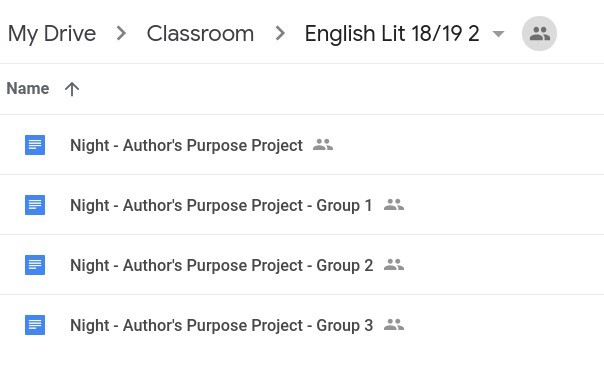
The first step in assigning group work in Classroom is to create an assignment document (Doc, Sheet, etc.) and make a copy for each group. Be sure to add the group name or number to the end of the file name to assist with organization. Save group assignment documents in Drive where they can be easily located. Saving documents in the Classroom folder is acceptable.
 

Step 2: Create Group Assignment Topic

On the Classwork tab, select the Create button and choose Topic. Give the topic an appropriate name relative to the group project.

Step 3: Choose Students

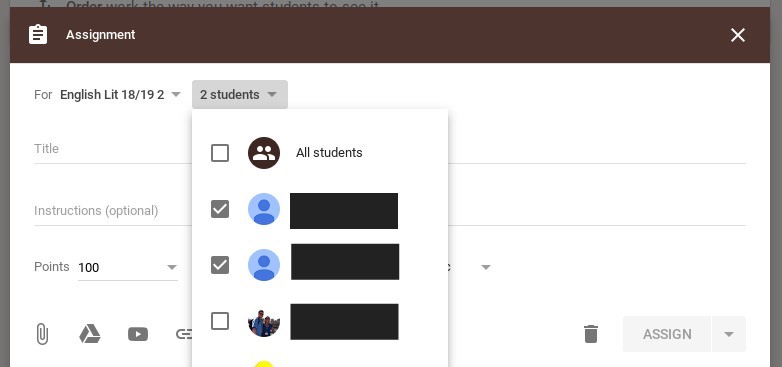
Select the Create button and choose Assignment. In the Assignment dialogue box, click the student dropdown menu, uncheck “all students” and choose the students who will be in the first group. This step will be repeated later for additional groups.
Step 4: Create Assignment

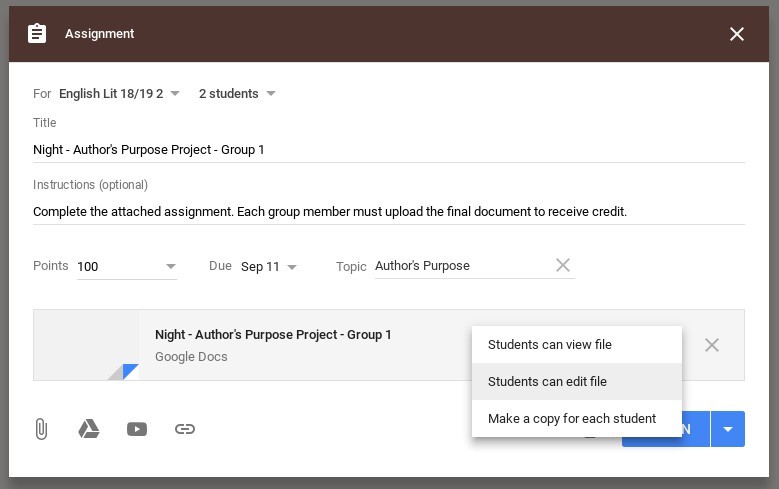
In the Assignment dialogue box, give the assignment an appropriate title which includes the group name and/or number and provide any additional instructions. Remember to select the Topic for the group project. Next, upload assignment documents for the initial group, and be sure “Students Can Edit” is chosen as the document option instead of making a copy for each student. Don’t post the assignment yet – save as a draft until all groups are created.
Step 5: Reuse Assignment for Additional Groups

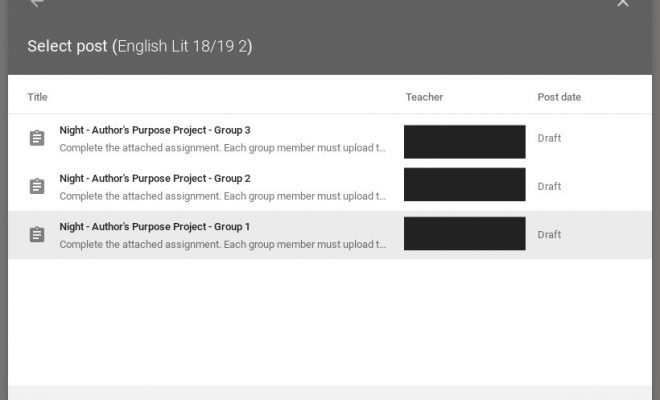
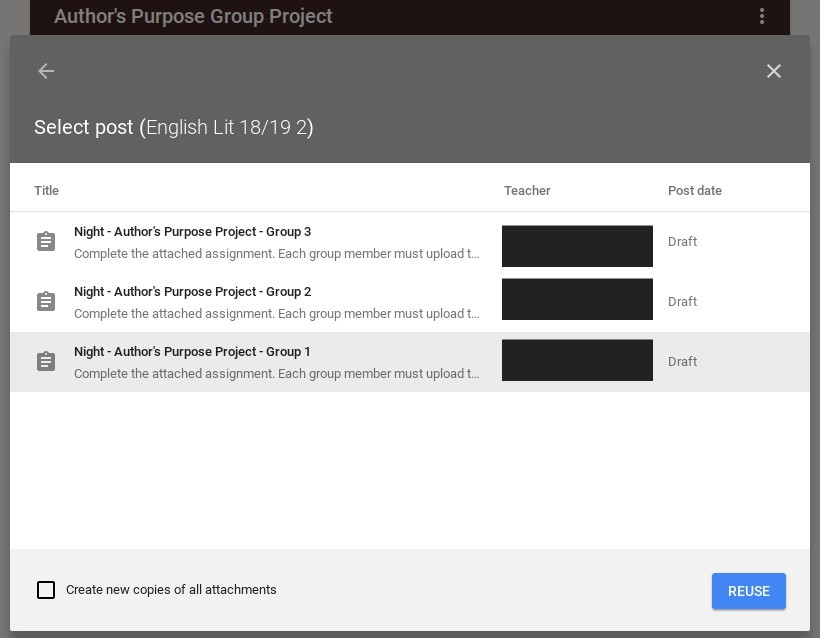
Using the “Reuse Post” feature helps teachers avoid the need to retype information for each group assignment. First, click the Create button and choose Reuse Post. The Reuse Post dialogue box will appear. Select the post to be duplicated and click Reuse. Finally, edit the assignment as needed for each group. Ensure that the group members are adjusted using the student dropdown menu and that the group number is changed in the title and instructions (if needed). Also, remember to remove the assignment documents for the prior group and upload the documents needed for the new group. Save additional group assignments as drafts (don’t post yet).
Step 6: Post All Group Assignments

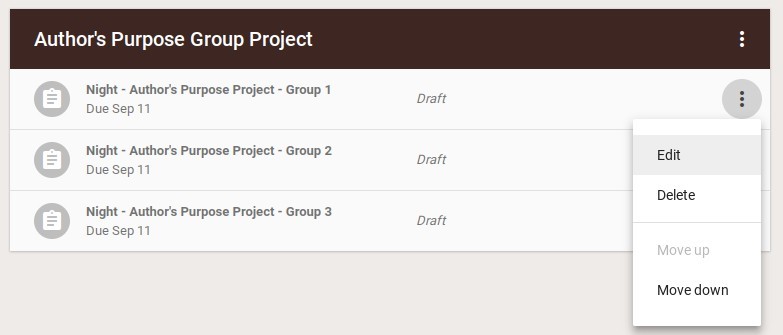
Once all group assignment draft are complete, the final step is to post the assignments so students can begin working. Drafts of group assignments will appear under the group topic created in Step 1. Click the triple dot menu and select Edit. The Assignment dialogue box will appear in order for the assignment to be posted. Repeat this step for each group.


Previous Article

3 Myths of Using Digital Tools in ...

Next Article

How to Use 3D Printing in STEM ...

Matthew Lynch

Related articles More from author

  • Higher EducationHigher Education EdTech

    Give Your Students a Free Laptop or Tablet and Watch Your Enrollment Rise

    December 26, 2017
    By Matthew Lynch
  • Early Childhood & K-12 EdTechEdTech FuturesHigher Education EdTech

    How will the presidential election results influence education technology in schools?

    November 28, 2016
    By Matthew Lynch
  • Early Childhood & K-12 EdTech

    4 Guidelines to Help You Merge Tech and PBL

    July 8, 2019
    By Matthew Lynch
  • Higher Education

    What Part Do Grades Play in College Admissions?

    November 20, 2023
    By Matthew Lynch
  • Google ClassroomGoogle Classroom Tips

    Can I Add an Assignment Without it Becoming a Part of the Google Classroom Stream?

    August 12, 2020
    By Matthew Lynch
  • Early Childhood & K-12 EdTech

    How to Create a Student-Run “Genius Bar”

    April 11, 2018
    By Matthew Lynch

Search

Login & Registration

  • Register
  • Log in
  • Entries feed
  • Comments feed
  • WordPress.org

Newsletter

Signup for The Tech Edvocate Newsletter and have the latest in EdTech news and opinion delivered to your email address!

About Us

Since technology is not going anywhere and does more good than harm, adapting is the best course of action. That is where The Tech Edvocate comes in. We plan to cover the PreK-12 and Higher Education EdTech sectors and provide our readers with the latest news and opinion on the subject. From time to time, I will invite other voices to weigh in on important issues in EdTech. We hope to provide a well-rounded, multi-faceted look at the past, present, the future of EdTech in the US and internationally.

We started this journey back in June 2016, and we plan to continue it for many more years to come. I hope that you will join us in this discussion of the past, present and future of EdTech and lend your own insight to the issues that are discussed.

Newsletter

Signup for The Tech Edvocate Newsletter and have the latest in EdTech news and opinion delivered to your email address!

Contact Us

The Tech Edvocate
910 Goddin Street
Richmond, VA 23231
(601) 630-5238
[email protected]

Copyright © 2025 Matthew Lynch. All rights reserved.