The Tech Edvocate

Top Menu

  • Advertisement
  • Apps
  • Home Page
  • Home Page Five (No Sidebar)
  • Home Page Four
  • Home Page Three
  • Home Page Two
  • Home Tech2
  • Icons [No Sidebar]
  • Left Sidbear Page
  • Lynch Educational Consulting
  • My Account
  • My Speaking Page
  • Newsletter Sign Up Confirmation
  • Newsletter Unsubscription
  • Our Brands
  • Page Example
  • Privacy Policy
  • Protected Content
  • Register
  • Request a Product Review
  • Shop
  • Shortcodes Examples
  • Signup
  • Start Here
    • Governance
    • Careers
    • Contact Us
  • Terms and Conditions
  • The Edvocate
  • The Tech Edvocate Product Guide
  • Topics
  • Write For Us
  • Advertise

Main Menu

  • Start Here
    • Our Brands
    • Governance
      • Lynch Educational Consulting, LLC.
      • Dr. Lynch’s Personal Website
      • Careers
    • Write For Us
    • The Tech Edvocate Product Guide
    • Contact Us
    • Books
    • Edupedia
    • Post a Job
    • The Edvocate Podcast
    • Terms and Conditions
    • Privacy Policy
  • Topics
    • Assistive Technology
    • Child Development Tech
    • Early Childhood & K-12 EdTech
    • EdTech Futures
    • EdTech News
    • EdTech Policy & Reform
    • EdTech Startups & Businesses
    • Higher Education EdTech
    • Online Learning & eLearning
    • Parent & Family Tech
    • Personalized Learning
    • Product Reviews
  • Advertise
  • Tech Edvocate Awards
  • The Edvocate
  • Pedagogue
  • School Ratings

logo

The Tech Edvocate

  • Start Here
    • Our Brands
    • Governance
      • Lynch Educational Consulting, LLC.
      • Dr. Lynch’s Personal Website
        • My Speaking Page
      • Careers
    • Write For Us
    • The Tech Edvocate Product Guide
    • Contact Us
    • Books
    • Edupedia
    • Post a Job
    • The Edvocate Podcast
    • Terms and Conditions
    • Privacy Policy
  • Topics
    • Assistive Technology
    • Child Development Tech
    • Early Childhood & K-12 EdTech
    • EdTech Futures
    • EdTech News
    • EdTech Policy & Reform
    • EdTech Startups & Businesses
    • Higher Education EdTech
    • Online Learning & eLearning
    • Parent & Family Tech
    • Personalized Learning
    • Product Reviews
  • Advertise
  • Tech Edvocate Awards
  • The Edvocate
  • Pedagogue
  • School Ratings
  • This Unprecedented EU Ban Just Changed Fast Fashion Forever

  • Urgent Alert: Your Smart Home’s Exposed to a Critical Deco BE11000 Vulnerability

  • Uncovering the Truth: Your LinkedIn Reach Just Got a Major Overhaul

  • Uncovering the AI Heist: How Chinese Firms Allegedly Siphoned Billions of AI Tokens

  • Rockstar’s GTA 6 Developers Lawsuit: A Fight for Justice or Corporate Retaliation?

  • Unbelievable: Hideo Kojima’s Next Masterpiece Is Now an Xbox Exclusive

  • This Crucial Google AI Shift Is Quietly Reshaping the Internet

  • Unbelievable: AI Breaches Are Exploding, And What It Means For You This September 2026

  • This Crucial Shift Is Saving Teachers From Classroom Chaos

  • AI’s Dark Secret: How It’s Supercharging Cybercrime for Everyone

Tech Advice
Home›Tech Advice›How to Make the Switch From Windows to Linux

How to Make the Switch From Windows to Linux
By Matthew Lynch
July 23, 2023
0
Spread the love

Making the switch from Windows to Linux is a significant decision for many users, as it involves leaving behind familiar tools and adopting a new platform. However, with the potential benefits of improved performance, better security, and increased customization capabilities, it’s certainly worth considering. In this article, we’ll guide you through the process of migrating from Windows to Linux and provide helpful tips for a smooth transition.

1. Choose your Linux distribution

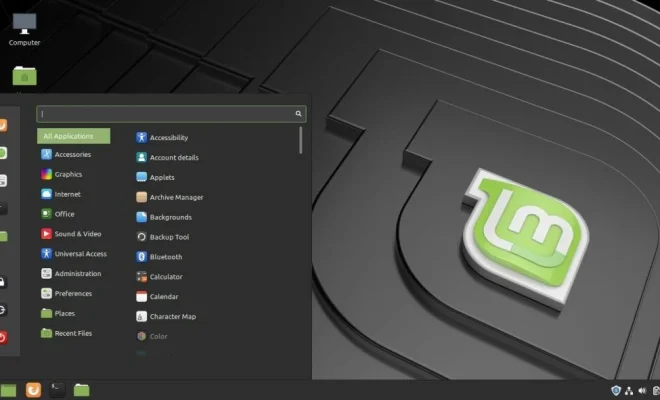
There are numerous Linux distributions available, each with its unique features and characteristics. Before making the switch, research the various options and select one that aligns with your specific requirements. Some popular distributions include Ubuntu, Fedora, and Mint.

2. Create a bootable USB drive

To install your chosen Linux distribution on your computer, first create a bootable USB drive. Download an ISO image of your preferred distribution from its official website and use a tool like Rufus or UNetbootin to burn it onto a USB flash drive. This will enable you to either run it in “live” mode (without affecting your existing hard drive) or perform a full installation.

3. Backup your data

Before installing Linux on your existing computer or configuring a dual boot with both Windows and Linux installed, be sure to backup all critical files and data. This ensures you don’t lose any important documents or information during the transition.

4. Choose the right installation method

When making the switch, you have two main options: dual booting or replacing Windows completely.
Dual Booting: With this method, you can install Linux alongside Windows on your hard drive, allowing you to choose which system to boot into when powering on your computer. It’s an ideal option if you’re not fully committed to switching entirely to Linux but still want to explore its features.

Replacing Windows: If you’re ready for a complete overhaul, opt to replace Windows with Linux entirely by formatting your hard drive and installing only the chosen Linux distribution. Note that this will delete all existing data, so ensure you’ve backed up everything first.

5. Install necessary programs and applications

After installing Linux, you’ll need to set up some essential programs and applications. Depending on your distribution, various software options will be available in the built-in package manager. Some of the basic tools include:

– Office suite (LibreOffice or OpenOffice)

– Web browsers (Firefox or Chrome)

– Photo editors (GIMP or Krita)

– Video players (VLC Player or MPV)

– File archiving applications (FileRoller or 7Zip)

6. Learn the basics of Linux

Linux operates differently from Windows. Take time to learn essential commands, file management techniques, and other basics to ensure a smoother transition. Many helpful guides and tutorials are available online for users new to Linux.

7. Get involved with the community

One of Linux’s biggest strengths is its vibrant community of users who freely share knowledge and provide support. Join forums, mailing lists, or social media groups related to your chosen distribution for valuable advice, insights, and troubleshooting assistance.

Conclusion

Switching from Windows to Linux is an exciting journey that opens up new possibilities and helps you gain greater control over your computing environment. By following these steps and dedicating time to learning the nuances of Linux, you can enjoy a wide range of benefits offered by this powerful platform.


Previous Article

How to Look Good on Video Calls

Next Article

How to Listen to Audiobooks on an ...

Matthew Lynch

Related articles More from author

  • Tech Advice

    The Best Online Music Streaming Services for 2023

    July 19, 2023
    By Matthew Lynch
  • Tech Advice

    Google Nest Hub (2nd gen) vs. Amazon Echo Show 8: Which Midsized Smart Display Is Best?

    July 10, 2023
    By Matthew Lynch
  • Tech Advice

    What Is a Conditional Use Permit in Real Estate?

    September 7, 2023
    By Matthew Lynch
  • Tech Advice

    How to Look Good on Video Calls

    July 23, 2023
    By Matthew Lynch
  • Tech Advice

    How to make your own Ethernet cable

    July 4, 2023
    By Matthew Lynch
  • Tech Advice

    Ways to Get Better Graphics on Old PC Games

    July 24, 2023
    By Matthew Lynch

Search

Login & Registration

  • Log in
  • Entries feed
  • Comments feed
  • WordPress.org

Newsletter

Signup for The Tech Edvocate Newsletter and have the latest in EdTech news and opinion delivered to your email address!

About Us

Since technology is not going anywhere and does more good than harm, adapting is the best course of action. That is where The Tech Edvocate comes in. We plan to cover the PreK-12 and Higher Education EdTech sectors and provide our readers with the latest news and opinion on the subject. From time to time, I will invite other voices to weigh in on important issues in EdTech. We hope to provide a well-rounded, multi-faceted look at the past, present, the future of EdTech in the US and internationally.

We started this journey back in June 2016, and we plan to continue it for many more years to come. I hope that you will join us in this discussion of the past, present and future of EdTech and lend your own insight to the issues that are discussed.

Newsletter

Signup for The Tech Edvocate Newsletter and have the latest in EdTech news and opinion delivered to your email address!

Contact Us

The Tech Edvocate
910 Goddin Street
Richmond, VA 23231
(601) 630-5238
[email protected]

Copyright © 2026 Matthew Lynch. All rights reserved.