The Tech Edvocate

Top Menu

  • Advertisement
  • Apps
  • Home Page
  • Home Page Five (No Sidebar)
  • Home Page Four
  • Home Page Three
  • Home Page Two
  • Home Tech2
  • Icons [No Sidebar]
  • Left Sidbear Page
  • Lynch Educational Consulting
  • My Account
  • My Speaking Page
  • Newsletter Sign Up Confirmation
  • Newsletter Unsubscription
  • Our Brands
  • Page Example
  • Privacy Policy
  • Protected Content
  • Register
  • Request a Product Review
  • Shop
  • Shortcodes Examples
  • Signup
  • Start Here
    • Governance
    • Careers
    • Contact Us
  • Terms and Conditions
  • The Edvocate
  • The Tech Edvocate Product Guide
  • Topics
  • Write For Us
  • Advertise

Main Menu

  • Start Here
    • Our Brands
    • Governance
      • Lynch Educational Consulting, LLC.
      • Dr. Lynch’s Personal Website
      • Careers
    • Write For Us
    • The Tech Edvocate Product Guide
    • Contact Us
    • Books
    • Edupedia
    • Post a Job
    • The Edvocate Podcast
    • Terms and Conditions
    • Privacy Policy
  • Topics
    • Assistive Technology
    • Child Development Tech
    • Early Childhood & K-12 EdTech
    • EdTech Futures
    • EdTech News
    • EdTech Policy & Reform
    • EdTech Startups & Businesses
    • Higher Education EdTech
    • Online Learning & eLearning
    • Parent & Family Tech
    • Personalized Learning
    • Product Reviews
  • Advertise
  • Tech Edvocate Awards
  • The Edvocate
  • Pedagogue
  • School Ratings

logo

The Tech Edvocate

  • Start Here
    • Our Brands
    • Governance
      • Lynch Educational Consulting, LLC.
      • Dr. Lynch’s Personal Website
        • My Speaking Page
      • Careers
    • Write For Us
    • The Tech Edvocate Product Guide
    • Contact Us
    • Books
    • Edupedia
    • Post a Job
    • The Edvocate Podcast
    • Terms and Conditions
    • Privacy Policy
  • Topics
    • Assistive Technology
    • Child Development Tech
    • Early Childhood & K-12 EdTech
    • EdTech Futures
    • EdTech News
    • EdTech Policy & Reform
    • EdTech Startups & Businesses
    • Higher Education EdTech
    • Online Learning & eLearning
    • Parent & Family Tech
    • Personalized Learning
    • Product Reviews
  • Advertise
  • Tech Edvocate Awards
  • The Edvocate
  • Pedagogue
  • School Ratings
  • The Shocking Truth: ESG Training Programs Are Quietly Reshaping Your Career Path

  • Why Millions of People Are Switching to These Green Energy Certifications Right Now

  • The green skills gap in 2026: How to address this growing problem

  • The Shocking Truth: Your Degree Won’t Land You the Best IT Jobs in 2026

  • The Brutal Truth About Degrees: Why Micro-Credentials Are Quietly Dominating Careers by 2026

  • Why 96% of Employers Now Prefer Skills Over Degrees: The Micro-Credential Revolution

  • This Crucial Mistake With AI Is Stunting Student Minds: Here’s How to Fix It

  • The AI ‘Cognitive Surrender’ Crisis: 7 Tools Every Educator Needs NOW

  • This Crucial Mistake Is Quietly Killing Students’ Brains, Says MIT

  • The Sneaky Truth About RTO: How to Negotiate Flexible Work Without Losing Your Job

Tech Advice
Home›Tech Advice›How to Listen to Audiobooks on an Amazon Echo Device

How to Listen to Audiobooks on an Amazon Echo Device
By Matthew Lynch
July 23, 2023
0
Spread the love

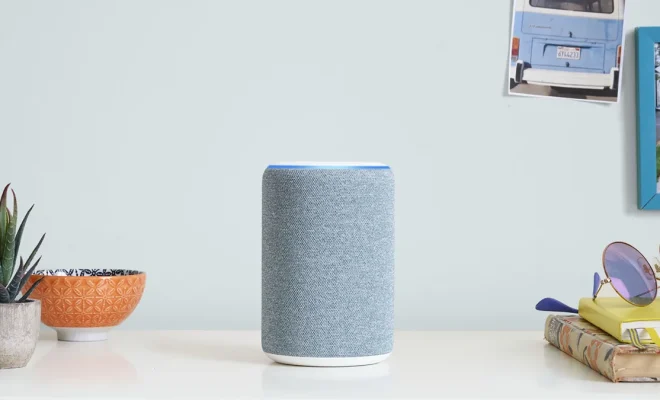
In today’s fast-paced world, audiobooks have become the go-to solution for many people who want to enjoy their favorite books without having to drop everything else. One of the most convenient ways of experiencing the joy of audiobooks is through your Amazon Echo device. In this article, we will walk you through a step-by-step guide on how to listen to audiobooks on an Amazon Echo device.

Step 1: Choose Your Audiobook App

Before using your Amazon Echo to listen to audiobooks, you’ll need an app that supports this feature. Some popular options include Audible (an Amazon-owned service), Kindle, and other third-party apps like Libby or OverDrive. Pick a service that suits your needs and preferences.

Step 2: Link the App with Your Amazon Account

To use these services with your Echo device, you must link the corresponding app to your Amazon account. To do this, follow these steps:

1. Open the Alexa app on your smartphone or tablet.

2. Navigate to the menu by tapping on the three horizontal lines in the top left corner.

3. Select “Settings.”

4. Scroll down and tap “Music & Podcasts.”

5. Choose the app that you wish to use under “Services.” (e.g., Audible)

6. Follow the instructions provided to link the app with your Amazon account.

Step 3: Connect Your Amazon Echo Device

To connect your Echo device and get it ready for playing audiobooks:

1. Ensure that your Echo device is connected to Wi-Fi.

2. Open the Alexa app on your mobile device.

3. Tap “Devices” at the bottom of the screen.

4. Select the “+” symbol in the top right corner.

5. Choose “Add Device,” then follow the on-screen instructions to complete the setup process.

Step 4: Voice Commands to Play Audiobooks

Once you have connected your Amazon Echo device, you can instruct Alexa to play audiobooks available on your chosen app. Some common commands include:

– “Alexa, play [Title] on Audible.”

– “Alexa, read [Title] from my Kindle library.”

– “Alexa, play [Title] on OverDrive.”

You can also control the playback options by issuing additional voice commands:

– “Alexa, pause.”

– “Alexa, resume.”

– “Alexa, go back 30 seconds.”

– “Alexa, skip forward 30 seconds.”

Step 5: Utilizing Additional Features

Your Amazon Echo device has several other features that can enhance your audiobook listening experience:

1. Set a sleep timer: If you like listening to audiobooks before going to sleep, tell Alexa to stop playing after a specific duration. For example: “Alexa, set a sleep timer for 30 minutes.”

2. Switch to different devices: If you own multiple Echo devices and want the audiobook playback to continue elsewhere, say: “Alexa, switch playback to [Device Name].”

3. Control playback speed: Depending on your preference, ask Alexa to change the narration speed with a command like: “Alexa, set the speed to 1.5x.”

Now that you know how to listen to audiobooks on an Amazon Echo device go ahead and indulge in this delightful experience of hands-free literary enjoyment.

Previous Article

How to Make the Switch From Windows ...

Next Article

Becoming a Teacher in Alabama

Matthew Lynch

Related articles More from author

  • Tech Advice

    Here’s how to play your Steam library on your iPhone or iPad

    July 17, 2023
    By Matthew Lynch
  • Tech Advice

    3 Stocks That Need to Follow Elon Musk’s Rebranding Moves

    August 11, 2023
    By Matthew Lynch
  • Tech Advice

    Pokemon Go Mega Lopunny Raid Guide: Best Counters, Weaknesses and Moveset

    July 15, 2023
    By Matthew Lynch
  • Tech Advice

    Best wireless mouse deals: Cheap accessories

    October 19, 2023
    By Matthew Lynch
  • Tech Advice

    The Top Hybrid Mattresses for a Perfect Night’s Sleep

    July 7, 2023
    By Matthew Lynch
  • Tech Advice

    Why We’re Obsessed With the Mind-Blowing ChatGPT AI Chatbot

    July 14, 2023
    By Matthew Lynch

Search

Login & Registration

  • Log in
  • Entries feed
  • Comments feed
  • WordPress.org

Newsletter

Signup for The Tech Edvocate Newsletter and have the latest in EdTech news and opinion delivered to your email address!

About Us

Since technology is not going anywhere and does more good than harm, adapting is the best course of action. That is where The Tech Edvocate comes in. We plan to cover the PreK-12 and Higher Education EdTech sectors and provide our readers with the latest news and opinion on the subject. From time to time, I will invite other voices to weigh in on important issues in EdTech. We hope to provide a well-rounded, multi-faceted look at the past, present, the future of EdTech in the US and internationally.

We started this journey back in June 2016, and we plan to continue it for many more years to come. I hope that you will join us in this discussion of the past, present and future of EdTech and lend your own insight to the issues that are discussed.

Newsletter

Signup for The Tech Edvocate Newsletter and have the latest in EdTech news and opinion delivered to your email address!

Contact Us

The Tech Edvocate
910 Goddin Street
Richmond, VA 23231
(601) 630-5238
[email protected]

Copyright © 2026 Matthew Lynch. All rights reserved.