The Tech Edvocate

Top Menu

  • Advertisement
  • Apps
  • Home Page
  • Home Page Five (No Sidebar)
  • Home Page Four
  • Home Page Three
  • Home Page Two
  • Home Tech2
  • Icons [No Sidebar]
  • Left Sidbear Page
  • Lynch Educational Consulting
  • My Account
  • My Speaking Page
  • Newsletter Sign Up Confirmation
  • Newsletter Unsubscription
  • Our Brands
  • Page Example
  • Privacy Policy
  • Protected Content
  • Register
  • Request a Product Review
  • Shop
  • Shortcodes Examples
  • Signup
  • Start Here
    • Governance
    • Careers
    • Contact Us
  • Terms and Conditions
  • The Edvocate
  • The Tech Edvocate Product Guide
  • Topics
  • Write For Us
  • Advertise

Main Menu

  • Start Here
    • Our Brands
    • Governance
      • Lynch Educational Consulting, LLC.
      • Dr. Lynch’s Personal Website
      • Careers
    • Write For Us
    • The Tech Edvocate Product Guide
    • Contact Us
    • Books
    • Edupedia
    • Post a Job
    • The Edvocate Podcast
    • Terms and Conditions
    • Privacy Policy
  • Topics
    • Assistive Technology
    • Child Development Tech
    • Early Childhood & K-12 EdTech
    • EdTech Futures
    • EdTech News
    • EdTech Policy & Reform
    • EdTech Startups & Businesses
    • Higher Education EdTech
    • Online Learning & eLearning
    • Parent & Family Tech
    • Personalized Learning
    • Product Reviews
  • Advertise
  • Tech Edvocate Awards
  • The Edvocate
  • Pedagogue
  • School Ratings

logo

The Tech Edvocate

  • Start Here
    • Our Brands
    • Governance
      • Lynch Educational Consulting, LLC.
      • Dr. Lynch’s Personal Website
        • My Speaking Page
      • Careers
    • Write For Us
    • The Tech Edvocate Product Guide
    • Contact Us
    • Books
    • Edupedia
    • Post a Job
    • The Edvocate Podcast
    • Terms and Conditions
    • Privacy Policy
  • Topics
    • Assistive Technology
    • Child Development Tech
    • Early Childhood & K-12 EdTech
    • EdTech Futures
    • EdTech News
    • EdTech Policy & Reform
    • EdTech Startups & Businesses
    • Higher Education EdTech
    • Online Learning & eLearning
    • Parent & Family Tech
    • Personalized Learning
    • Product Reviews
  • Advertise
  • Tech Edvocate Awards
  • The Edvocate
  • Pedagogue
  • School Ratings
  • A Visitors Guide to Pittsburgh (PA), United States

  • A Visitors Guide to Colorado Springs (CO), United States

  • 5 Pairs of Shoes That Will Instantly Step Your Shoe Game Up

  • Radiant Youthful Skin is the Perfect Christmas Gift

  • Give Your Loved One the Gift of Youthful, Radiant Skin this Christmas

  • Give Your Loved One the Gift of a Restful Night Sleep this Christmas

  • Nex Playground’s Holiday Sales Bring Active Play Indoors This Seaso

  • A Visitors Guide to Louisville (KY), United States

  • A Visitor’s Guide to Nashville-Davidson (TN), United States

  • A Visitors Guide to Portland (OR), United States

Assistive Technology
Home›Assistive Technology›How to Install TutuApp on iOS and Android Devices

How to Install TutuApp on iOS and Android Devices
By Matthew Lynch
June 10, 2023
0
Spread the love

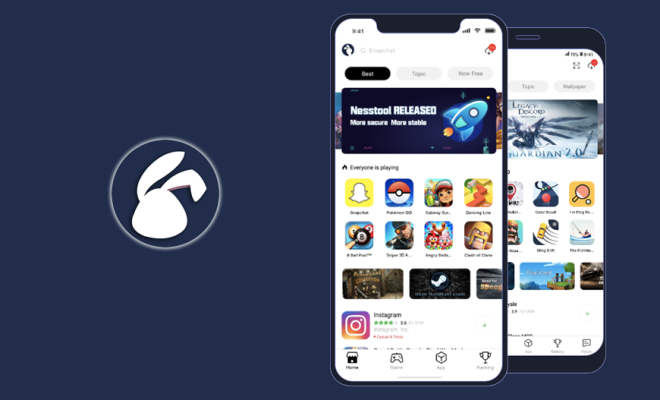
TutuApp is one of the most popular third-party app stores for iOS and Android devices. It offers a wide range of applications, games, and modded apps that you cannot find on the official app stores. TutuApp is also known as a great alternative for Cydia on iOS devices as it provides access to many apps and tweaks that are not available on the App Store.

Installing TutuApp on iOS devices

Step 1:

Firstly, visit the TutuApp website from your iOS device.

Step 2:

Click on the “Download” button on the homepage.

Step 3:

Click on the “Install Now” button to start the installation.

Step 4:

If you see a message that says “Untrusted Enterprise Developer,” then you need to trust the TutuApp developer before using it.

To do this, go to Settings > General > Profiles or Device Management > Trust the TutuApp developer.

Step 5:

Once the installation is complete and you have trusted the developer, you can open TutuApp and search for your favorite apps to download.

Installing TutuApp on Android devices

Step 1:

Firstly, go to the TutuApp website on your Android device.

Step 2:

Click on the “Download” button on the homepage.

Step 3:

Once you have downloaded the APK file, go to your phone’s settings, and then to security, and allow installations from unknown sources.

Step 4:

Install the TutuApp APK file.

Step 5:

Once the installation is complete, you can open TutuApp and start downloading your favorite apps.

Conclusion

TutuApp is a great app store for downloading modified apps, games, and tweaks. It is simple to install on both iOS and Android devices, and it offers a wide range of apps that are not available on the official app stores. However, you should always be cautious when using third-party app stores as they can potentially harm your device. Always make sure to download apps from trusted sources and scan them for viruses before installing them on your device. 

Previous Article

What Is a Subtweet on Twitter?

Next Article

Earphones vs. Earbuds

Matthew Lynch

Related articles More from author

  • Assistive Technology

    How to Set up Your Fitbit Charge 2

    June 12, 2023
    By Matthew Lynch
  • Assistive Technology

    How Do I Replace a Hard Drive?

    June 8, 2023
    By Matthew Lynch
  • Assistive Technology

    Ways to Flip Photos on macOS

    June 15, 2023
    By Matthew Lynch
  • Assistive Technology

    How to Fix the Error Code “0xc00000e5” on Windows

    June 23, 2023
    By Matthew Lynch
  • Assistive Technology

    How to Create Animated GIFs on a Samsung Galaxy Phone

    August 5, 2023
    By Matthew Lynch
  • Assistive Technology

    How to Fix a Black Screen of Death Error in Windows 10

    June 6, 2023
    By Matthew Lynch

Search

Login & Registration

  • Register
  • Log in
  • Entries feed
  • Comments feed
  • WordPress.org

Newsletter

Signup for The Tech Edvocate Newsletter and have the latest in EdTech news and opinion delivered to your email address!

About Us

Since technology is not going anywhere and does more good than harm, adapting is the best course of action. That is where The Tech Edvocate comes in. We plan to cover the PreK-12 and Higher Education EdTech sectors and provide our readers with the latest news and opinion on the subject. From time to time, I will invite other voices to weigh in on important issues in EdTech. We hope to provide a well-rounded, multi-faceted look at the past, present, the future of EdTech in the US and internationally.

We started this journey back in June 2016, and we plan to continue it for many more years to come. I hope that you will join us in this discussion of the past, present and future of EdTech and lend your own insight to the issues that are discussed.

Newsletter

Signup for The Tech Edvocate Newsletter and have the latest in EdTech news and opinion delivered to your email address!

Contact Us

The Tech Edvocate
910 Goddin Street
Richmond, VA 23231
(601) 630-5238
[email protected]

Copyright © 2025 Matthew Lynch. All rights reserved.