The Tech Edvocate

Top Menu

  • Advertisement
  • Apps
  • Home Page
  • Home Page Five (No Sidebar)
  • Home Page Four
  • Home Page Three
  • Home Page Two
  • Home Tech2
  • Icons [No Sidebar]
  • Left Sidbear Page
  • Lynch Educational Consulting
  • My Account
  • My Speaking Page
  • Newsletter Sign Up Confirmation
  • Newsletter Unsubscription
  • Our Brands
  • Page Example
  • Privacy Policy
  • Protected Content
  • Register
  • Request a Product Review
  • Shop
  • Shortcodes Examples
  • Signup
  • Start Here
    • Governance
    • Careers
    • Contact Us
  • Terms and Conditions
  • The Edvocate
  • The Tech Edvocate Product Guide
  • Topics
  • Write For Us
  • Advertise

Main Menu

  • Start Here
    • Our Brands
    • Governance
      • Lynch Educational Consulting, LLC.
      • Dr. Lynch’s Personal Website
      • Careers
    • Write For Us
    • The Tech Edvocate Product Guide
    • Contact Us
    • Books
    • Edupedia
    • Post a Job
    • The Edvocate Podcast
    • Terms and Conditions
    • Privacy Policy
  • Topics
    • Assistive Technology
    • Child Development Tech
    • Early Childhood & K-12 EdTech
    • EdTech Futures
    • EdTech News
    • EdTech Policy & Reform
    • EdTech Startups & Businesses
    • Higher Education EdTech
    • Online Learning & eLearning
    • Parent & Family Tech
    • Personalized Learning
    • Product Reviews
  • Advertise
  • Tech Edvocate Awards
  • The Edvocate
  • Pedagogue
  • School Ratings

logo

The Tech Edvocate

  • Start Here
    • Our Brands
    • Governance
      • Lynch Educational Consulting, LLC.
      • Dr. Lynch’s Personal Website
        • My Speaking Page
      • Careers
    • Write For Us
    • The Tech Edvocate Product Guide
    • Contact Us
    • Books
    • Edupedia
    • Post a Job
    • The Edvocate Podcast
    • Terms and Conditions
    • Privacy Policy
  • Topics
    • Assistive Technology
    • Child Development Tech
    • Early Childhood & K-12 EdTech
    • EdTech Futures
    • EdTech News
    • EdTech Policy & Reform
    • EdTech Startups & Businesses
    • Higher Education EdTech
    • Online Learning & eLearning
    • Parent & Family Tech
    • Personalized Learning
    • Product Reviews
  • Advertise
  • Tech Edvocate Awards
  • The Edvocate
  • Pedagogue
  • School Ratings
  • Miro vs Conceptboard for project management

  • How to use Teamwork for resource management

  • How much does Procore cost per month

  • How to organize Microsoft Planner buckets

  • Is Teamwork good for billable hours

  • Procore vs Buildertrend which is better

  • Airtable project management templates

  • Can Miro track project progress

  • How to use Basecamp for client work

  • Can Lucidchart create swimlane diagrams

Digital & Mobile Technology
Home›Digital & Mobile Technology›How to Install Mods for No Man’s Sky

How to Install Mods for No Man’s Sky
By Matthew Lynch
June 21, 2023
0
Spread the love

No Man’s Sky is one of the best exploration games in the market, offering a massive universe to explore, full of planets to discover, and countless adventures to dive into. While the game is impressive, players can take their experience to the next level by installing mods. Mods are modifications made to the game by other players that enhance or alter gameplay, graphics, sounds, and more.

If you’re new to modding, don’t worry. Here’s a step-by-step guide to help you install mods for No Man’s Sky.

Step #1: Download and Install a Mod Manager

There are many mod managers available for No Man’s Sky, but the most popular one is the Nexus Mod Manager. It’s a free and easy-to-use software that allows you to install, update, and manage all your mods in one place. Download and install the Nexus Mod Manager from the Nexus Mods website (https://www.nexusmods.com/) and follow the instructions provided.

Step #2: Browse and Download Mods

Now that you have the Nexus Mod Manager installed, you can start browsing the mods available. The Nexus Mods website has a vast library of mods, covering everything from graphics improvements to gameplay tweaks. Search for “No Man’s Sky” and select the game from the list. From there, you can explore the various categories and find the mods that interest you. Once you find a mod you like, click the download button.

Step #3: Install the Mod

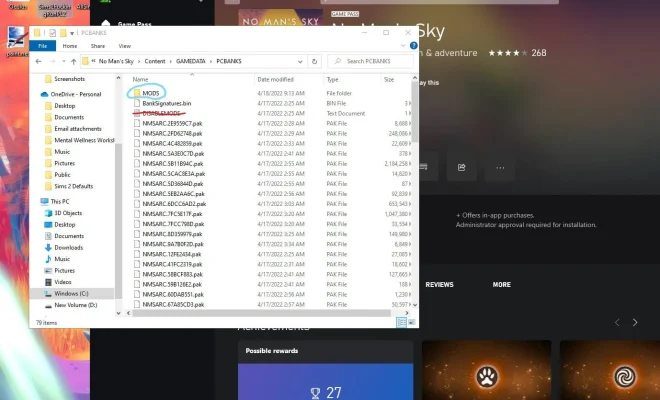
After downloading a mod, open the Nexus Mod Manager and navigate to the “Mods” tab; this is where all the mods you have downloaded will be. Click the “Add Mod” button in the top left corner of the screen, and select the downloaded mod file. The Nexus Mod Manager will then install the mod.

Step #4: Activate the Mod

Once the mod is installed, you need to activate it in the Nexus Mod Manager before it takes effect in-game. To activate a mod, go to the “Mods” tab and make sure the checkbox next to the mod’s name is ticked. Ensure that the mod’s load order is set correctly, as some mods require specific load order to work correctly.

Step #5: Launch No Man’s Sky

Now that you’ve installed and activated the mods, it’s time to launch No Man’s Sky. Click the “Play” button in the Nexus Mod Manager or launch the game manually from your Steam library. If everything is working correctly, you should notice the changes that the mods have made.

In conclusion, modding No Man’s Sky is an excellent way to enhance the game’s experience and make it more exciting. With a little bit of effort, you can install mods and customize the game to your liking. Just make sure to download and install mods from reputable websites, and be mindful of mod compatibility issues. Happy exploring !


Previous Article

Visual Studio Code vs. Atom: Which Text ...

Next Article

The Best Samsung Galaxy S22 Cases and ...

Matthew Lynch

Related articles More from author

  • Best of the Best ListsDigital & Mobile Technology

    The Best Buy Now, Pay Later Sites

    June 6, 2023
    By Matthew Lynch
  • Digital & Mobile Technology

    What Are Network Settings?

    June 6, 2023
    By Matthew Lynch
  • Digital & Mobile Technology

    Apple CEO Tim Cook’s Email Address

    June 4, 2023
    By Matthew Lynch
  • Digital & Mobile Technology

    JLabs Launch Absolutely Tiny JBuds Mini Earbuds at CES 2023

    June 23, 2023
    By Matthew Lynch
  • Digital & Mobile Technology

    RemotePC Free Review

    July 31, 2023
    By Matthew Lynch
  • Digital & Mobile Technology

    Best Free Movie Websites

    May 30, 2023
    By Matthew Lynch

Search

Login & Registration

  • Log in
  • Entries feed
  • Comments feed
  • WordPress.org

Newsletter

Signup for The Tech Edvocate Newsletter and have the latest in EdTech news and opinion delivered to your email address!

About Us

Since technology is not going anywhere and does more good than harm, adapting is the best course of action. That is where The Tech Edvocate comes in. We plan to cover the PreK-12 and Higher Education EdTech sectors and provide our readers with the latest news and opinion on the subject. From time to time, I will invite other voices to weigh in on important issues in EdTech. We hope to provide a well-rounded, multi-faceted look at the past, present, the future of EdTech in the US and internationally.

We started this journey back in June 2016, and we plan to continue it for many more years to come. I hope that you will join us in this discussion of the past, present and future of EdTech and lend your own insight to the issues that are discussed.

Newsletter

Signup for The Tech Edvocate Newsletter and have the latest in EdTech news and opinion delivered to your email address!

Contact Us

The Tech Edvocate
910 Goddin Street
Richmond, VA 23231
(601) 630-5238
[email protected]

Copyright © 2026 Matthew Lynch. All rights reserved.