The Tech Edvocate

Top Menu

  • Advertisement
  • Apps
  • Home Page
  • Home Page Five (No Sidebar)
  • Home Page Four
  • Home Page Three
  • Home Page Two
  • Home Tech2
  • Icons [No Sidebar]
  • Left Sidbear Page
  • Lynch Educational Consulting
  • My Account
  • My Speaking Page
  • Newsletter Sign Up Confirmation
  • Newsletter Unsubscription
  • Our Brands
  • Page Example
  • Privacy Policy
  • Protected Content
  • Register
  • Request a Product Review
  • Shop
  • Shortcodes Examples
  • Signup
  • Start Here
    • Governance
    • Careers
    • Contact Us
  • Terms and Conditions
  • The Edvocate
  • The Tech Edvocate Product Guide
  • Topics
  • Write For Us
  • Advertise

Main Menu

  • Start Here
    • Our Brands
    • Governance
      • Lynch Educational Consulting, LLC.
      • Dr. Lynch’s Personal Website
      • Careers
    • Write For Us
    • The Tech Edvocate Product Guide
    • Contact Us
    • Books
    • Edupedia
    • Post a Job
    • The Edvocate Podcast
    • Terms and Conditions
    • Privacy Policy
  • Topics
    • Assistive Technology
    • Child Development Tech
    • Early Childhood & K-12 EdTech
    • EdTech Futures
    • EdTech News
    • EdTech Policy & Reform
    • EdTech Startups & Businesses
    • Higher Education EdTech
    • Online Learning & eLearning
    • Parent & Family Tech
    • Personalized Learning
    • Product Reviews
  • Advertise
  • Tech Edvocate Awards
  • The Edvocate
  • Pedagogue
  • School Ratings

logo

The Tech Edvocate

  • Start Here
    • Our Brands
    • Governance
      • Lynch Educational Consulting, LLC.
      • Dr. Lynch’s Personal Website
        • My Speaking Page
      • Careers
    • Write For Us
    • The Tech Edvocate Product Guide
    • Contact Us
    • Books
    • Edupedia
    • Post a Job
    • The Edvocate Podcast
    • Terms and Conditions
    • Privacy Policy
  • Topics
    • Assistive Technology
    • Child Development Tech
    • Early Childhood & K-12 EdTech
    • EdTech Futures
    • EdTech News
    • EdTech Policy & Reform
    • EdTech Startups & Businesses
    • Higher Education EdTech
    • Online Learning & eLearning
    • Parent & Family Tech
    • Personalized Learning
    • Product Reviews
  • Advertise
  • Tech Edvocate Awards
  • The Edvocate
  • Pedagogue
  • School Ratings
  • A Visitors Guide to Pittsburgh (PA), United States

  • A Visitors Guide to Colorado Springs (CO), United States

  • 5 Pairs of Shoes That Will Instantly Step Your Shoe Game Up

  • Radiant Youthful Skin is the Perfect Christmas Gift

  • Give Your Loved One the Gift of Youthful, Radiant Skin this Christmas

  • Give Your Loved One the Gift of a Restful Night Sleep this Christmas

  • Nex Playground’s Holiday Sales Bring Active Play Indoors This Seaso

  • A Visitors Guide to Louisville (KY), United States

  • A Visitor’s Guide to Nashville-Davidson (TN), United States

  • A Visitors Guide to Portland (OR), United States

Assistive Technology
Home›Assistive Technology›How to Install In-Wall Stereo Speakers

How to Install In-Wall Stereo Speakers
By Matthew Lynch
June 12, 2023
0
Spread the love

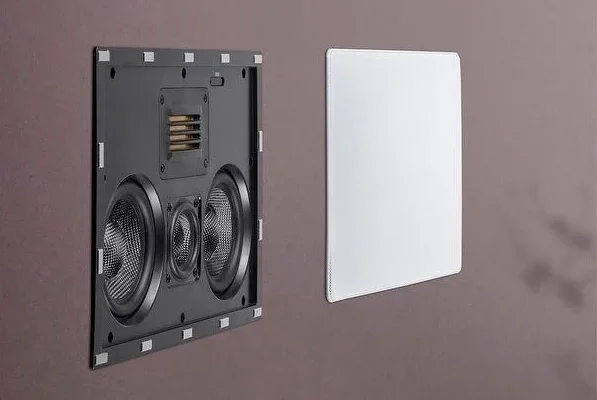
In-wall stereo speakers are the perfect way to enhance the sound system in your home or office and create a cinematic experience. Installing in-wall speakers is a great way to free up some floor space and get your speakers up off the floor. In-wall speakers can be placed in the ceiling or walls and blend seamlessly into the decor of your room.

Here’s a step-by-step guide on how to install in-wall stereo speakers:

1) Choose your location and the size of the speakers:

First, decide where you want to install the speakers. The ideal placement for in-wall speakers is on the opposite walls in the room, as this offers the best sound quality. You should also choose the right size speakers for your room. Smaller rooms may not require bigger speakers, but a larger room or home theatre may require larger speakers for optimal sound quality.

2) Cut a hole and install the mounting bracket:

Cut a hole in the wall or ceiling where you would like to place the speakers. You can use a drywall saw or reciprocating saw to cut the hole. After cutting the hole, place the mounting bracket inside and tighten the screws to secure it. Make sure the mounting bracket is level and centered before tightening the screws.

3) Install the speaker wires:

Thread the speaker wires through the hole in the mounting bracket. Make sure you have enough wire to connect the speakers to the receiver or amplifier. If the wires are not long enough, you can use a splicing kit to join them together. Then, fasten the wires to the mounting bracket using the wire clips.

4) Attach the speaker to the mounting bracket:

Once the speaker wires are secure, it’s time to attach the speaker to the mounting bracket. Most in-wall speakers come with a grille that snaps onto the speaker and covers the mounting bracket. Snap the grille onto the speaker and make sure it sits flush with the wall.

5) Connect the speakers to the amplifier or receiver:

Connect the speaker wires to the amplifier or receiver. Connect the red wire to the red terminal, and the black wire to the black terminal. Then, plug in the speaker wire to the receiver or amplifier. Make sure the connections are tight so that no sound is lost.

6) Test the speakers:

Turn on your sound system and test the speakers. Play some music or a movie and listen to the sound quality from your newly installed in-wall speakers. Make any necessary adjustments to ensure the sound quality is optimal.

Conclusion:

Installing in-wall stereo speakers can be a fun and rewarding project that can improve your home or office’s sound quality. Follow these steps to install your in-wall speakers and enjoy the ultimate sound experience. Remember to be patient, take your time, and follow the instructions correctly to ensure a successful installation.


Previous Article

What Is an EX4 File?

Next Article

How to Clean Install Windows 7

Matthew Lynch

Related articles More from author

  • Assistive Technology

    How to Connect AirPods to an HP Laptop

    June 8, 2023
    By Matthew Lynch
  • Assistive Technology

    How to Avoid Tolls on Google Maps

    June 8, 2023
    By Matthew Lynch
  • Assistive Technology

    Ways to Make Your Computer Read Documents to You

    June 14, 2023
    By Matthew Lynch
  • Assistive Technology

    How to Insert a Link Into an Email With Outlook

    June 7, 2023
    By Matthew Lynch
  • Assistive Technology

    How to Turn Off Your Apple TV

    June 12, 2023
    By Matthew Lynch
  • Assistive Technology

    Ways to Fix iMessage Not Working on Your iPhone, iPad, or Mac

    June 6, 2023
    By Matthew Lynch

Search

Login & Registration

  • Register
  • Log in
  • Entries feed
  • Comments feed
  • WordPress.org

Newsletter

Signup for The Tech Edvocate Newsletter and have the latest in EdTech news and opinion delivered to your email address!

About Us

Since technology is not going anywhere and does more good than harm, adapting is the best course of action. That is where The Tech Edvocate comes in. We plan to cover the PreK-12 and Higher Education EdTech sectors and provide our readers with the latest news and opinion on the subject. From time to time, I will invite other voices to weigh in on important issues in EdTech. We hope to provide a well-rounded, multi-faceted look at the past, present, the future of EdTech in the US and internationally.

We started this journey back in June 2016, and we plan to continue it for many more years to come. I hope that you will join us in this discussion of the past, present and future of EdTech and lend your own insight to the issues that are discussed.

Newsletter

Signup for The Tech Edvocate Newsletter and have the latest in EdTech news and opinion delivered to your email address!

Contact Us

The Tech Edvocate
910 Goddin Street
Richmond, VA 23231
(601) 630-5238
[email protected]

Copyright © 2025 Matthew Lynch. All rights reserved.