The Tech Edvocate

Top Menu

  • Advertisement
  • Apps
  • Home Page
  • Home Page Five (No Sidebar)
  • Home Page Four
  • Home Page Three
  • Home Page Two
  • Home Tech2
  • Icons [No Sidebar]
  • Left Sidbear Page
  • Lynch Educational Consulting
  • My Account
  • My Speaking Page
  • Newsletter Sign Up Confirmation
  • Newsletter Unsubscription
  • Our Brands
  • Page Example
  • Privacy Policy
  • Protected Content
  • Register
  • Request a Product Review
  • Shop
  • Shortcodes Examples
  • Signup
  • Start Here
    • Governance
    • Careers
    • Contact Us
  • Terms and Conditions
  • The Edvocate
  • The Tech Edvocate Product Guide
  • Topics
  • Write For Us
  • Advertise

Main Menu

  • Start Here
    • Our Brands
    • Governance
      • Lynch Educational Consulting, LLC.
      • Dr. Lynch’s Personal Website
      • Careers
    • Write For Us
    • The Tech Edvocate Product Guide
    • Contact Us
    • Books
    • Edupedia
    • Post a Job
    • The Edvocate Podcast
    • Terms and Conditions
    • Privacy Policy
  • Topics
    • Assistive Technology
    • Child Development Tech
    • Early Childhood & K-12 EdTech
    • EdTech Futures
    • EdTech News
    • EdTech Policy & Reform
    • EdTech Startups & Businesses
    • Higher Education EdTech
    • Online Learning & eLearning
    • Parent & Family Tech
    • Personalized Learning
    • Product Reviews
  • Advertise
  • Tech Edvocate Awards
  • The Edvocate
  • Pedagogue
  • School Ratings

logo

The Tech Edvocate

  • Start Here
    • Our Brands
    • Governance
      • Lynch Educational Consulting, LLC.
      • Dr. Lynch’s Personal Website
        • My Speaking Page
      • Careers
    • Write For Us
    • The Tech Edvocate Product Guide
    • Contact Us
    • Books
    • Edupedia
    • Post a Job
    • The Edvocate Podcast
    • Terms and Conditions
    • Privacy Policy
  • Topics
    • Assistive Technology
    • Child Development Tech
    • Early Childhood & K-12 EdTech
    • EdTech Futures
    • EdTech News
    • EdTech Policy & Reform
    • EdTech Startups & Businesses
    • Higher Education EdTech
    • Online Learning & eLearning
    • Parent & Family Tech
    • Personalized Learning
    • Product Reviews
  • Advertise
  • Tech Edvocate Awards
  • The Edvocate
  • Pedagogue
  • School Ratings
  • A Visitors Guide to Long Beach (CA), United States

  • A Visitor’s Guide to Fresno (CA), United States

  • A Visitors Guide to New Orleans (LA), United States

  • A Visitors Guide to Sacramento (CA), United States

  • A Visitors Guide to Lyon, France

  • JisuLife Ultra2 Portable Fan: A Powerful Multi-Function Cooling Solution

  • A Visitors Guide to Viña del Mar, Chile

  • A Visitors Guide to Århus, Denmark

  • A Visitors Guide to Bakersfield (CA), United States

  • A Visitors Guide to Aurora (CO), United States

Assistive TechnologyDigital & Mobile Technology
Home›Assistive Technology›How to Install a Dashcam in Your Car

How to Install a Dashcam in Your Car
By Matthew Lynch
June 6, 2023
0
Spread the love

Installing a dashcam in your car has become increasingly popular over the past few years. With the rise of accidents and incidents on the road, the dashcam has become a valuable tool for drivers. Installing a dashcam can provide you with peace of mind while driving, serving as your witness on the road. Here’s a step-by-step guide on how to install a dashcam in your car.

Step 1: Choose Your Dashcam

The first step in installing a dashcam in your car is to choose the right one. There are various types of dashcams on the market. Some are designed to be mounted on the windshield, while others are mounted on the dashboard. You’ll also want to consider the quality of the video, the lens angle, and the storage capacity.

Step 2: Locate the Best Position for the Dashcam

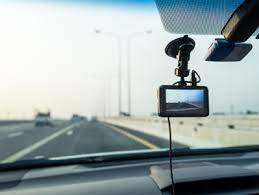
The next step is to determine the best position for the dashcam to be installed. Ideally, the dashcam should be installed behind the rearview mirror or on the center of the dashboard to ensure optimal visibility. You should also ensure that the wires from the dashcam are not in the way of the driver’s view or obstructive in any way.

Step 3: Power Up the Dashcam

Now that you have chosen the best position for your dashcam, the next step is to power it up. If your dashcam comes with a cigarette lighter adapter, plug it in and connect it to the dashcam. Alternatively, you can connect the dashcam directly to the car’s battery by using a hardwire kit.

Step 4: Mount the Dashcam

After powering up the dashcam, it’s time to mount it. If the dashcam is windshield-mounted, ensure that the windshield is clean before mounting. Peel off the adhesive backing of the mount and place it on the windshield. Press it down firmly to ensure proper adhesion. If the dashcam is dashboard-mounted, use the included bracket or adhesive tape to attach the dashcam to the dashboard.

Step 5: Adjust the Dashcam

Now that the dashcam is mounted, it’s time to adjust it to the desired angle. Most dashcams come with a swivel mount that allows you to adjust the angle of the camera. Ensure that the camera angle covers the road ahead and is not obstructed by the rearview mirror or any other object in the view.

Step 6: Test the Dashcam

The final step is to test the dashcam. Turn on the car and ensure that the dashcam power is on. Check the dashcam’s settings to ensure that it is correctly configured for your needs. You should also check the footage to ensure that the dashcam is recording correctly.

In conclusion, installing a dashcam in your car is a relatively simple process. By following these six steps, you can install the dashcam and enjoy the benefits of having a tool that provides peace of mind while driving. Remember to choose the right dashcam, locate the best position, and adjust the camera angle to ensure optimal visibility. With a dashcam installed in your car, you can drive with confidence knowing that your vehicle is protected.


Previous Article

How and When to Use Close-Up Shots ...

Next Article

How to Fix Game Security Violation Detected ...

Matthew Lynch

Related articles More from author

  • Digital & Mobile Technology

    Essential Smart Luggage Trackers for Your Next Trip

    June 23, 2023
    By Matthew Lynch
  • Digital & Mobile TechnologyOnline Learning & eLearning

    Crafting a Compelling Digital Story

    July 8, 2021
    By Matthew Lynch
  • Digital & Mobile Technology

    What About:Blank in a Browser Means and How to Resolve It

    August 5, 2023
    By Matthew Lynch
  • Digital & Mobile Technology

    How to Double Space Your Text on Google Docs

    June 6, 2023
    By Matthew Lynch
  • Digital & Mobile Technology

    Why Is My iPad Bluetooth Not Working? How to Fix the Problem

    June 3, 2023
    By Matthew Lynch
  • Assistive Technology

    Genius DIY Cell Phone Signal Boosters

    June 8, 2023
    By Matthew Lynch

Search

Login & Registration

  • Register
  • Log in
  • Entries feed
  • Comments feed
  • WordPress.org

Newsletter

Signup for The Tech Edvocate Newsletter and have the latest in EdTech news and opinion delivered to your email address!

About Us

Since technology is not going anywhere and does more good than harm, adapting is the best course of action. That is where The Tech Edvocate comes in. We plan to cover the PreK-12 and Higher Education EdTech sectors and provide our readers with the latest news and opinion on the subject. From time to time, I will invite other voices to weigh in on important issues in EdTech. We hope to provide a well-rounded, multi-faceted look at the past, present, the future of EdTech in the US and internationally.

We started this journey back in June 2016, and we plan to continue it for many more years to come. I hope that you will join us in this discussion of the past, present and future of EdTech and lend your own insight to the issues that are discussed.

Newsletter

Signup for The Tech Edvocate Newsletter and have the latest in EdTech news and opinion delivered to your email address!

Contact Us

The Tech Edvocate
910 Goddin Street
Richmond, VA 23231
(601) 630-5238
[email protected]

Copyright © 2025 Matthew Lynch. All rights reserved.