The Tech Edvocate

Top Menu

  • Advertisement
  • Apps
  • Home Page
  • Home Page Five (No Sidebar)
  • Home Page Four
  • Home Page Three
  • Home Page Two
  • Home Tech2
  • Icons [No Sidebar]
  • Left Sidbear Page
  • Lynch Educational Consulting
  • My Account
  • My Speaking Page
  • Newsletter Sign Up Confirmation
  • Newsletter Unsubscription
  • Our Brands
  • Page Example
  • Privacy Policy
  • Protected Content
  • Register
  • Request a Product Review
  • Shop
  • Shortcodes Examples
  • Signup
  • Start Here
    • Governance
    • Careers
    • Contact Us
  • Terms and Conditions
  • The Edvocate
  • The Tech Edvocate Product Guide
  • Topics
  • Write For Us
  • Advertise

Main Menu

  • Start Here
    • Our Brands
    • Governance
      • Lynch Educational Consulting, LLC.
      • Dr. Lynch’s Personal Website
      • Careers
    • Write For Us
    • The Tech Edvocate Product Guide
    • Contact Us
    • Books
    • Edupedia
    • Post a Job
    • The Edvocate Podcast
    • Terms and Conditions
    • Privacy Policy
  • Topics
    • Assistive Technology
    • Child Development Tech
    • Early Childhood & K-12 EdTech
    • EdTech Futures
    • EdTech News
    • EdTech Policy & Reform
    • EdTech Startups & Businesses
    • Higher Education EdTech
    • Online Learning & eLearning
    • Parent & Family Tech
    • Personalized Learning
    • Product Reviews
  • Advertise
  • Tech Edvocate Awards
  • The Edvocate
  • Pedagogue
  • School Ratings

logo

The Tech Edvocate

  • Start Here
    • Our Brands
    • Governance
      • Lynch Educational Consulting, LLC.
      • Dr. Lynch’s Personal Website
        • My Speaking Page
      • Careers
    • Write For Us
    • The Tech Edvocate Product Guide
    • Contact Us
    • Books
    • Edupedia
    • Post a Job
    • The Edvocate Podcast
    • Terms and Conditions
    • Privacy Policy
  • Topics
    • Assistive Technology
    • Child Development Tech
    • Early Childhood & K-12 EdTech
    • EdTech Futures
    • EdTech News
    • EdTech Policy & Reform
    • EdTech Startups & Businesses
    • Higher Education EdTech
    • Online Learning & eLearning
    • Parent & Family Tech
    • Personalized Learning
    • Product Reviews
  • Advertise
  • Tech Edvocate Awards
  • The Edvocate
  • Pedagogue
  • School Ratings
  • 100 Best VPN Apps

  • 100 Best Security Apps

  • 100 Best Backup Apps

  • 100 Best Cloud Storage Apps

  • 100 Best API Tools

  • 100 Best Automation Apps

  • 100 Best No-Code Tools

  • 100 Best AI/ML Apps

  • 100 Best Data Science Apps

  • 100 Best Development Apps

Assistive Technology
Home›Assistive Technology›How to Get Google on Your Roku

How to Get Google on Your Roku
By Matthew Lynch
June 10, 2023
0
Spread the love

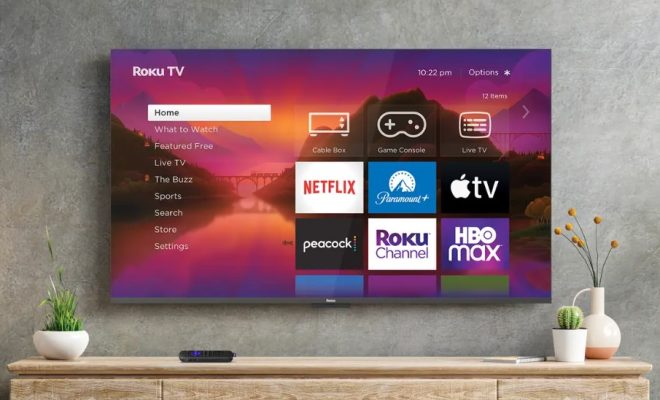
If you’re looking to get Google on your Roku, there are a few easy steps you can follow to get the most out of your streaming device. Here are some simple tips to help you get started.

Step 1: Check Your Roku’s Hardware

Before you get started, make sure your Roku device is compatible with Google. If your Roku device is not a smart TV, be sure that it is connected to a Wi-Fi hotspot or your home’s internet network. Once you have a solid connection, make sure your Roku’s software is up-to-date. To do this, go into your Roku’s settings and select “System Update.”

Step 2: Download the Google Play Movies & TV App

Once you have confirmed that your Roku is compatible with Google, go to the Roku Channel Store and search for “Google Play Movies & TV.” Click “Add Channel” to download the app onto your device.

Step 3: Sign In to Your Google Account

Open the Google Play Movies & TV app on your Roku device and sign in to your Google account. If you don’t already have a Google account, you’ll need to create one.

Step 4: Start Streaming

Once you’re signed in, you’ll be able to access your Google Play library on your Roku device. You can browse through movies and TV shows that you’ve already purchased or rented, as well as new releases and top-rated content.

Step 5: Get Chromecast Compatibility

If you want to take things a step further, you can also get Chromecast compatibility on your Roku. This will allow you to cast your Google Play content from your phone or tablet directly to your Roku device. To do this, download the Google Home app on your phone or tablet and set up your Chromecast device. Once your Chromecast is set up, you’ll be able to cast your content to your Roku device using the Google Play Movies & TV app.

Overall, getting Google on your Roku is a straightforward process. Follow these steps to take advantage of the great content available in the Google Play Movies & TV app on your streaming device.


Previous Article

How to Create Empty Lines in Forms ...

Next Article

How to Manage Multiple Google Accounts on ...

Matthew Lynch

Related articles More from author

  • Assistive Technology

    The Best Amazon Customer Service Tips That Make You a Better Shopper

    June 23, 2023
    By Matthew Lynch
  • Assistive Technology

    How to Sell Your Art Online: A Complete Beginner’s Guide

    June 15, 2023
    By Matthew Lynch
  • Assistive Technology

    Wearable health technology in medical and consumer arenas

    April 14, 2023
    By Matthew Lynch
  • Assistive Technology

    How to Use PlayStation 2 Devices on Your Computer

    June 30, 2023
    By Matthew Lynch
  • Assistive Technology

    How to Put Text on an Image in Photoshop

    June 23, 2023
    By Matthew Lynch
  • Assistive Technology

    How to Connect Bluetooth Headphones to Any Device

    June 10, 2023
    By Matthew Lynch

Search

Login & Registration

  • Log in
  • Entries feed
  • Comments feed
  • WordPress.org

Newsletter

Signup for The Tech Edvocate Newsletter and have the latest in EdTech news and opinion delivered to your email address!

About Us

Since technology is not going anywhere and does more good than harm, adapting is the best course of action. That is where The Tech Edvocate comes in. We plan to cover the PreK-12 and Higher Education EdTech sectors and provide our readers with the latest news and opinion on the subject. From time to time, I will invite other voices to weigh in on important issues in EdTech. We hope to provide a well-rounded, multi-faceted look at the past, present, the future of EdTech in the US and internationally.

We started this journey back in June 2016, and we plan to continue it for many more years to come. I hope that you will join us in this discussion of the past, present and future of EdTech and lend your own insight to the issues that are discussed.

Newsletter

Signup for The Tech Edvocate Newsletter and have the latest in EdTech news and opinion delivered to your email address!

Contact Us

The Tech Edvocate
910 Goddin Street
Richmond, VA 23231
(601) 630-5238
[email protected]

Copyright © 2026 Matthew Lynch. All rights reserved.