The Tech Edvocate

Top Menu

  • Advertisement
  • Apps
  • Home Page
  • Home Page Five (No Sidebar)
  • Home Page Four
  • Home Page Three
  • Home Page Two
  • Home Tech2
  • Icons [No Sidebar]
  • Left Sidbear Page
  • Lynch Educational Consulting
  • My Account
  • My Speaking Page
  • Newsletter Sign Up Confirmation
  • Newsletter Unsubscription
  • Our Brands
  • Page Example
  • Privacy Policy
  • Protected Content
  • Register
  • Request a Product Review
  • Shop
  • Shortcodes Examples
  • Signup
  • Start Here
    • Governance
    • Careers
    • Contact Us
  • Terms and Conditions
  • The Edvocate
  • The Tech Edvocate Product Guide
  • Topics
  • Write For Us
  • Advertise

Main Menu

  • Start Here
    • Our Brands
    • Governance
      • Lynch Educational Consulting, LLC.
      • Dr. Lynch’s Personal Website
      • Careers
    • Write For Us
    • The Tech Edvocate Product Guide
    • Contact Us
    • Books
    • Edupedia
    • Post a Job
    • The Edvocate Podcast
    • Terms and Conditions
    • Privacy Policy
  • Topics
    • Assistive Technology
    • Child Development Tech
    • Early Childhood & K-12 EdTech
    • EdTech Futures
    • EdTech News
    • EdTech Policy & Reform
    • EdTech Startups & Businesses
    • Higher Education EdTech
    • Online Learning & eLearning
    • Parent & Family Tech
    • Personalized Learning
    • Product Reviews
  • Advertise
  • Tech Edvocate Awards
  • The Edvocate
  • Pedagogue
  • School Ratings

logo

The Tech Edvocate

  • Start Here
    • Our Brands
    • Governance
      • Lynch Educational Consulting, LLC.
      • Dr. Lynch’s Personal Website
        • My Speaking Page
      • Careers
    • Write For Us
    • The Tech Edvocate Product Guide
    • Contact Us
    • Books
    • Edupedia
    • Post a Job
    • The Edvocate Podcast
    • Terms and Conditions
    • Privacy Policy
  • Topics
    • Assistive Technology
    • Child Development Tech
    • Early Childhood & K-12 EdTech
    • EdTech Futures
    • EdTech News
    • EdTech Policy & Reform
    • EdTech Startups & Businesses
    • Higher Education EdTech
    • Online Learning & eLearning
    • Parent & Family Tech
    • Personalized Learning
    • Product Reviews
  • Advertise
  • Tech Edvocate Awards
  • The Edvocate
  • Pedagogue
  • School Ratings
  • The Brutal Truth: 8 Lies Scammers Tell About Your Student Loans

  • New Student Loan Rules: The Shocking Truth About 2026 Relief Programs

  • New Repayment Plan Changes Trigger Student Loan Scam Epidemic

  • Why Millions Are Ditching Degrees for This One Skill-Boosting Secret

  • The Quiet Revolution: How Micro-Credentials Are Reshaping Tech Careers

  • Why 96% of Employers Are Now Demanding Micro-Credentials

  • This One Incident Exposed How Vulnerable Your Student Data Really Is

  • The Brutal Truth About EdTech Security: 10 Solutions to Prevent Another Canvas LMS Disaster

  • The Billion-User Data Heist: Why Your Child’s School Data Is Under Attack

  • This Crucial Mistake Is Killing Your Tech Career (It’s Not What You Think)

Digital & Mobile Technology
Home›Digital & Mobile Technology›How to Fix “The Installer Has Encountered an Unexpected Error 2203” on Windows 10 and 11

How to Fix “The Installer Has Encountered an Unexpected Error 2203” on Windows 10 and 11
By Matthew Lynch
June 15, 2023
0
Spread the love

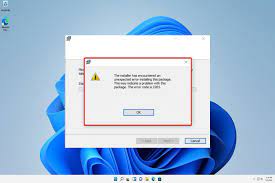
If you’re trying to install a program on your Windows 10 or 11 computer and you encounter an unexpected error message stating “The Installer Has Encountered an Unexpected Error 2203,” you’re not alone. This error can happen for several reasons, including permissions, file sharing issues, and more.

Fortunately, there are a few simple steps you can take to resolve this error and continue with your installation. Here’s how:

Step 1: Restart your computer
This may seem like an obvious solution, but sometimes a simple restart can resolve the issue. If you’ve encountered the error message, close out of all programs and restart your computer. Once the computer has restarted, try to install the program again and see if the error message reappears.

Step 2: Check your permissions
One common reason for the “The Installer Has Encountered an Unexpected Error 2203” message is a lack of permissions. When installing a program, you need to have administrative rights to install it. If you don’t have the necessary permissions, you may encounter this error message.

To check your permissions, right-click on the program you’re trying to install and select “Run as administrator.” If you’re able to install the program when running it as an administrator, your permissions were likely the issue.

Step 3: Disable any antivirus or firewall programs
Sometimes antivirus or firewall programs can interfere with the installation process, causing the error message to appear. To resolve this, temporarily disable any antivirus or firewall programs you have running on your computer and try to install the program again.

Step 4: Check your file sharing settings
If you’re installing a program from a network location or shared drive, it’s possible that your file sharing settings are causing the error message to appear. To resolve this issue, check your file sharing settings and ensure that the location you’re installing the program from has the necessary permissions.

Step 5: Run a disk cleanup
Running a disk cleanup can help resolve any issues with corrupted files or settings that may be causing the error message. To run a disk cleanup, go to your file explorer and right-click on your hard drive. Select “Properties” and then click on “Disk Cleanup.” Follow the prompts to run the disk cleanup.

In conclusion, encountering an unexpected error message when trying to install a program can be frustrating, but there are several solutions to try. Restarting your computer, checking permissions, disabling antivirus or firewall programs, checking file sharing settings, and running a disk cleanup are all potential solutions to resolve the “The Installer Has Encountered an Unexpected Error 2203” message and get you back to installing your desired program.


Previous Article

Who Viewed My Instagram Stories?

Next Article

How to Read Resistor Color Codes

Matthew Lynch

Related articles More from author

  • Digital & Mobile Technology

    How to Download an Entire Website for Offline Reading

    August 4, 2023
    By Matthew Lynch
  • Digital & Mobile Technology

    Is DealDash a Scam or Can You Get Legit Bargains?

    August 5, 2023
    By Matthew Lynch
  • Digital & Mobile Technology

    The Best Games to Stream on Twitch Right Now

    June 12, 2023
    By Matthew Lynch
  • Digital & Mobile Technology

    A Guide to Adding Extra Storage to Your Xbox Series X|S

    June 26, 2023
    By Matthew Lynch
  • Digital & Mobile Technology

    How to Fix a 500 Internal Server Error

    May 30, 2023
    By Matthew Lynch
  • Digital & Mobile Technology

    Mobile Apps With Bedtime Stories to Help Adults Drift Off to Sleep

    August 5, 2023
    By Matthew Lynch

Search

Login & Registration

  • Log in
  • Entries feed
  • Comments feed
  • WordPress.org

Newsletter

Signup for The Tech Edvocate Newsletter and have the latest in EdTech news and opinion delivered to your email address!

About Us

Since technology is not going anywhere and does more good than harm, adapting is the best course of action. That is where The Tech Edvocate comes in. We plan to cover the PreK-12 and Higher Education EdTech sectors and provide our readers with the latest news and opinion on the subject. From time to time, I will invite other voices to weigh in on important issues in EdTech. We hope to provide a well-rounded, multi-faceted look at the past, present, the future of EdTech in the US and internationally.

We started this journey back in June 2016, and we plan to continue it for many more years to come. I hope that you will join us in this discussion of the past, present and future of EdTech and lend your own insight to the issues that are discussed.

Newsletter

Signup for The Tech Edvocate Newsletter and have the latest in EdTech news and opinion delivered to your email address!

Contact Us

The Tech Edvocate
910 Goddin Street
Richmond, VA 23231
(601) 630-5238
[email protected]

Copyright © 2026 Matthew Lynch. All rights reserved.