The Tech Edvocate

Top Menu

  • Advertisement
  • Apps
  • Home Page
  • Home Page Five (No Sidebar)
  • Home Page Four
  • Home Page Three
  • Home Page Two
  • Home Tech2
  • Icons [No Sidebar]
  • Left Sidbear Page
  • Lynch Educational Consulting
  • My Account
  • My Speaking Page
  • Newsletter Sign Up Confirmation
  • Newsletter Unsubscription
  • Our Brands
  • Page Example
  • Privacy Policy
  • Protected Content
  • Register
  • Request a Product Review
  • Shop
  • Shortcodes Examples
  • Signup
  • Start Here
    • Governance
    • Careers
    • Contact Us
  • Terms and Conditions
  • The Edvocate
  • The Tech Edvocate Product Guide
  • Topics
  • Write For Us
  • Advertise

Main Menu

  • Start Here
    • Our Brands
    • Governance
      • Lynch Educational Consulting, LLC.
      • Dr. Lynch’s Personal Website
      • Careers
    • Write For Us
    • The Tech Edvocate Product Guide
    • Contact Us
    • Books
    • Edupedia
    • Post a Job
    • The Edvocate Podcast
    • Terms and Conditions
    • Privacy Policy
  • Topics
    • Assistive Technology
    • Child Development Tech
    • Early Childhood & K-12 EdTech
    • EdTech Futures
    • EdTech News
    • EdTech Policy & Reform
    • EdTech Startups & Businesses
    • Higher Education EdTech
    • Online Learning & eLearning
    • Parent & Family Tech
    • Personalized Learning
    • Product Reviews
  • Advertise
  • Tech Edvocate Awards
  • The Edvocate
  • Pedagogue
  • School Ratings

logo

The Tech Edvocate

  • Start Here
    • Our Brands
    • Governance
      • Lynch Educational Consulting, LLC.
      • Dr. Lynch’s Personal Website
        • My Speaking Page
      • Careers
    • Write For Us
    • The Tech Edvocate Product Guide
    • Contact Us
    • Books
    • Edupedia
    • Post a Job
    • The Edvocate Podcast
    • Terms and Conditions
    • Privacy Policy
  • Topics
    • Assistive Technology
    • Child Development Tech
    • Early Childhood & K-12 EdTech
    • EdTech Futures
    • EdTech News
    • EdTech Policy & Reform
    • EdTech Startups & Businesses
    • Higher Education EdTech
    • Online Learning & eLearning
    • Parent & Family Tech
    • Personalized Learning
    • Product Reviews
  • Advertise
  • Tech Edvocate Awards
  • The Edvocate
  • Pedagogue
  • School Ratings
  • The Brutal Truth: Why K-12 Cybersecurity Needs More Than Just Awareness

  • The Unseen Threat: How K-12 Cybersecurity Training Is Quietly Reshaping Education

  • The Staggering Truth: K-12 Cybersecurity Education Is Failing – Here’s How to Fix It

  • Why Millions Are Ditching Degrees For This Career-Boosting Secret

  • 7 Crucial Micro-Credentials Boosting Recent Grads’ Salaries by 15%

  • The Brutal Truth: Why Your College Degree Isn’t Enough Anymore

  • The Ethical AI Auditor Boom: Why Salaries Are Skyrocketing Globally

  • This Crucial Skill Now Pays $150,000 Starting — Here’s How to Get Certified in 2024

  • This Unforeseen Tech Job Pays Six Figures — And You Can Start Today

  • One Stunning Reason Why Quantum Certifications Trump Traditional IT

Digital & Mobile Technology
Home›Digital & Mobile Technology›How to Fix It When Roku Won’t Turn On

How to Fix It When Roku Won’t Turn On
By Matthew Lynch
June 23, 2023
0
Spread the love

Roku has been one of the most popular streaming devices in the market. This device is relatively easy to use and affordable. However, despite its simplicity, some users may encounter problems with it. If you are trying to access your Roku and it won’t turn on, don’t panic. There are simple steps you can follow to solve the problem.

First, ensure that your Roku device is properly connected to the power source. Check the power cable and ensure it is firmly plugged into the device and the power outlet. If this is not the issue, try connecting the device to another power outlet to eliminate the possibility of a faulty power source.

If the first step doesn’t solve the issue, perform a hard reset. To do this, unplug the device from the power outlet and remove the batteries from the remote control. Press and hold the power button on the Roku for about 20 seconds then release it. Reinsert the batteries and plug the device back in. Try turning on the device using the remote or the power button on the device.

Another solution is to ensure that the HDMI cable is properly connected to both the Roku and the TV. It is essential to check the HDMI port on the TV to ensure that it is set to the correct input. If the cable is damaged, replace it with a new one.

If none of the above solutions work, check if the Roku firmware is up to date. An outdated firmware can cause the device to malfunction or not turn on. To update your Roku firmware, go to the settings menu and select the System option. Click on System Update, and if there is an available update, let the system download and install it. Once completed, try turning on the device again.

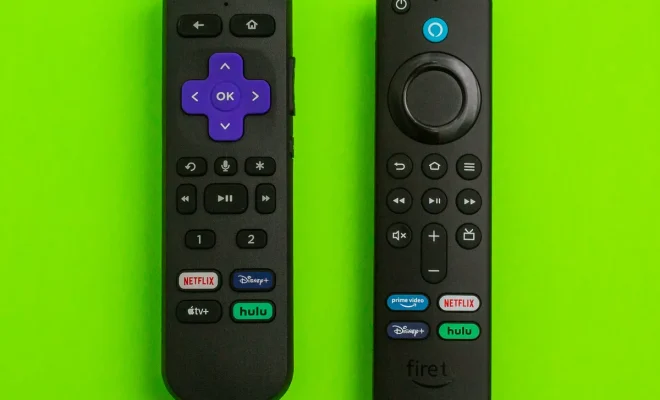
In some cases, the problem may be related to the remote control. Try replacing the batteries in the remote control or resetting it. If the remote fails to respond or the issue persists, you may need to replace the remote or purchase a universal remote compatible with Roku.

In conclusion, if your Roku won’t turn on, there are several solutions you can try to resolve the issue. Ensure that the device is properly connected to the power source, perform a hard reset, check the HDMI cable, update the firmware, check the remote control batteries, or replace the remote control. With these simple steps, you can quickly fix your Roku device and enjoy your favorite TV shows and movies again.


Previous Article

How to Fix Common Car Amp Problems

Next Article

How to Use Facebook on Apple Watch

Matthew Lynch

Related articles More from author

  • Digital & Mobile Technology

    What Are Open Directories and What You Should Take Note Of

    April 15, 2023
    By Matthew Lynch
  • Digital & Mobile Technology

    How to Hide or Show the Firewall and Network Protection Area in Windows Security

    August 3, 2023
    By Matthew Lynch
  • Digital & Mobile Technology

    How to Unlock a Secured Wi-Fi Connection

    June 9, 2023
    By Matthew Lynch
  • Digital & Mobile Technology

    How to Search for Messages in Yahoo Mail

    June 4, 2023
    By Matthew Lynch
  • Digital & Mobile Technology

    10 of the Best iOS Puzzle Games

    June 23, 2023
    By Matthew Lynch
  • Digital & Mobile Technology

    Social Workout Apps to Exercise With Friends and Meet Fitness Goals Together

    September 8, 2023
    By Matthew Lynch

Search

Login & Registration

  • Log in
  • Entries feed
  • Comments feed
  • WordPress.org

Newsletter

Signup for The Tech Edvocate Newsletter and have the latest in EdTech news and opinion delivered to your email address!

About Us

Since technology is not going anywhere and does more good than harm, adapting is the best course of action. That is where The Tech Edvocate comes in. We plan to cover the PreK-12 and Higher Education EdTech sectors and provide our readers with the latest news and opinion on the subject. From time to time, I will invite other voices to weigh in on important issues in EdTech. We hope to provide a well-rounded, multi-faceted look at the past, present, the future of EdTech in the US and internationally.

We started this journey back in June 2016, and we plan to continue it for many more years to come. I hope that you will join us in this discussion of the past, present and future of EdTech and lend your own insight to the issues that are discussed.

Newsletter

Signup for The Tech Edvocate Newsletter and have the latest in EdTech news and opinion delivered to your email address!

Contact Us

The Tech Edvocate
910 Goddin Street
Richmond, VA 23231
(601) 630-5238
[email protected]

Copyright © 2026 Matthew Lynch. All rights reserved.