The Tech Edvocate

Top Menu

  • Advertisement
  • Apps
  • Home Page
  • Home Page Five (No Sidebar)
  • Home Page Four
  • Home Page Three
  • Home Page Two
  • Home Tech2
  • Icons [No Sidebar]
  • Left Sidbear Page
  • Lynch Educational Consulting
  • My Account
  • My Speaking Page
  • Newsletter Sign Up Confirmation
  • Newsletter Unsubscription
  • Our Brands
  • Page Example
  • Privacy Policy
  • Protected Content
  • Register
  • Request a Product Review
  • Shop
  • Shortcodes Examples
  • Signup
  • Start Here
    • Governance
    • Careers
    • Contact Us
  • Terms and Conditions
  • The Edvocate
  • The Tech Edvocate Product Guide
  • Topics
  • Write For Us
  • Advertise

Main Menu

  • Start Here
    • Our Brands
    • Governance
      • Lynch Educational Consulting, LLC.
      • Dr. Lynch’s Personal Website
      • Careers
    • Write For Us
    • The Tech Edvocate Product Guide
    • Contact Us
    • Books
    • Edupedia
    • Post a Job
    • The Edvocate Podcast
    • Terms and Conditions
    • Privacy Policy
  • Topics
    • Assistive Technology
    • Child Development Tech
    • Early Childhood & K-12 EdTech
    • EdTech Futures
    • EdTech News
    • EdTech Policy & Reform
    • EdTech Startups & Businesses
    • Higher Education EdTech
    • Online Learning & eLearning
    • Parent & Family Tech
    • Personalized Learning
    • Product Reviews
  • Advertise
  • Tech Edvocate Awards
  • The Edvocate
  • Pedagogue
  • School Ratings

logo

The Tech Edvocate

  • Start Here
    • Our Brands
    • Governance
      • Lynch Educational Consulting, LLC.
      • Dr. Lynch’s Personal Website
        • My Speaking Page
      • Careers
    • Write For Us
    • The Tech Edvocate Product Guide
    • Contact Us
    • Books
    • Edupedia
    • Post a Job
    • The Edvocate Podcast
    • Terms and Conditions
    • Privacy Policy
  • Topics
    • Assistive Technology
    • Child Development Tech
    • Early Childhood & K-12 EdTech
    • EdTech Futures
    • EdTech News
    • EdTech Policy & Reform
    • EdTech Startups & Businesses
    • Higher Education EdTech
    • Online Learning & eLearning
    • Parent & Family Tech
    • Personalized Learning
    • Product Reviews
  • Advertise
  • Tech Edvocate Awards
  • The Edvocate
  • Pedagogue
  • School Ratings
  • Miro vs Conceptboard for project management

  • How to use Teamwork for resource management

  • How much does Procore cost per month

  • How to organize Microsoft Planner buckets

  • Is Teamwork good for billable hours

  • Procore vs Buildertrend which is better

  • Airtable project management templates

  • Can Miro track project progress

  • How to use Basecamp for client work

  • Can Lucidchart create swimlane diagrams

Digital & Mobile Technology
Home›Digital & Mobile Technology›How to Fix Bad Pool Caller Error on Windows 10

How to Fix Bad Pool Caller Error on Windows 10
By Matthew Lynch
June 12, 2023
0
Spread the love

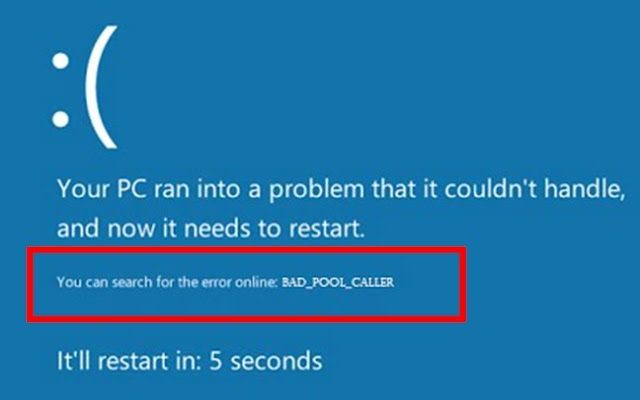
As a Windows 10 user, you may have encountered the “Bad Pool Caller” error, which can be quite frustrating. This error usually occurs when there is a problem with your computer’s memory, particularly when it comes to its pool of memory resources. Fortunately, this error can be easily resolved with a few simple steps.
Here are some ways to fix the Bad Pool Caller Error on Windows 10:

1. Update Drivers

Outdated or corrupted drivers can cause the Bad Pool Caller error. To update your drivers, go to the Device Manager by right-clicking on the Start menu button and selecting Device Manager. In the Device Manager, select the device with a yellow exclamation mark next to it, right-click, and choose Update Driver. Follow the prompts to update the driver.

2. Check Your System Files

Corrupted system files may cause the Bad Pool Caller error as well. You can fix corrupted files using the System File Checker. To do this, open the Command Prompt as an administrator and type sfc /scannow followed by Enter. Wait for the scan to complete, and it will diagnose and repair any corrupted system files.

3. Roll Back Recent Changes

Sometimes, installing new software or hardware can cause the Bad Pool Caller error. To fix this, try to roll back any recent changes you have made to your system. You can do this by accessing the Control Panel, clicking on Programs and Features, then selecting the problematic application, and clicking Uninstall. For hardware, try disconnecting the device and see if the error goes away.

4. Perform a System Restore

If none of the above methods work, you might want to try performing a system restore. This will restore your system to a previous state when it was running smoothly. To do this, search for System Restore in the search bar, open it and follow the prompts to restore your system to an earlier date.

5. Check your Hardware

Faulty hardware, specifically your computer’s RAM, can also cause the Bad Pool Caller error. To check if this is the problem, you can run a memory diagnostic test by typing Windows Memory Diagnostic in the search bar and following the prompts. If it finds any errors, you may need to replace the faulty RAM stick.

Conclusion

The Bad Pool Caller error is an annoying issue that can interrupt your work, but it can be easily fixed using the methods outlined above. Try these steps one by one, and you’ll hopefully identify and fix the root of the problem. If none of these methods work, seek the help of an expert or your hardware vendor to get additional support in resolving this error.


Previous Article

How to Access iCloud From Your Android ...

Next Article

How Many Steps Are in a Mile ...

Matthew Lynch

Related articles More from author

  • Digital & Mobile Technology

    How to Clean Your Phone and Screen

    June 10, 2023
    By Matthew Lynch
  • Digital & Mobile Technology

    Fix Physxloader.dll Is Missing or Not Found Errors

    July 14, 2023
    By Matthew Lynch
  • Digital & Mobile Technology

    How to Use Siri on iPhone 11

    June 9, 2023
    By Matthew Lynch
  • Digital & Mobile Technology

    Did Gary’s Raticate Really Die in Pokemon Red and Blue?

    June 10, 2023
    By Matthew Lynch
  • Digital & Mobile Technology

    Error Code 0xc000000f: What It Means and How to Fix It

    June 4, 2023
    By Matthew Lynch
  • Digital & Mobile Technology

    How Do Wi-Fi Extenders Work?

    July 6, 2023
    By Matthew Lynch

Search

Login & Registration

  • Log in
  • Entries feed
  • Comments feed
  • WordPress.org

Newsletter

Signup for The Tech Edvocate Newsletter and have the latest in EdTech news and opinion delivered to your email address!

About Us

Since technology is not going anywhere and does more good than harm, adapting is the best course of action. That is where The Tech Edvocate comes in. We plan to cover the PreK-12 and Higher Education EdTech sectors and provide our readers with the latest news and opinion on the subject. From time to time, I will invite other voices to weigh in on important issues in EdTech. We hope to provide a well-rounded, multi-faceted look at the past, present, the future of EdTech in the US and internationally.

We started this journey back in June 2016, and we plan to continue it for many more years to come. I hope that you will join us in this discussion of the past, present and future of EdTech and lend your own insight to the issues that are discussed.

Newsletter

Signup for The Tech Edvocate Newsletter and have the latest in EdTech news and opinion delivered to your email address!

Contact Us

The Tech Edvocate
910 Goddin Street
Richmond, VA 23231
(601) 630-5238
[email protected]

Copyright © 2026 Matthew Lynch. All rights reserved.