The Tech Edvocate

Top Menu

  • Advertisement
  • Apps
  • Home Page
  • Home Page Five (No Sidebar)
  • Home Page Four
  • Home Page Three
  • Home Page Two
  • Home Tech2
  • Icons [No Sidebar]
  • Left Sidbear Page
  • Lynch Educational Consulting
  • My Account
  • My Speaking Page
  • Newsletter Sign Up Confirmation
  • Newsletter Unsubscription
  • Our Brands
  • Page Example
  • Privacy Policy
  • Protected Content
  • Register
  • Request a Product Review
  • Shop
  • Shortcodes Examples
  • Signup
  • Start Here
    • Governance
    • Careers
    • Contact Us
  • Terms and Conditions
  • The Edvocate
  • The Tech Edvocate Product Guide
  • Topics
  • Write For Us
  • Advertise

Main Menu

  • Start Here
    • Our Brands
    • Governance
      • Lynch Educational Consulting, LLC.
      • Dr. Lynch’s Personal Website
      • Careers
    • Write For Us
    • The Tech Edvocate Product Guide
    • Contact Us
    • Books
    • Edupedia
    • Post a Job
    • The Edvocate Podcast
    • Terms and Conditions
    • Privacy Policy
  • Topics
    • Assistive Technology
    • Child Development Tech
    • Early Childhood & K-12 EdTech
    • EdTech Futures
    • EdTech News
    • EdTech Policy & Reform
    • EdTech Startups & Businesses
    • Higher Education EdTech
    • Online Learning & eLearning
    • Parent & Family Tech
    • Personalized Learning
    • Product Reviews
  • Advertise
  • Tech Edvocate Awards
  • The Edvocate
  • Pedagogue
  • School Ratings

logo

The Tech Edvocate

  • Start Here
    • Our Brands
    • Governance
      • Lynch Educational Consulting, LLC.
      • Dr. Lynch’s Personal Website
        • My Speaking Page
      • Careers
    • Write For Us
    • The Tech Edvocate Product Guide
    • Contact Us
    • Books
    • Edupedia
    • Post a Job
    • The Edvocate Podcast
    • Terms and Conditions
    • Privacy Policy
  • Topics
    • Assistive Technology
    • Child Development Tech
    • Early Childhood & K-12 EdTech
    • EdTech Futures
    • EdTech News
    • EdTech Policy & Reform
    • EdTech Startups & Businesses
    • Higher Education EdTech
    • Online Learning & eLearning
    • Parent & Family Tech
    • Personalized Learning
    • Product Reviews
  • Advertise
  • Tech Edvocate Awards
  • The Edvocate
  • Pedagogue
  • School Ratings
  • 100 Best Salesforce Apps

  • 100 Best Notion Integrations

  • 100 Best Windows Apps

  • 100 Best Mac Apps

  • 100 Best Android Apps

  • 100 Best iOS Apps

  • 100 Best Chrome Extensions

  • 100 Best Slack Integrations

  • 100 Best Shopify Apps

  • 100 Best Apps That Integrate Freshdesk + Slack + Salesforce

Assistive Technology
Home›Assistive Technology›How to Fix AirPlay When It’s Not Working

How to Fix AirPlay When It’s Not Working
By Matthew Lynch
June 14, 2023
0
Spread the love

AirPlay is one of the most popular ways for Apple users to stream audio or video content from their iPhone, iPad, or Mac to other AirPlay-enabled devices like an Apple TV, speaker, or home theater system. But, just like any technology, AirPlay can sometimes encounter issues causing it to not work properly. Here are some tips on how to fix AirPlay when it’s not working.

  1. Check your Connection

Before trying any further troubleshooting, make sure that you have a stable internet connection and that both devices are connected to the same Wi-Fi network. AirPlay relies on a stable and strong signal to function properly, so any interruption or weak signal could cause it to stop working.

  1. Restart Your Devices

If your connection is stable, but AirPlay still isn’t working, try restarting both devices. Power off your Apple device and AirPlay-enabled speaker, wait a few minutes, and then power them back on. Doing so can often solve the issue.

  1. Update Your Devices

AirPlay requires an up-to-date software version for both the sender and receiver. Make sure that both your Apple device and AirPlay-enabled speaker have the latest firmware installed. Check for updates in the Settings menu on your device or the manufacturer’s website.

  1. Disable Bluetooth

If you have Bluetooth enabled on your Apple device, it could interfere with AirPlay. Try turning off Bluetooth before attempting to use AirPlay. Go to Settings, Bluetooth, and toggle off the switch.

  1. Check Firewall Settings

If AirPlay is not working on your Mac, the firewall settings can sometimes interfere with the connection. Make sure that AirPlay is allowed through the firewall settings. Go to System Preferences, Security & Privacy, Firewall, and click on Firewall Options. Check the box next to AirPlay to allow it.

  1. Check AirPlay Settings

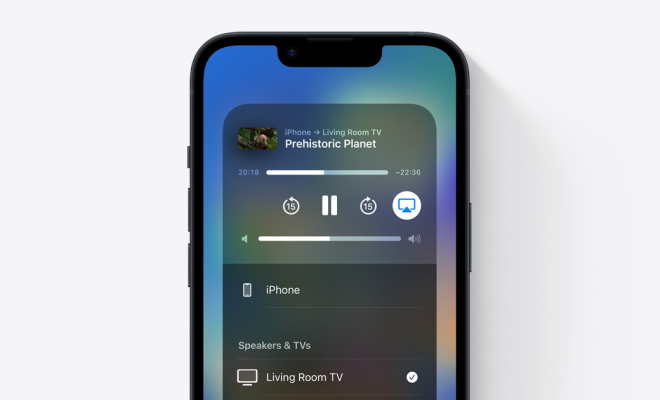
Double-check that your AirPlay settings are configured properly. On your Apple device, navigate to the Control Center and ensure that the AirPlay option is selected and that your AirPlay-enabled device is selected as well. If not, select it from the list.

  1. Reset Network Settings

As a last resort, you can try resetting your network settings to their default. This deletes any saved Wi-Fi passwords and other network settings, but it can sometimes fix issues with AirPlay. Go to Settings, General, Reset, and choose Reset Network Settings.

Previous Article

How to Edit Macro Security Settings for ...

Next Article

How to Play Animal Crossing: New Leaf ...

Matthew Lynch

Related articles More from author

  • Assistive Technology

    How to Print From an Android Phone or Tablet

    June 23, 2023
    By Matthew Lynch
  • Assistive Technology

    How to Use an Amazon Echo Show as a Security Camera

    June 6, 2023
    By Matthew Lynch
  • Assistive Technology

    How to Empty Spam and Trash Fast in Gmail

    June 10, 2023
    By Matthew Lynch
  • Assistive Technology

    How to Make Your Own Personal Movie Lists: The Best Sites

    June 12, 2023
    By Matthew Lynch
  • Assistive Technology

    How to See New Gmail Messages in iOS Notification Center

    June 10, 2023
    By Matthew Lynch
  • Assistive Technology

    How to Fix It When Apps Aren’t Working on an Android Tablet

    June 10, 2023
    By Matthew Lynch

Search

Login & Registration

  • Log in
  • Entries feed
  • Comments feed
  • WordPress.org

Newsletter

Signup for The Tech Edvocate Newsletter and have the latest in EdTech news and opinion delivered to your email address!

About Us

Since technology is not going anywhere and does more good than harm, adapting is the best course of action. That is where The Tech Edvocate comes in. We plan to cover the PreK-12 and Higher Education EdTech sectors and provide our readers with the latest news and opinion on the subject. From time to time, I will invite other voices to weigh in on important issues in EdTech. We hope to provide a well-rounded, multi-faceted look at the past, present, the future of EdTech in the US and internationally.

We started this journey back in June 2016, and we plan to continue it for many more years to come. I hope that you will join us in this discussion of the past, present and future of EdTech and lend your own insight to the issues that are discussed.

Newsletter

Signup for The Tech Edvocate Newsletter and have the latest in EdTech news and opinion delivered to your email address!

Contact Us

The Tech Edvocate
910 Goddin Street
Richmond, VA 23231
(601) 630-5238
[email protected]

Copyright © 2026 Matthew Lynch. All rights reserved.