The Tech Edvocate

Top Menu

  • Advertisement
  • Apps
  • Home Page
  • Home Page Five (No Sidebar)
  • Home Page Four
  • Home Page Three
  • Home Page Two
  • Home Tech2
  • Icons [No Sidebar]
  • Left Sidbear Page
  • Lynch Educational Consulting
  • My Account
  • My Speaking Page
  • Newsletter Sign Up Confirmation
  • Newsletter Unsubscription
  • Our Brands
  • Page Example
  • Privacy Policy
  • Protected Content
  • Register
  • Request a Product Review
  • Shop
  • Shortcodes Examples
  • Signup
  • Start Here
    • Governance
    • Careers
    • Contact Us
  • Terms and Conditions
  • The Edvocate
  • The Tech Edvocate Product Guide
  • Topics
  • Write For Us
  • Advertise

Main Menu

  • Start Here
    • Our Brands
    • Governance
      • Lynch Educational Consulting, LLC.
      • Dr. Lynch’s Personal Website
      • Careers
    • Write For Us
    • The Tech Edvocate Product Guide
    • Contact Us
    • Books
    • Edupedia
    • Post a Job
    • The Edvocate Podcast
    • Terms and Conditions
    • Privacy Policy
  • Topics
    • Assistive Technology
    • Child Development Tech
    • Early Childhood & K-12 EdTech
    • EdTech Futures
    • EdTech News
    • EdTech Policy & Reform
    • EdTech Startups & Businesses
    • Higher Education EdTech
    • Online Learning & eLearning
    • Parent & Family Tech
    • Personalized Learning
    • Product Reviews
  • Advertise
  • Tech Edvocate Awards
  • The Edvocate
  • Pedagogue
  • School Ratings

logo

The Tech Edvocate

  • Start Here
    • Our Brands
    • Governance
      • Lynch Educational Consulting, LLC.
      • Dr. Lynch’s Personal Website
        • My Speaking Page
      • Careers
    • Write For Us
    • The Tech Edvocate Product Guide
    • Contact Us
    • Books
    • Edupedia
    • Post a Job
    • The Edvocate Podcast
    • Terms and Conditions
    • Privacy Policy
  • Topics
    • Assistive Technology
    • Child Development Tech
    • Early Childhood & K-12 EdTech
    • EdTech Futures
    • EdTech News
    • EdTech Policy & Reform
    • EdTech Startups & Businesses
    • Higher Education EdTech
    • Online Learning & eLearning
    • Parent & Family Tech
    • Personalized Learning
    • Product Reviews
  • Advertise
  • Tech Edvocate Awards
  • The Edvocate
  • Pedagogue
  • School Ratings
  • Viaim Opennote Review: The AI Note-Taker That Disappears Into Your Daily Routine

  • A Visitors Guide to Long Beach (CA), United States

  • A Visitor’s Guide to Fresno (CA), United States

  • A Visitors Guide to New Orleans (LA), United States

  • A Visitors Guide to Sacramento (CA), United States

  • A Visitors Guide to Lyon, France

  • JisuLife Ultra2 Portable Fan: A Powerful Multi-Function Cooling Solution

  • A Visitors Guide to Viña del Mar, Chile

  • A Visitors Guide to Århus, Denmark

  • A Visitors Guide to Bakersfield (CA), United States

Digital & Mobile Technology
Home›Digital & Mobile Technology›How to Fix a Cracked LCD Display

How to Fix a Cracked LCD Display
By Matthew Lynch
May 28, 2023
0
Spread the love

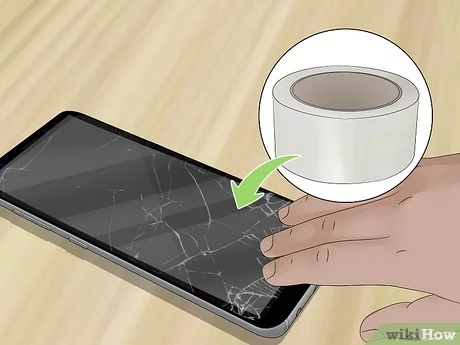
LCD displays are common in almost all electronic devices from smartphones to televisions. The displays offer high quality and crystal-clear images, perfect for gaming, watching movies or browsing pictures. The downside is that they are also delicate and prone to breakages, which is not uncommon after a fall or bump. A cracked LCD display is an obvious eyesore, making it difficult to use the device. However, if you have a cracked LCD display, it is not the end of the world as it can be repaired. Whether you opt for a replacement or a repair, you can give your device a new lease of life by following these steps.

1. Evaluate the extend of the damage

The extent of the damage will determine how much it will cost to repair or replace your LCD display. Begin by assessing the size of the crack and see whether any wires are exposed. Examine the surrounding screen to determine whether there are any spider web fractures that may decrease the overall quality of the display. This assessment will help you know whether the device needs a replacement or repair.

2. Order a repair kit

If you are going to repair the device yourself, the next step is ordering a repair kit. Kits vary depending on the size of the screen, but the basic components include a replacement LCD screen, a screwdriver, a plastic spudger, adhesive tape, and a dust cloth. If you are unsure which kit to order, consult with an expert in the field.

3. Disassemble the device

Before you remove a broken LCD, it is essential to remove the power source. Once you take care of the power source, remove the screws to gain access to the damaged LCD. Use a spudger to gently push the plastic casing out of the way, exposing the broken LCD.

4. Remove the old LCD

Begin by detaching the ribbon cable around the edge of the screen. Gently remove the old LCD, taking care not to damage the wires.

5. Install the replacement LCD

Begin by detaching the protective film around the edge of the new LCD. Once you’ve done that, lay the LCD onto the device and connect the ribbon cable. To make sure that the replacement LCD aligns with the device’s frame, use adhesive tape to hold the screen in position. Finally, connect the power source to make sure that the LCD is working correctly.

6. Clean your device

Before reassembling your device, use a dust cloth to wipe down any visible fingerprints or dirt around the case.

7. Reassembly

Once you have installed the new LCD, close the device casing, and tighten the screws.

In conclusion, repairing a cracked LCD display can be a daunting task, but with the right tools and technical knowledge, you can do it yourself. However, if you are not confident about repairing your LCD, it may be worth contacting a professional technician to help with the repair. Remember to protect your device by using protective covers that shield it from damages. Once your device is working, protect it from falls by investing in a sturdy case.


Previous Article

How to Fix an Unformattable and Unusable ...

Next Article

How to Find Your Windows 11 Product ...

Matthew Lynch

Related articles More from author

  • Digital & Mobile Technology

    Unify and Make Sense of Your Games Collections With Playnite on Windows

    August 1, 2023
    By Matthew Lynch
  • Digital & Mobile Technology

    How to Change the Video Quality on Netflix

    June 12, 2023
    By Matthew Lynch
  • Digital & Mobile Technology

    How to Add, View, and Manage Favorites in Safari on a Mac

    August 5, 2023
    By Matthew Lynch
  • Digital & Mobile Technology

    Best Sleep Apps for the Apple Watch

    June 23, 2023
    By Matthew Lynch
  • Digital & Mobile Technology

    How to Invite Friends to Follow You on Instagram

    June 13, 2023
    By Matthew Lynch
  • Digital & Mobile Technology

    Best iPhone 14 Pro Max Waterproof Cases

    June 23, 2023
    By Matthew Lynch

Search

Login & Registration

  • Register
  • Log in
  • Entries feed
  • Comments feed
  • WordPress.org

Newsletter

Signup for The Tech Edvocate Newsletter and have the latest in EdTech news and opinion delivered to your email address!

About Us

Since technology is not going anywhere and does more good than harm, adapting is the best course of action. That is where The Tech Edvocate comes in. We plan to cover the PreK-12 and Higher Education EdTech sectors and provide our readers with the latest news and opinion on the subject. From time to time, I will invite other voices to weigh in on important issues in EdTech. We hope to provide a well-rounded, multi-faceted look at the past, present, the future of EdTech in the US and internationally.

We started this journey back in June 2016, and we plan to continue it for many more years to come. I hope that you will join us in this discussion of the past, present and future of EdTech and lend your own insight to the issues that are discussed.

Newsletter

Signup for The Tech Edvocate Newsletter and have the latest in EdTech news and opinion delivered to your email address!

Contact Us

The Tech Edvocate
910 Goddin Street
Richmond, VA 23231
(601) 630-5238
[email protected]

Copyright © 2025 Matthew Lynch. All rights reserved.