The Tech Edvocate

Top Menu

  • Advertisement
  • Apps
  • Home Page
  • Home Page Five (No Sidebar)
  • Home Page Four
  • Home Page Three
  • Home Page Two
  • Home Tech2
  • Icons [No Sidebar]
  • Left Sidbear Page
  • Lynch Educational Consulting
  • My Account
  • My Speaking Page
  • Newsletter Sign Up Confirmation
  • Newsletter Unsubscription
  • Our Brands
  • Page Example
  • Privacy Policy
  • Protected Content
  • Register
  • Request a Product Review
  • Shop
  • Shortcodes Examples
  • Signup
  • Start Here
    • Governance
    • Careers
    • Contact Us
  • Terms and Conditions
  • The Edvocate
  • The Tech Edvocate Product Guide
  • Topics
  • Write For Us
  • Advertise

Main Menu

  • Start Here
    • Our Brands
    • Governance
      • Lynch Educational Consulting, LLC.
      • Dr. Lynch’s Personal Website
      • Careers
    • Write For Us
    • The Tech Edvocate Product Guide
    • Contact Us
    • Books
    • Edupedia
    • Post a Job
    • The Edvocate Podcast
    • Terms and Conditions
    • Privacy Policy
  • Topics
    • Assistive Technology
    • Child Development Tech
    • Early Childhood & K-12 EdTech
    • EdTech Futures
    • EdTech News
    • EdTech Policy & Reform
    • EdTech Startups & Businesses
    • Higher Education EdTech
    • Online Learning & eLearning
    • Parent & Family Tech
    • Personalized Learning
    • Product Reviews
  • Advertise
  • Tech Edvocate Awards
  • The Edvocate
  • Pedagogue
  • School Ratings

logo

The Tech Edvocate

  • Start Here
    • Our Brands
    • Governance
      • Lynch Educational Consulting, LLC.
      • Dr. Lynch’s Personal Website
        • My Speaking Page
      • Careers
    • Write For Us
    • The Tech Edvocate Product Guide
    • Contact Us
    • Books
    • Edupedia
    • Post a Job
    • The Edvocate Podcast
    • Terms and Conditions
    • Privacy Policy
  • Topics
    • Assistive Technology
    • Child Development Tech
    • Early Childhood & K-12 EdTech
    • EdTech Futures
    • EdTech News
    • EdTech Policy & Reform
    • EdTech Startups & Businesses
    • Higher Education EdTech
    • Online Learning & eLearning
    • Parent & Family Tech
    • Personalized Learning
    • Product Reviews
  • Advertise
  • Tech Edvocate Awards
  • The Edvocate
  • Pedagogue
  • School Ratings
  • This Unprecedented EU Ban Just Changed Fast Fashion Forever

  • Urgent Alert: Your Smart Home’s Exposed to a Critical Deco BE11000 Vulnerability

  • Uncovering the Truth: Your LinkedIn Reach Just Got a Major Overhaul

  • Uncovering the AI Heist: How Chinese Firms Allegedly Siphoned Billions of AI Tokens

  • Rockstar’s GTA 6 Developers Lawsuit: A Fight for Justice or Corporate Retaliation?

  • Unbelievable: Hideo Kojima’s Next Masterpiece Is Now an Xbox Exclusive

  • This Crucial Google AI Shift Is Quietly Reshaping the Internet

  • Unbelievable: AI Breaches Are Exploding, And What It Means For You This September 2026

  • This Crucial Shift Is Saving Teachers From Classroom Chaos

  • AI’s Dark Secret: How It’s Supercharging Cybercrime for Everyone

Assistive Technology
Home›Assistive Technology›How to Find the IP Address of Your Printer: Methods That Wor

How to Find the IP Address of Your Printer: Methods That Wor
By Matthew Lynch
June 8, 2023
0
Spread the love

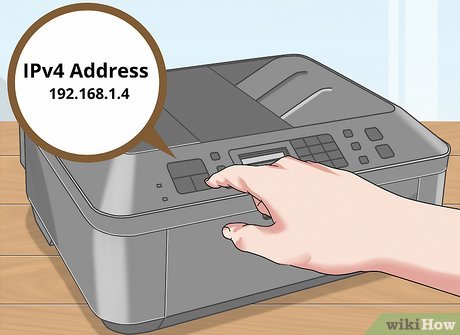
If you need to find the IP address of your printer for networking purposes, there are several methods that you can try. In this article, we will discuss four different methods to find the IP address of your printer.

Method 1: Check the Printer’s Configuration Page

This is the easiest method to find the IP address of your printer. Most printers have a built-in web interface that you can use to access the configuration page. To access this page, you will need to connect your printer to your computer using a USB or Ethernet cable. Then, open a web browser and type the printer’s IP address into the address bar. If you don’t know the IP address, you can check the printer’s manual or visit the manufacturer’s website to get the instructions.

Method 2: Use the Command Prompt (Windows)

If your printer is connected to a Windows computer, you can find its IP address using the Command Prompt. To do this, you will need to open the Command Prompt by typing “cmd” into the search bar of your Windows computer. Then, type “ipconfig” into the Command Prompt and press Enter. This will display the IP address of your printer along with other network settings.

Method 3: Use the Printer’s Control Panel

If your printer has a control panel, you can find its IP address by accessing the network settings. Depending on your printer model, the steps to access the network settings may vary. Generally, you will need to press the * or # button on the control panel to access the menu, then navigate to the network settings.

Method 4: Use the Printer’s Mobile App

Many printers come with a mobile app that you can use to access the printer’s settings. If you have installed the app on your mobile device, you can check the printer’s IP address through the app. The steps to access the IP address may vary depending on the app and printer model.

Previous Article

How to Create a Follow Button on ...

Next Article

Surface Pen Not Working? Here’s How to ...

Matthew Lynch

Related articles More from author

  • Assistive Technology

    How to Turn on a Laptop Without the Power Button

    June 12, 2023
    By Matthew Lynch
  • Assistive Technology

    How Much Does It Cost to Charge an Electric Car?

    May 16, 2023
    By Matthew Lynch
  • Assistive Technology

    Ways to Personalize Windows 11

    June 23, 2023
    By Matthew Lynch
  • Assistive Technology

    How to Enable Macros in Excel Without Risks

    June 22, 2023
    By Matthew Lynch
  • Assistive Technology

    How to Access and Use Internet Recovery on Mac

    June 15, 2023
    By Matthew Lynch
  • Assistive Technology

    How to Use Apple Maps Online in a Web Browser

    June 12, 2023
    By Matthew Lynch

Search

Login & Registration

  • Log in
  • Entries feed
  • Comments feed
  • WordPress.org

Newsletter

Signup for The Tech Edvocate Newsletter and have the latest in EdTech news and opinion delivered to your email address!

About Us

Since technology is not going anywhere and does more good than harm, adapting is the best course of action. That is where The Tech Edvocate comes in. We plan to cover the PreK-12 and Higher Education EdTech sectors and provide our readers with the latest news and opinion on the subject. From time to time, I will invite other voices to weigh in on important issues in EdTech. We hope to provide a well-rounded, multi-faceted look at the past, present, the future of EdTech in the US and internationally.

We started this journey back in June 2016, and we plan to continue it for many more years to come. I hope that you will join us in this discussion of the past, present and future of EdTech and lend your own insight to the issues that are discussed.

Newsletter

Signup for The Tech Edvocate Newsletter and have the latest in EdTech news and opinion delivered to your email address!

Contact Us

The Tech Edvocate
910 Goddin Street
Richmond, VA 23231
(601) 630-5238
[email protected]

Copyright © 2026 Matthew Lynch. All rights reserved.