The Tech Edvocate

Top Menu

  • Advertisement
  • Apps
  • Home Page
  • Home Page Five (No Sidebar)
  • Home Page Four
  • Home Page Three
  • Home Page Two
  • Home Tech2
  • Icons [No Sidebar]
  • Left Sidbear Page
  • Lynch Educational Consulting
  • My Account
  • My Speaking Page
  • Newsletter Sign Up Confirmation
  • Newsletter Unsubscription
  • Our Brands
  • Page Example
  • Privacy Policy
  • Protected Content
  • Register
  • Request a Product Review
  • Shop
  • Shortcodes Examples
  • Signup
  • Start Here
    • Governance
    • Careers
    • Contact Us
  • Terms and Conditions
  • The Edvocate
  • The Tech Edvocate Product Guide
  • Topics
  • Write For Us
  • Advertise

Main Menu

  • Start Here
    • Our Brands
    • Governance
      • Lynch Educational Consulting, LLC.
      • Dr. Lynch’s Personal Website
      • Careers
    • Write For Us
    • The Tech Edvocate Product Guide
    • Contact Us
    • Books
    • Edupedia
    • Post a Job
    • The Edvocate Podcast
    • Terms and Conditions
    • Privacy Policy
  • Topics
    • Assistive Technology
    • Child Development Tech
    • Early Childhood & K-12 EdTech
    • EdTech Futures
    • EdTech News
    • EdTech Policy & Reform
    • EdTech Startups & Businesses
    • Higher Education EdTech
    • Online Learning & eLearning
    • Parent & Family Tech
    • Personalized Learning
    • Product Reviews
  • Advertise
  • Tech Edvocate Awards
  • The Edvocate
  • Pedagogue
  • School Ratings

logo

The Tech Edvocate

  • Start Here
    • Our Brands
    • Governance
      • Lynch Educational Consulting, LLC.
      • Dr. Lynch’s Personal Website
        • My Speaking Page
      • Careers
    • Write For Us
    • The Tech Edvocate Product Guide
    • Contact Us
    • Books
    • Edupedia
    • Post a Job
    • The Edvocate Podcast
    • Terms and Conditions
    • Privacy Policy
  • Topics
    • Assistive Technology
    • Child Development Tech
    • Early Childhood & K-12 EdTech
    • EdTech Futures
    • EdTech News
    • EdTech Policy & Reform
    • EdTech Startups & Businesses
    • Higher Education EdTech
    • Online Learning & eLearning
    • Parent & Family Tech
    • Personalized Learning
    • Product Reviews
  • Advertise
  • Tech Edvocate Awards
  • The Edvocate
  • Pedagogue
  • School Ratings
  • The Future of Civilization: Economic Trends Reshaping Our World

  • Top Fintech Stocks to Watch: Insights from March 8, 2026

  • Canada’s Economic Landscape Faces Challenges Amid Slowing Population Growth

  • Vancouver Gains Canada’s First Prediction Market as Toronto Startup Makes Strategic Move

  • Anthropic Controversy: Implications for Startups in Defense Technology

  • AI Startup Thinking Machines Lab Faces Leadership Exodus to Meta Amid Rapid Growth

  • UN Highlights Gender Disparities in Legal Rights on International Women’s Day

  • Video Game Workers Unite: A New Union Emerges Amid Labor Rights Challenges

  • NIH’s Controversial Decertification of Research Union Raises Concerns for Early-Career Scientists

  • The Generational Shift: Why Grandparents Are Warmer and More Lenient with Grandchildren

Tech Advice
Home›Tech Advice›How to Factory Reset Your Xbox Series X, Xbox Series S or Xbox One

How to Factory Reset Your Xbox Series X, Xbox Series S or Xbox One
By Matthew Lynch
July 17, 2023
0
Spread the love

Introduction

There might be several reasons why you’d want to factory reset your Xbox console. It could be due to technical issues like slow performance, an unresponsive interface, or even malware infections. Alternatively, you might be looking to sell or give away your console and want to ensure all of your personal data is wiped clean. Regardless of the reason, in this article, we will demonstrate a step-by-step guide on how to perform a factory reset on your Xbox Series X, Xbox Series S, or Xbox One.
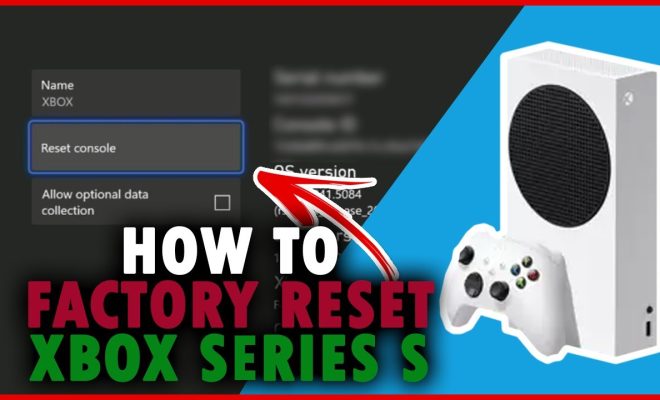
Factory Resetting Your Xbox Series X or Xbox Series S

Step 1: Power On your Console

Turn on your Xbox console by pressing the Power button on the front of the device.

Step 2: Go to Settings

Press the Xbox button on your controller to access the Guide and then click the ‘Profile & System’ tab (icon with your gamer picture).

From there, select ‘Settings.’

Step 3: Navigate to System

Under ‘Settings’, find and select the ‘System’ tab.

Step 4: Choose Console Info

Within the ‘System’ options, look for ‘Console Info’ and click it.

Step 5: Select Reset Console

Once in the ‘Console Info’ window, choose ‘Reset Console.’

Step 6: Choose Reset Option

You will now see two options:

– Reset and keep my games & apps (recommended)

– Reset and remove everything

Select the second option if you want a full factory reset and remove all personal data. If you only want to reset settings while keeping installed content intact, opt for the first option.

The console will then start resetting itself. Please do not turn off the device during this process as it may cause damage or loss of data.

Factory Resetting Your Xbox One

Step 1: Power On your Console

Turn on your Xbox One console by pressing the Power button on the front of the device.

Step 2: Go to Settings

Press the Xbox button on your controller to access the Guide, and then click the ‘Settings’ option (gear icon).

Step 3: Navigate to System

Under ‘Settings’, find and select the ‘System’ tab.

Step 4: Choose Console Info & Updates

Within the ‘System’ options, look for ‘Console Info & Updates’ and click it.

Step 5: Select Reset Console

Once in the ‘Console Info & Updates’ window, choose ‘Reset console.’

Step 6: Choose Reset Option

You will now see two options:

– Reset and keep my games & apps (recommended)

– Reset and remove everything

Select the second option if you want a full factory reset and remove all personal data. If you only want to reset settings while keeping installed content intact, opt for the first option.

The console will then start resetting itself. Please do not turn off the device during this process as it may cause damage or loss of data.

Conclusion

Factory resetting your Xbox Series X, Xbox Series S, or Xbox One is relatively simple. Just follow the steps outlined in this article, and you will have a fresh slate in no time. Remember to always back up your saved game data before performing a factory reset, as it will be permanently deleted in the process. Happy gaming!


Previous Article

How to Factory Reset Your PS5 or ...

Next Article

Here’s how to play your Steam library ...

Matthew Lynch

Related articles More from author

  • Tech Advice

    What Is Luxury Car Insurance?

    August 22, 2023
    By Matthew Lynch
  • Tech Advice

    Why the Type of Solar Panel You Get Matters

    July 8, 2023
    By Matthew Lynch
  • Tech Advice

    12 of the Best Large Language Models

    August 11, 2023
    By Matthew Lynch
  • Tech Advice

    What Do “Dual Core” and “Quad Core” Mean?

    June 23, 2023
    By Matthew Lynch
  • Tech Advice

    TV or Monitor for Gaming: 5 Things You Need to Know

    October 19, 2023
    By Matthew Lynch
  • Tech Advice

    Natural Sugar Alternatives with Health Benefits

    July 7, 2023
    By Matthew Lynch

Search

Login & Registration

  • Register
  • Log in
  • Entries feed
  • Comments feed
  • WordPress.org

Newsletter

Signup for The Tech Edvocate Newsletter and have the latest in EdTech news and opinion delivered to your email address!

About Us

Since technology is not going anywhere and does more good than harm, adapting is the best course of action. That is where The Tech Edvocate comes in. We plan to cover the PreK-12 and Higher Education EdTech sectors and provide our readers with the latest news and opinion on the subject. From time to time, I will invite other voices to weigh in on important issues in EdTech. We hope to provide a well-rounded, multi-faceted look at the past, present, the future of EdTech in the US and internationally.

We started this journey back in June 2016, and we plan to continue it for many more years to come. I hope that you will join us in this discussion of the past, present and future of EdTech and lend your own insight to the issues that are discussed.

Newsletter

Signup for The Tech Edvocate Newsletter and have the latest in EdTech news and opinion delivered to your email address!

Contact Us

The Tech Edvocate
910 Goddin Street
Richmond, VA 23231
(601) 630-5238
[email protected]

Copyright © 2025 Matthew Lynch. All rights reserved.