The Tech Edvocate

Top Menu

  • Advertisement
  • Apps
  • Home Page
  • Home Page Five (No Sidebar)
  • Home Page Four
  • Home Page Three
  • Home Page Two
  • Home Tech2
  • Icons [No Sidebar]
  • Left Sidbear Page
  • Lynch Educational Consulting
  • My Account
  • My Speaking Page
  • Newsletter Sign Up Confirmation
  • Newsletter Unsubscription
  • Our Brands
  • Page Example
  • Privacy Policy
  • Protected Content
  • Register
  • Request a Product Review
  • Shop
  • Shortcodes Examples
  • Signup
  • Start Here
    • Governance
    • Careers
    • Contact Us
  • Terms and Conditions
  • The Edvocate
  • The Tech Edvocate Product Guide
  • Topics
  • Write For Us
  • Advertise

Main Menu

  • Start Here
    • Our Brands
    • Governance
      • Lynch Educational Consulting, LLC.
      • Dr. Lynch’s Personal Website
      • Careers
    • Write For Us
    • The Tech Edvocate Product Guide
    • Contact Us
    • Books
    • Edupedia
    • Post a Job
    • The Edvocate Podcast
    • Terms and Conditions
    • Privacy Policy
  • Topics
    • Assistive Technology
    • Child Development Tech
    • Early Childhood & K-12 EdTech
    • EdTech Futures
    • EdTech News
    • EdTech Policy & Reform
    • EdTech Startups & Businesses
    • Higher Education EdTech
    • Online Learning & eLearning
    • Parent & Family Tech
    • Personalized Learning
    • Product Reviews
  • Advertise
  • Tech Edvocate Awards
  • The Edvocate
  • Pedagogue
  • School Ratings

logo

The Tech Edvocate

  • Start Here
    • Our Brands
    • Governance
      • Lynch Educational Consulting, LLC.
      • Dr. Lynch’s Personal Website
        • My Speaking Page
      • Careers
    • Write For Us
    • The Tech Edvocate Product Guide
    • Contact Us
    • Books
    • Edupedia
    • Post a Job
    • The Edvocate Podcast
    • Terms and Conditions
    • Privacy Policy
  • Topics
    • Assistive Technology
    • Child Development Tech
    • Early Childhood & K-12 EdTech
    • EdTech Futures
    • EdTech News
    • EdTech Policy & Reform
    • EdTech Startups & Businesses
    • Higher Education EdTech
    • Online Learning & eLearning
    • Parent & Family Tech
    • Personalized Learning
    • Product Reviews
  • Advertise
  • Tech Edvocate Awards
  • The Edvocate
  • Pedagogue
  • School Ratings
  • Unbelievable: How SpaceX’s Starship Just Rewrote NASA’s Lunar Playbook

  • Unbelievable: SpaceX Starship Launch Ignites New Era, Defies Expectations

  • The Astonishing Truth: Esports Business Master’s vs Traditional MBA — Which Is a Total Waste?

  • The Shocking Truth About Affordable Online Esports Business Master’s Degrees for 2027

  • The Truth About Esports Master’s: Are These ‘Affordable’ Degrees a Hidden Trap?

  • The Shocking Truth About Denuvo vs. Alternative DRM Solutions

  • Why Millions of Gamers Are Now Rushing to Get the Best VPN for Gaming 2026

  • The Denuvo Lawsuit: Why This Hacker Is Shaking the Gaming World

  • The Silent Battle: Why Billions Are Pouring Into Gaming (and What It Means for Your Money)

  • This Crucial Factor Is Fueling Gaming’s Massive Comeback

Assistive Technology
Home›Assistive Technology›How to Disable Cortana on Windows 10

How to Disable Cortana on Windows 10
By Matthew Lynch
June 6, 2023
0
Spread the love

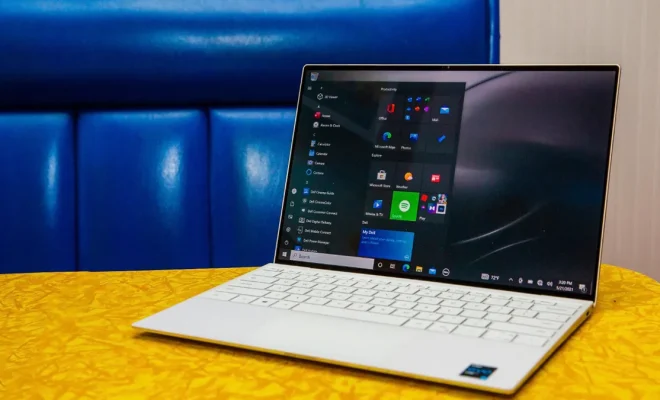
Cortana is a virtual assistant that was first introduced in Windows 10. It is a feature that allows users to interact with their computers using voice commands. While some users find Cortana helpful, others may find it intrusive or annoying. If you fall into the latter category, you may want to disable Cortana on your Windows 10 device. Here’s how to do it.

Step 1: Open the Start menu and type ‘Cortana’.

Step 2: Click on ‘Cortana & Search Settings’ from the search results.

Step 3: On the next screen, toggle the switch to ‘Off’ for ‘Cortana can give you suggestions, ideas, reminders, alerts, and more’.

Step 4: If you want to completely disable Cortana, toggle the switch to ‘Off’ for ‘Cortana can respond to “Hey Cortana”’.

Step 5: If you want to remove Cortana from the taskbar, right-click on the taskbar and select ‘Cortana > Hidden’.

Step 6: Restart your computer to apply the changes.

It’s important to note that disabling Cortana will prevent you from using certain features, such as voice commands and personalization of content based on your search history. However, if you’re concerned about privacy or simply don’t use Cortana, disabling it may be the right choice for you.

In addition to the above steps, there are other methods to disable Cortana on Windows 10. One involves editing the registry, but this can be risky as editing the registry incorrectly can cause serious problems with your computer. Another method involves using third-party apps, but these typically come with their own set of potential risks.

In conclusion, disabling Cortana on Windows 10 is easy and can be done in just a few steps. While it may limit some features, it can also improve privacy and eliminate unnecessary distractions. If you’re considering disabling Cortana, simply follow the steps outlined above and you’ll be on your way to a more personalized Windows 10 experience.    

Previous Article

Apple AirPods Pro 2 vs. Sony WF-1000XM4: ...

Next Article

How to Change Your Homepage on a ...

Matthew Lynch

Related articles More from author

  • Assistive Technology

    How to Create a Free Spotify Account

    June 11, 2023
    By Matthew Lynch
  • Assistive Technology

    What Is USB-C? Will It Replace All Other USB Connectors?

    June 8, 2023
    By Matthew Lynch
  • Assistive Technology

    Ways to Fix It When an iPhone Speaker Is Not Working

    June 6, 2023
    By Matthew Lynch
  • Assistive Technology

    Ways To Secretly Hide Messages In Pictures

    June 23, 2023
    By Matthew Lynch
  • Assistive Technology

    How to Turn Off Parental Controls on Nintendo Switch

    June 15, 2023
    By Matthew Lynch
  • Assistive Technology

    How to Send a New Email With iPhone Mail App

    June 15, 2023
    By Matthew Lynch

Search

Login & Registration

  • Log in
  • Entries feed
  • Comments feed
  • WordPress.org

Newsletter

Signup for The Tech Edvocate Newsletter and have the latest in EdTech news and opinion delivered to your email address!

About Us

Since technology is not going anywhere and does more good than harm, adapting is the best course of action. That is where The Tech Edvocate comes in. We plan to cover the PreK-12 and Higher Education EdTech sectors and provide our readers with the latest news and opinion on the subject. From time to time, I will invite other voices to weigh in on important issues in EdTech. We hope to provide a well-rounded, multi-faceted look at the past, present, the future of EdTech in the US and internationally.

We started this journey back in June 2016, and we plan to continue it for many more years to come. I hope that you will join us in this discussion of the past, present and future of EdTech and lend your own insight to the issues that are discussed.

Newsletter

Signup for The Tech Edvocate Newsletter and have the latest in EdTech news and opinion delivered to your email address!

Contact Us

The Tech Edvocate
910 Goddin Street
Richmond, VA 23231
(601) 630-5238
[email protected]

Copyright © 2026 Matthew Lynch. All rights reserved.