The Tech Edvocate

Top Menu

  • Advertisement
  • Apps
  • Home Page
  • Home Page Five (No Sidebar)
  • Home Page Four
  • Home Page Three
  • Home Page Two
  • Home Tech2
  • Icons [No Sidebar]
  • Left Sidbear Page
  • Lynch Educational Consulting
  • My Account
  • My Speaking Page
  • Newsletter Sign Up Confirmation
  • Newsletter Unsubscription
  • Our Brands
  • Page Example
  • Privacy Policy
  • Protected Content
  • Register
  • Request a Product Review
  • Shop
  • Shortcodes Examples
  • Signup
  • Start Here
    • Governance
    • Careers
    • Contact Us
  • Terms and Conditions
  • The Edvocate
  • The Tech Edvocate Product Guide
  • Topics
  • Write For Us
  • Advertise

Main Menu

  • Start Here
    • Our Brands
    • Governance
      • Lynch Educational Consulting, LLC.
      • Dr. Lynch’s Personal Website
      • Careers
    • Write For Us
    • The Tech Edvocate Product Guide
    • Contact Us
    • Books
    • Edupedia
    • Post a Job
    • The Edvocate Podcast
    • Terms and Conditions
    • Privacy Policy
  • Topics
    • Assistive Technology
    • Child Development Tech
    • Early Childhood & K-12 EdTech
    • EdTech Futures
    • EdTech News
    • EdTech Policy & Reform
    • EdTech Startups & Businesses
    • Higher Education EdTech
    • Online Learning & eLearning
    • Parent & Family Tech
    • Personalized Learning
    • Product Reviews
  • Advertise
  • Tech Edvocate Awards
  • The Edvocate
  • Pedagogue
  • School Ratings

logo

The Tech Edvocate

  • Start Here
    • Our Brands
    • Governance
      • Lynch Educational Consulting, LLC.
      • Dr. Lynch’s Personal Website
        • My Speaking Page
      • Careers
    • Write For Us
    • The Tech Edvocate Product Guide
    • Contact Us
    • Books
    • Edupedia
    • Post a Job
    • The Edvocate Podcast
    • Terms and Conditions
    • Privacy Policy
  • Topics
    • Assistive Technology
    • Child Development Tech
    • Early Childhood & K-12 EdTech
    • EdTech Futures
    • EdTech News
    • EdTech Policy & Reform
    • EdTech Startups & Businesses
    • Higher Education EdTech
    • Online Learning & eLearning
    • Parent & Family Tech
    • Personalized Learning
    • Product Reviews
  • Advertise
  • Tech Edvocate Awards
  • The Edvocate
  • Pedagogue
  • School Ratings
  • Xbox Cuts Deep: Age of Empires Studio’s New Game Vanishes Amid Restructuring

  • The PS5 Accessory You NEED Before GTA 6 Drops (And Why Millions Already Pre-Ordered It)

  • GTA 6: PS5 Pre-Orders Are Crushing Xbox Series X — Here’s Why Everyone’s Choosing PlayStation

  • Why GTA 6 Pre-Orders PS5 Dominate: 7 Unexpected Reasons

  • The AI Revolution in Real Estate: Why 58% of Firms Are Adopting It (and What They’re Missing)

  • Why 58% of Landlords Are Embracing AI Right Now (And You Should Too)

  • 58% of Real Estate Just Went AI: Why No One’s Talking About the Looming Crisis

  • The Game-Changing Secret to Implementing Trusted AI in Your Financial Close

  • The Quiet Revolution: How AI is Reshaping Financial Close Management

  • This Crucial Shift in Trusted AI Will Reshape Finance Forever

Digital & Mobile Technology
Home›Digital & Mobile Technology›How to Close Apps on an Apple Watch

How to Close Apps on an Apple Watch
By Matthew Lynch
June 2, 2023
0
Spread the love

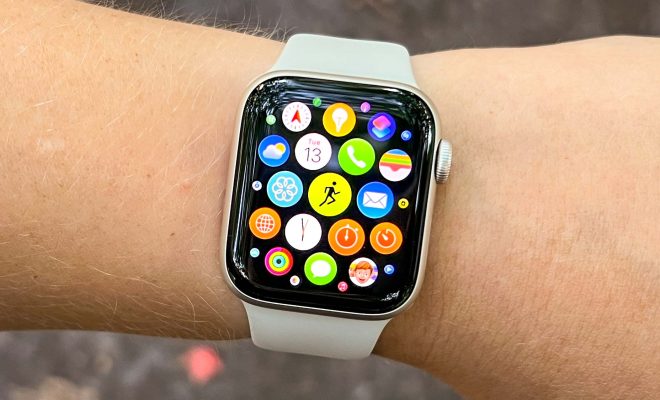
Apple Watch is an amazing wearable device that helps you stay connected to your phone and your world. It has become an essential part of our day-to-day lives, providing us with the convenience of receiving notifications, making calls, checking social media, and much more. However, with so much functionality, it is easy to end up with too many open apps, and it can lead to sluggish performance, battery drain, and even crashes.

So, if you are wondering how to close apps on an Apple Watch, this article is for you. Here are the different ways to do it:

Method 1: Using the Dock

The Dock is a built-in feature in the Apple Watch, which shows your most frequently used apps. You can access it by pressing the side button on your watch, which will display your Dock. The apps in the Dock are already open and running, so the best way to close them is to remove them from the Dock. Here is how you can do it:

1. Press the side button on your Apple Watch to bring up the Dock.
2. Swipe left or right on the app you want to close.
3. When the “Remove” option appears, tap it to remove the app from the Dock and close it.

Method 2: Using the Home Screen

If you don’t have the app in your Dock, you can close it from the Home Screen. Here is how:

1. Press the Digital Crown button to open the Home Screen.
2. Find the app you want to close and swipe up on it.
3. The app will disappear from the screen, indicating that it has been closed.

Method 3: Using the iPhone Watch App

If you have too many apps running that you cannot find on your watch, you can use your iPhone to manage them. Here is how:

1. Open the Watch app on your iPhone.
2. Scroll down to find the app you want to close.
3. When you find it, swipe left on the app, and tap the “X” button to remove it.
4. Alternatively, you can tap on the app and then tap on “Force Quit App” to close it.

Conclusion

Closing apps on your Apple Watch is a simple process that can improve your watch’s performance and battery life. With these different methods, you can easily manage your apps and keep your watch running smoothly. Remember to close apps you are not using to keep your watch running at its best, and only keep those that you use frequently on the Dock.


Previous Article

How to Hide and Unhide Worksheets in ...

Next Article

How to Use Photo Cutout on an ...

Matthew Lynch

Related articles More from author

  • Digital & Mobile Technology

    How to Change (or Reset) Your Hulu Password

    August 3, 2023
    By Matthew Lynch
  • Digital & Mobile Technology

    How to Find Your Windows 10 Computer Name in a Few Clicks

    June 8, 2023
    By Matthew Lynch
  • Digital & Mobile Technology

    How to Remove the Microsoft Office Upload Center From Windows 10

    July 31, 2023
    By Matthew Lynch
  • Digital & Mobile Technology

    Free Time Tracking Apps to Maximize Your Deep Work

    June 12, 2023
    By Matthew Lynch
  • Digital & Mobile Technology

    Best Third-Party YouTube Apps for Mobile You Should Try

    April 10, 2023
    By Matthew Lynch
  • Digital & Mobile Technology

    Types of Raspberry Pi Disk Image You Can Install Today

    June 23, 2023
    By Matthew Lynch

Search

Login & Registration

  • Log in
  • Entries feed
  • Comments feed
  • WordPress.org

Newsletter

Signup for The Tech Edvocate Newsletter and have the latest in EdTech news and opinion delivered to your email address!

About Us

Since technology is not going anywhere and does more good than harm, adapting is the best course of action. That is where The Tech Edvocate comes in. We plan to cover the PreK-12 and Higher Education EdTech sectors and provide our readers with the latest news and opinion on the subject. From time to time, I will invite other voices to weigh in on important issues in EdTech. We hope to provide a well-rounded, multi-faceted look at the past, present, the future of EdTech in the US and internationally.

We started this journey back in June 2016, and we plan to continue it for many more years to come. I hope that you will join us in this discussion of the past, present and future of EdTech and lend your own insight to the issues that are discussed.

Newsletter

Signup for The Tech Edvocate Newsletter and have the latest in EdTech news and opinion delivered to your email address!

Contact Us

The Tech Edvocate
910 Goddin Street
Richmond, VA 23231
(601) 630-5238
[email protected]

Copyright © 2026 Matthew Lynch. All rights reserved.