The Tech Edvocate

Top Menu

  • Advertisement
  • Apps
  • Home Page
  • Home Page Five (No Sidebar)
  • Home Page Four
  • Home Page Three
  • Home Page Two
  • Home Tech2
  • Icons [No Sidebar]
  • Left Sidbear Page
  • Lynch Educational Consulting
  • My Account
  • My Speaking Page
  • Newsletter Sign Up Confirmation
  • Newsletter Unsubscription
  • Our Brands
  • Page Example
  • Privacy Policy
  • Protected Content
  • Register
  • Request a Product Review
  • Shop
  • Shortcodes Examples
  • Signup
  • Start Here
    • Governance
    • Careers
    • Contact Us
  • Terms and Conditions
  • The Edvocate
  • The Tech Edvocate Product Guide
  • Topics
  • Write For Us
  • Advertise

Main Menu

  • Start Here
    • Our Brands
    • Governance
      • Lynch Educational Consulting, LLC.
      • Dr. Lynch’s Personal Website
      • Careers
    • Write For Us
    • The Tech Edvocate Product Guide
    • Contact Us
    • Books
    • Edupedia
    • Post a Job
    • The Edvocate Podcast
    • Terms and Conditions
    • Privacy Policy
  • Topics
    • Assistive Technology
    • Child Development Tech
    • Early Childhood & K-12 EdTech
    • EdTech Futures
    • EdTech News
    • EdTech Policy & Reform
    • EdTech Startups & Businesses
    • Higher Education EdTech
    • Online Learning & eLearning
    • Parent & Family Tech
    • Personalized Learning
    • Product Reviews
  • Advertise
  • Tech Edvocate Awards
  • The Edvocate
  • Pedagogue
  • School Ratings

logo

The Tech Edvocate

  • Start Here
    • Our Brands
    • Governance
      • Lynch Educational Consulting, LLC.
      • Dr. Lynch’s Personal Website
        • My Speaking Page
      • Careers
    • Write For Us
    • The Tech Edvocate Product Guide
    • Contact Us
    • Books
    • Edupedia
    • Post a Job
    • The Edvocate Podcast
    • Terms and Conditions
    • Privacy Policy
  • Topics
    • Assistive Technology
    • Child Development Tech
    • Early Childhood & K-12 EdTech
    • EdTech Futures
    • EdTech News
    • EdTech Policy & Reform
    • EdTech Startups & Businesses
    • Higher Education EdTech
    • Online Learning & eLearning
    • Parent & Family Tech
    • Personalized Learning
    • Product Reviews
  • Advertise
  • Tech Edvocate Awards
  • The Edvocate
  • Pedagogue
  • School Ratings
  • Ramp’s Staggering $60 Billion Valuation: 8 Reasons Why Investors Are Piling In

  • Uncovering the Cost: Why This AI Startup’s Collapse Is a Troubling Sign for Tech

  • The Silent Crisis: Why Your Next Console Will Cost a Fortune

  • Advisers urged to steer clear of ‘hyperscale’ AI models

  • The Quiet Crisis: Is AI in Education Creating an ‘Illusion of Learning’?

  • 84% of Ransomware Attacks Use AI: This Is How Your Own Systems Are Turning Against You

  • The Staggering Truth About Healthcare Cyberattacks: 76.6 Million Records Exposed in 2026

  • This Crucial Deadline For Rogue AI Is Much Closer Than You Think

  • This RNA Breakthrough Could Rewrite Alzheimer’s Treatment

  • This One Thing Is Silently Crushing US Consumer Inflation — And Your Wallet

Digital & Mobile Technology
Home›Digital & Mobile Technology›How to Check the Power Board on a Vizio TV

How to Check the Power Board on a Vizio TV
By Matthew Lynch
May 29, 2023
0
Spread the love

Vizio TV has been recognized as one of the market’s leading television brands. Their innovative technology and offerings have made them a favorite among consumers. However, even the most reliable technology can sometimes encounter some issues. One common problem encountered by Vizio users is a faulty power board. A power board issue can prevent your TV from turning on or cause it to shut down unexpectedly. Fortunately, you don’t have to be a tech expert to learn how to check the power board on your Vizio TV. In this article, we will teach you some simple troubleshooting steps to help you diagnose the problem.

Step 1 – Check the Power Cord

Before digging into more complex troubleshooting, it is important to make sure that your Vizio TV is receiving the proper power supply. Check the power cord that connects your television to an electrical outlet. Ensure that the power cord is not frayed, damaged, or unplugged. Also, check the wall outlet to verify whether it has an electrical current. If both the cord and outlet appear to be in good condition try to use a different power outlet.

Step 2 – Inspect the Power Board

If your power cord is not faulty, move on to inspect your power board. The power board is usually located in the back of your Vizio TV and has an AC inlet or power cord that connects it to your power supply. Check the power board for any signs of physical damage, such as burnt components on the board or swollen capacitors. These are signs that the power board is defective and needs to be replaced. In some cases, it might be easy to identify the burnt parts or damaged capacitors visible, but at other times, you may need to open the case to inspect thoroughly.

Step 3 – Test the Voltage

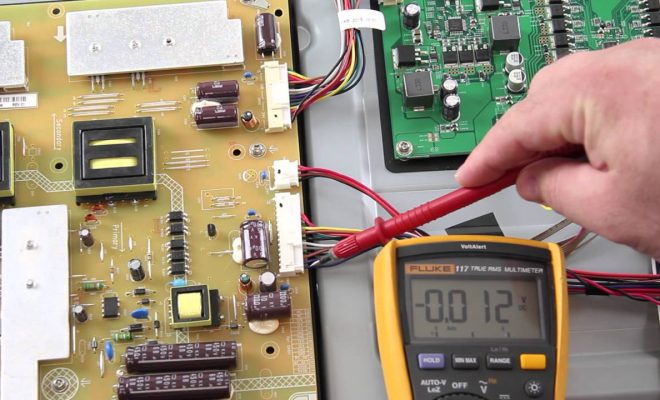
You can also use a digital multimeter to test the voltage on your Vizio TV’s power board. Using the multimeter, place the black or negative probe on any metal part of your television, ensuring that it makes a reliable connection while the red probe should test the 5V, 12V, and 24V voltage rails on the power board. Make sure that each voltage rail reads the correct value. This test will help you to determine whether the board is receiving the correct voltage.

Step 4 – Replace the Power Board

If you conclude that the power board is defective, it’s time to replace it. You can purchase a new power board from a Vizio-authorized dealer or on Vizio’s website. Make sure that the new power board matches your original power board in terms of voltage, part number, and model number. Disconnect the old board and install the new board, carefully following the manufacturer’s instructions.

Conclusion

Checking your Vizio TV power board is a simple process, which can help you identify the cause of any power-related issues. It’s essential to ensure that you perform these tests carefully to avoid any further damage to the TV. If you find it difficult to carry out the power board troubleshooting or are unable to find the problem with your Vizio TV, it is advisable to seek professional assistance from a reputable repair technician or Vizio Customer Service.

Previous Article

How to Check If Ethernet Cable Is ...

Next Article

How to Check the Phone Call History ...

Matthew Lynch

Related articles More from author

  • Digital & Mobile Technology

    The Best Cooling Accessories and Gadgets for the Steam Deck

    June 10, 2023
    By Matthew Lynch
  • Digital & Mobile Technology

    How to Connect Fire Stick to Hotel Wi-Fi

    June 11, 2023
    By Matthew Lynch
  • Digital & Mobile Technology

    What Is Plexamp and Why Do You Need It?

    June 12, 2023
    By Matthew Lynch
  • Digital & Mobile Technology

    Which GPU Should You Choose? Nvidia RTX 3070 vs. RTX 3080

    August 3, 2023
    By Matthew Lynch
  • Digital & Mobile Technology

    Video Game Motion Sickness Causes and Solutions

    June 4, 2023
    By Matthew Lynch
  • Digital & Mobile Technology

    Online Riddle Games to Keep You Glued to Your Computer

    June 5, 2023
    By Matthew Lynch

Search

Login & Registration

  • Log in
  • Entries feed
  • Comments feed
  • WordPress.org

Newsletter

Signup for The Tech Edvocate Newsletter and have the latest in EdTech news and opinion delivered to your email address!

About Us

Since technology is not going anywhere and does more good than harm, adapting is the best course of action. That is where The Tech Edvocate comes in. We plan to cover the PreK-12 and Higher Education EdTech sectors and provide our readers with the latest news and opinion on the subject. From time to time, I will invite other voices to weigh in on important issues in EdTech. We hope to provide a well-rounded, multi-faceted look at the past, present, the future of EdTech in the US and internationally.

We started this journey back in June 2016, and we plan to continue it for many more years to come. I hope that you will join us in this discussion of the past, present and future of EdTech and lend your own insight to the issues that are discussed.

Newsletter

Signup for The Tech Edvocate Newsletter and have the latest in EdTech news and opinion delivered to your email address!

Contact Us

The Tech Edvocate
910 Goddin Street
Richmond, VA 23231
(601) 630-5238
[email protected]

Copyright © 2026 Matthew Lynch. All rights reserved.