The Tech Edvocate

Top Menu

  • Advertisement
  • Apps
  • Home Page
  • Home Page Five (No Sidebar)
  • Home Page Four
  • Home Page Three
  • Home Page Two
  • Home Tech2
  • Icons [No Sidebar]
  • Left Sidbear Page
  • Lynch Educational Consulting
  • My Account
  • My Speaking Page
  • Newsletter Sign Up Confirmation
  • Newsletter Unsubscription
  • Our Brands
  • Page Example
  • Privacy Policy
  • Protected Content
  • Register
  • Request a Product Review
  • Shop
  • Shortcodes Examples
  • Signup
  • Start Here
    • Governance
    • Careers
    • Contact Us
  • Terms and Conditions
  • The Edvocate
  • The Tech Edvocate Product Guide
  • Topics
  • Write For Us
  • Advertise

Main Menu

  • Start Here
    • Our Brands
    • Governance
      • Lynch Educational Consulting, LLC.
      • Dr. Lynch’s Personal Website
      • Careers
    • Write For Us
    • The Tech Edvocate Product Guide
    • Contact Us
    • Books
    • Edupedia
    • Post a Job
    • The Edvocate Podcast
    • Terms and Conditions
    • Privacy Policy
  • Topics
    • Assistive Technology
    • Child Development Tech
    • Early Childhood & K-12 EdTech
    • EdTech Futures
    • EdTech News
    • EdTech Policy & Reform
    • EdTech Startups & Businesses
    • Higher Education EdTech
    • Online Learning & eLearning
    • Parent & Family Tech
    • Personalized Learning
    • Product Reviews
  • Advertise
  • Tech Edvocate Awards
  • The Edvocate
  • Pedagogue
  • School Ratings

logo

The Tech Edvocate

  • Start Here
    • Our Brands
    • Governance
      • Lynch Educational Consulting, LLC.
      • Dr. Lynch’s Personal Website
        • My Speaking Page
      • Careers
    • Write For Us
    • The Tech Edvocate Product Guide
    • Contact Us
    • Books
    • Edupedia
    • Post a Job
    • The Edvocate Podcast
    • Terms and Conditions
    • Privacy Policy
  • Topics
    • Assistive Technology
    • Child Development Tech
    • Early Childhood & K-12 EdTech
    • EdTech Futures
    • EdTech News
    • EdTech Policy & Reform
    • EdTech Startups & Businesses
    • Higher Education EdTech
    • Online Learning & eLearning
    • Parent & Family Tech
    • Personalized Learning
    • Product Reviews
  • Advertise
  • Tech Edvocate Awards
  • The Edvocate
  • Pedagogue
  • School Ratings
  • A Visitor’s Guide to Fresno (CA), United States

  • A Visitors Guide to New Orleans (LA), United States

  • A Visitors Guide to Sacramento (CA), United States

  • A Visitors Guide to Lyon, France

  • JisuLife Ultra2 Portable Fan: A Powerful Multi-Function Cooling Solution

  • A Visitors Guide to Viña del Mar, Chile

  • A Visitors Guide to Århus, Denmark

  • A Visitors Guide to Bakersfield (CA), United States

  • A Visitors Guide to Aurora (CO), United States

  • A Visitor’s Guide to Toledo (OH), United States

Digital & Mobile Technology
Home›Digital & Mobile Technology›How to Change Background on Zoom

How to Change Background on Zoom
By Matthew Lynch
June 12, 2023
0
Spread the love

Zoom has become an extremely popular video conferencing and remote work tool in 2020, and it is not surprising that users are looking to personalize their online meetings. One way to do this is by changing the background on Zoom. If you are wondering how to do it, here is a step-by-step guide:

1. Open your Zoom client and sign in to your account.

2. Click on your profile picture or initials in the top-right corner of the screen.

3. From the menu that appears, select “Settings.”

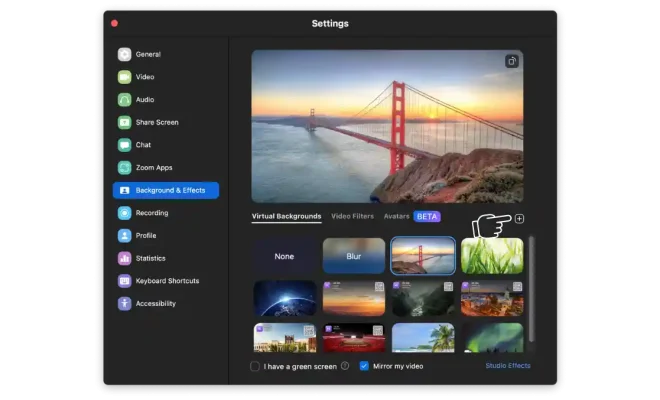
4. In the Settings window, click on the “Virtual Background” tab on the left-hand side.

5. By default, Zoom offers a few background images that you can use. Click on one of them to preview it.

6. If you want to use an image from your computer instead, click on the “+” icon above the default images.

7. Select the image you want to use and click “Open.”

8. The image will appear behind you in the preview window. If it looks good, click on “Save” to apply it as your new background.

9. If you have multiple images that you want to use as your background, repeat steps 6-8 for each of them.

10. To remove a custom background and go back to your real background, click on the “None” option in the virtual background menu.

A few tips to keep in mind:

– Make sure your background image is high-quality and appropriate for the occasion. A fun and funny background might be appropriate for a casual meeting with friends, but it might not be the best choice for a job interview or a professional meeting.
– Avoid using transparent images or videos as your background because they can cause visual glitches.
– If you do not have a green screen, make sure your background is well-lit and evenly colored to avoid issues with the virtual background feature.
– Test your virtual background before your meeting to make sure everything looks good and functions smoothly.

In conclusion, changing your background on Zoom is an easy and quick way to make your online meetings more engaging and fun. With a little creativity, you can personalize your video calls and add a splash of color and personality to your virtual space.


Previous Article

The Best Android Cases of 2023

Next Article

How to Open, Edit, and Convert OPML ...

Matthew Lynch

Related articles More from author

  • Digital & Mobile Technology

    The iPhone XS Max behemoth shown from every angle

    February 3, 2024
    By Matthew Lynch
  • Digital & Mobile Technology

    How to Order an Uber Ride From Google Maps

    June 30, 2023
    By Matthew Lynch
  • Digital & Mobile Technology

    5 Automatic Citation Apps That Make Bibliographies Easier to Write

    August 2, 2023
    By Matthew Lynch
  • Digital & Mobile Technology

    Does Apple Watch Work Without an iPhone?

    June 4, 2023
    By Matthew Lynch
  • Digital & Mobile Technology

    Things Your PC Can Do That Your iPad Can’t

    June 10, 2023
    By Matthew Lynch
  • Digital & Mobile Technology

    The Best Android Apps to Catch Someone Unlocking Your Phone

    June 12, 2023
    By Matthew Lynch

Search

Login & Registration

  • Register
  • Log in
  • Entries feed
  • Comments feed
  • WordPress.org

Newsletter

Signup for The Tech Edvocate Newsletter and have the latest in EdTech news and opinion delivered to your email address!

About Us

Since technology is not going anywhere and does more good than harm, adapting is the best course of action. That is where The Tech Edvocate comes in. We plan to cover the PreK-12 and Higher Education EdTech sectors and provide our readers with the latest news and opinion on the subject. From time to time, I will invite other voices to weigh in on important issues in EdTech. We hope to provide a well-rounded, multi-faceted look at the past, present, the future of EdTech in the US and internationally.

We started this journey back in June 2016, and we plan to continue it for many more years to come. I hope that you will join us in this discussion of the past, present and future of EdTech and lend your own insight to the issues that are discussed.

Newsletter

Signup for The Tech Edvocate Newsletter and have the latest in EdTech news and opinion delivered to your email address!

Contact Us

The Tech Edvocate
910 Goddin Street
Richmond, VA 23231
(601) 630-5238
[email protected]

Copyright © 2025 Matthew Lynch. All rights reserved.