The Tech Edvocate

Top Menu

  • Advertisement
  • Apps
  • Home Page
  • Home Page Five (No Sidebar)
  • Home Page Four
  • Home Page Three
  • Home Page Two
  • Home Tech2
  • Icons [No Sidebar]
  • Left Sidbear Page
  • Lynch Educational Consulting
  • My Account
  • My Speaking Page
  • Newsletter Sign Up Confirmation
  • Newsletter Unsubscription
  • Our Brands
  • Page Example
  • Privacy Policy
  • Protected Content
  • Register
  • Request a Product Review
  • Shop
  • Shortcodes Examples
  • Signup
  • Start Here
    • Governance
    • Careers
    • Contact Us
  • Terms and Conditions
  • The Edvocate
  • The Tech Edvocate Product Guide
  • Topics
  • Write For Us
  • Advertise

Main Menu

  • Start Here
    • Our Brands
    • Governance
      • Lynch Educational Consulting, LLC.
      • Dr. Lynch’s Personal Website
      • Careers
    • Write For Us
    • The Tech Edvocate Product Guide
    • Contact Us
    • Books
    • Edupedia
    • Post a Job
    • The Edvocate Podcast
    • Terms and Conditions
    • Privacy Policy
  • Topics
    • Assistive Technology
    • Child Development Tech
    • Early Childhood & K-12 EdTech
    • EdTech Futures
    • EdTech News
    • EdTech Policy & Reform
    • EdTech Startups & Businesses
    • Higher Education EdTech
    • Online Learning & eLearning
    • Parent & Family Tech
    • Personalized Learning
    • Product Reviews
  • Advertise
  • Tech Edvocate Awards
  • The Edvocate
  • Pedagogue
  • School Ratings

logo

The Tech Edvocate

  • Start Here
    • Our Brands
    • Governance
      • Lynch Educational Consulting, LLC.
      • Dr. Lynch’s Personal Website
        • My Speaking Page
      • Careers
    • Write For Us
    • The Tech Edvocate Product Guide
    • Contact Us
    • Books
    • Edupedia
    • Post a Job
    • The Edvocate Podcast
    • Terms and Conditions
    • Privacy Policy
  • Topics
    • Assistive Technology
    • Child Development Tech
    • Early Childhood & K-12 EdTech
    • EdTech Futures
    • EdTech News
    • EdTech Policy & Reform
    • EdTech Startups & Businesses
    • Higher Education EdTech
    • Online Learning & eLearning
    • Parent & Family Tech
    • Personalized Learning
    • Product Reviews
  • Advertise
  • Tech Edvocate Awards
  • The Edvocate
  • Pedagogue
  • School Ratings
  • Michigan Students Gain Key Insight Through Civic Education Effort

  • The Rise of Day Trips: A New Trend in Travel

  • Navigating AI in Education: Beyond Bans

  • Companies Need a New Playbook to Unlock the Value of AI Agents

  • The New Wave of Soccer Players: Key Habits for Young Athletes

  • BrandPilot AI Expands into European Markets with Performance-Based Advertising

  • The Brutal Truth: Why K-12 Cybersecurity Needs More Than Just Awareness

  • The Unseen Threat: How K-12 Cybersecurity Training Is Quietly Reshaping Education

  • The Staggering Truth: K-12 Cybersecurity Education Is Failing – Here’s How to Fix It

  • Why Millions Are Ditching Degrees For This Career-Boosting Secret

Digital & Mobile Technology
Home›Digital & Mobile Technology›How to Block an Artist on Spotify

How to Block an Artist on Spotify
By Matthew Lynch
June 23, 2023
0
Spread the love

As a Spotify user, the platform provides a personalized listening experience for every individual. Spotify recommends artists, playlists, and songs based on users’ listening habits. However, some users might encounter artists they do not wish to listen to for various reasons. Blocked artists will not appear in the user’s playlists, search results or recommendations. Here’s how to block an artist on Spotify.

Step 1: Open the Spotify App

The first step is to open the Spotify application on your device. You can do this by clicking on the Spotify icon on your home screen if you have installed the app on your smartphone.

Step 2: Search for the Artist

Next, navigate to the artist’s profile you want to block. You can search for the artist by typing their name in the search bar at the top of the screen.

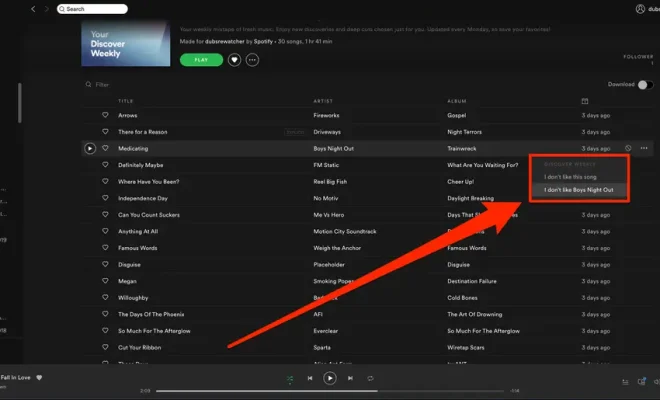
Step 3: Click on the Three Dots

Once you have found the artist’s profile, click on the three dots at the top right corner of the screen. This will open a drop-down menu containing different options, including “Block.”

Step 4: Block the Artist

Clicking on “Block” will prompt you to confirm your action. Once you tap “Yes,” you will have successfully blocked the artist. You will no longer receive any recommendations, playlists, or notifications relating to the blocked artist.

Step 5: Unblock the Artist

If you decide to unblock the artist at any point, simply navigate to the “Settings” section of the app, click on “Blocked Artists,” and find the artist you want to unblock. From there, select “Unblock.”
In conclusion, blocking an artist on Spotify is a straightforward process that can help you tailor your listening experience to your personal preferences. By following these five easy steps, you can take charge of your music library and ensure that every song you hear is one you want to hear.


Previous Article

Wireless Access Point vs. Wireless Application Protocol

Next Article

Freemake Video Converter Review

Matthew Lynch

Related articles More from author

  • Digital & Mobile Technology

    The Best Apps for a Virtual Makeover

    June 12, 2023
    By Matthew Lynch
  • Digital & Mobile Technology

    Locast Alternatives to Watch Local TV Channels

    September 8, 2023
    By Matthew Lynch
  • Digital & Mobile Technology

    Reasons Why You Should Skip the iPhone 14

    June 15, 2023
    By Matthew Lynch
  • Digital & Mobile Technology

    The Best Halloween Live Wallpaper for 2023

    June 4, 2023
    By Matthew Lynch
  • Digital & Mobile Technology

    Reasons Your iPhone Is Slow and How to Fix It

    June 15, 2023
    By Matthew Lynch
  • Digital & Mobile Technology

    What’s the Best Voice Changer for Discord?

    June 9, 2023
    By Matthew Lynch

Search

Login & Registration

  • Log in
  • Entries feed
  • Comments feed
  • WordPress.org

Newsletter

Signup for The Tech Edvocate Newsletter and have the latest in EdTech news and opinion delivered to your email address!

About Us

Since technology is not going anywhere and does more good than harm, adapting is the best course of action. That is where The Tech Edvocate comes in. We plan to cover the PreK-12 and Higher Education EdTech sectors and provide our readers with the latest news and opinion on the subject. From time to time, I will invite other voices to weigh in on important issues in EdTech. We hope to provide a well-rounded, multi-faceted look at the past, present, the future of EdTech in the US and internationally.

We started this journey back in June 2016, and we plan to continue it for many more years to come. I hope that you will join us in this discussion of the past, present and future of EdTech and lend your own insight to the issues that are discussed.

Newsletter

Signup for The Tech Edvocate Newsletter and have the latest in EdTech news and opinion delivered to your email address!

Contact Us

The Tech Edvocate
910 Goddin Street
Richmond, VA 23231
(601) 630-5238
[email protected]

Copyright © 2026 Matthew Lynch. All rights reserved.