How to automate followup emails
“`html
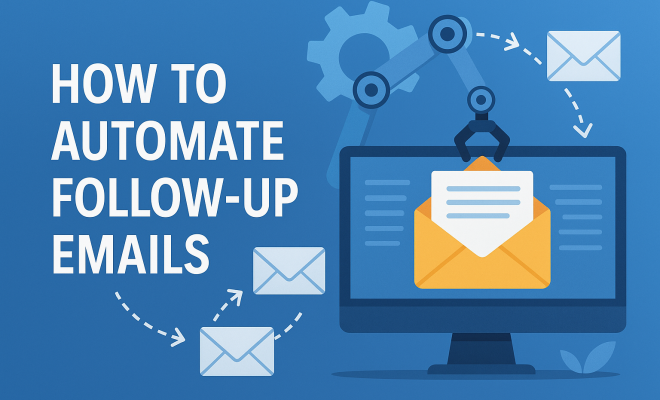
In today’s fast-paced business environment, staying on top of your communications is crucial. One of the most effective ways to ensure you’re maintaining those connections is to automate follow up emails. Whether you’re reaching out to potential clients, following up after meetings, or nurturing leads, automating this process can save you time and enhance your productivity.
1. Understand the Importance of Follow-Up Emails
Follow-up emails are vital for a variety of reasons. According to the HubSpot Marketing Statistics, nearly 80% of sales require at least five follow-ups to close the deal. This indicates that many potential clients might slip away if they’re not nurtured properly through consistent communication. By automating follow-up emails, you ensure that every lead receives the attention they deserve without the risk of forgetting to follow up.
Moreover, follow-up emails help solidify relationships, remind recipients of your services, and provide additional value through helpful content. An automated system allows you to maintain contact without overwhelming your schedule.
2. Choose the Right Tools
To automate follow up emails, you’ll need to select a robust email automation tool. There are various options available, each offering unique features. Some popular choices include:
- Mailchimp – Known for its user-friendly interface and robust analytics.
- ActiveCampaign – Offers advanced segmentation and CRM capabilities.
- HubSpot – Provides an integrated platform with CRM functionality.
- Salesforce – Ideal for larger organizations needing extensive customization.
- FollowUp.cc – A lightweight tool that integrates seamlessly with Gmail.
When choosing a tool, consider factors like your budget, the complexity of your requirements, and whether you need CRM integration. Many tools offer free trials, so take advantage of these to find the best fit for your needs.
3. Segment Your Audience
Segmentation is critical for effective email marketing. It allows you to tailor your messaging based on the audience’s behavior, interests, or demographics. For example, you might want to send different follow-up emails to prospects who opened your initial email versus those who didn’t.
By segmenting your contacts, you can create personalized follow-up sequences that resonate more with each group. This approach not only increases engagement rates but also makes the recipients feel valued, which can lead to enhanced conversion rates. Most email automation tools provide features to segment your audience easily.
4. Craft Compelling Email Content
The content of your follow-up emails is vital to their success. Aim for clarity and brevity — the last thing you want is to overload your readers with information. Start with a personal greeting, remind the recipient of your last interaction, and clearly state your purpose.
Including a call-to-action (CTA) is essential. Whether you want the recipient to schedule a call, reply to your email, or check out a resource, make sure your CTA is clear and actionable. You might say, “Let’s schedule a quick call to discuss your needs further!” This encourages recipients to engage more actively.
5. Set Up a Follow-Up Sequence
A follow-up sequence can effectively guide your leads through the sales funnel. Start with an initial follow-up email shortly after your primary contact. Subsequent emails can be spaced out over days or weeks, depending on the context and urgency. For instance, if you meet a prospect at a networking event, a follow-up email within 24 hours is ideal.
As you create your sequence, think about the progression: each email should serve a specific purpose. Perhaps the first email is a reminder, the second offers additional resources, and the third invites them to an event or a meeting. This structured approach keeps your communications purposeful and engaging.
6. Utilize A/B Testing
A/B testing is a valuable strategy that allows you to refine your email campaigns. By sending two variations of an email to segments of your audience, you can determine which performs better based on open rates, click-through rates, and responses.
For example, you might test different subject lines, email layouts, or CTAs. Data from these tests will guide your future follow-up strategies and help you hone in on what resonates most with your audience. Over time, even minor adjustments can lead to significant improvements in engagement and conversion metrics.
7. Monitor and Adjust Your Strategy
Once you’ve implemented your automated follow-up emails, it’s important to monitor their performance. Most email automation tools provide analytics features that track key metrics like open rates, click rates, and replies. Regularly reviewing these metrics will help you identify what’s working and what isn’t.
Don’t hesitate to adjust your strategy based on what the data tells you. If certain emails aren’t performing well, consider tweaking the content, changing the send times, or refining your audience segments. This ongoing optimization is crucial for maintaining high engagement levels. (See: CDC communication strategies.)
8. Timing Is Everything
Timing can significantly impact the effectiveness of your follow-up emails. Sending emails at optimal times increases the likelihood that they’ll be opened. Research indicates that emails sent on Tuesdays and Thursdays tend to have higher open rates compared to other days. Additionally, consider the time zone of your recipients to ensure emails arrive during business hours.
Automated tools often allow you to schedule emails to be sent at specific times. Use this feature to your advantage, tailoring your send times to when your audience is most likely to engage. Remember, even the best content can fall flat if it lands in an inbox at the wrong time.
9. Personalize Your Communications
Personalization goes beyond just using a recipient’s name in the greeting. It involves tailoring your messages based on the recipient’s previous interactions, preferences, and interests. This level of customization can make your emails feel more genuine and relevant.
For instance, if a lead expressed interest in a specific service during a prior conversation, reference that in your follow-up email. Mention how your service can address their needs. The more personalized your communication, the more likely the recipient will feel valued and understood, leading to a positive response.
10. Stay Compliant With Email Regulations
When automating follow-up emails, it’s crucial to stay compliant with email marketing regulations, such as the CAN-SPAM Act in the United States and GDPR in Europe. These laws dictate how you should handle recipient information, consent, and provide options to unsubscribe from your email lists.
Make sure your emails include a clear and easy way for recipients to opt-out. Not only is this a legal requirement, but it also builds trust and respect with your audience. Being transparent about how you handle their data and respecting their preferences can enhance your brand’s reputation and lead to long-term relationships.
11. Examples of Effective Follow-Up Emails
Crafting an effective follow-up email can depend on the context of your communication. Here are a few examples tailored to different scenarios:
Example 1: After a Networking Event
Subject: Great Meeting You at [Event Name]
Hi [Recipient’s Name],
It was a pleasure meeting you at [Event Name]. I really enjoyed our conversation about [specific topic]. I believe there’s potential for us to collaborate on [specific idea].
Would you be available for a quick call next week to explore this further? Let me know what works for you.
Best,
[Your Name]
Example 2: After a Sales Call
Subject: Following Up on Our Call
Hi [Recipient’s Name],
I appreciate you taking the time to speak with me about [specific topic]. As discussed, I’ve attached [resource or document] that outlines [specific detail].
If you have any questions or need further information, please don’t hesitate to reach out. Looking forward to hearing from you! (See: ScienceDirect article on email communication.)
Best regards,
[Your Name]
Example 3: After Sending a Proposal
Subject: Proposal Follow-Up
Hi [Recipient’s Name],
I hope this message finds you well. I wanted to follow up regarding the proposal I sent over on 2026. Have you had a chance to review it?
If there are any questions or additional details you need, feel free to reach out. I’d love the opportunity to work together.
Thank you,
[Your Name]
12. Statistics on Email Follow-Ups
Understanding the impact of follow-up emails can help convince you and your team to embrace automation. Here are some compelling statistics:
- 65% of salespeople say that a lack of follow-up is the primary reason they lose sales. This emphasizes the need for consistent communication.
- Emails with personalized subject lines are 26% more likely to be opened. Personalization is crucial for engagement.
- According to a study, 49% of salespeople say that their biggest challenge is engaging prospects. Automated follow-up emails can significantly alleviate this burden.
- Automated emails can lead to 119% higher click rates compared to manually sent emails. This statistic highlights the effectiveness of automation.
13. Common Mistakes to Avoid in Follow-Up Emails
Even with the best intentions and plans, it’s easy to make mistakes in your follow-up emails. Here are some common pitfalls to avoid:
- Sending Emails Too Soon: While prompt follow-ups are important, rushing can come off as pushy. Give your recipients some time to absorb the previous interaction.
- Being Vague: Ensure your emails have a clear purpose. Avoid generic content; always aim for specificity.
- Neglecting to Proofread: Typos and grammatical errors can undermine your professionalism. Always review your emails before sending.
- Ignoring Responses: If a recipient responds, ensure you follow up promptly. Ignoring replies can damage relationships.
14. Best Practices for Writing Follow-Up Emails
Here are some best practices to enhance your follow-up email writing:
- Keep It Short: Recipients are more likely to read shorter emails. Aim to convey your message in a few concise paragraphs.
- Use a Clear Subject Line: A subject line should reflect the content of the email and prompt the recipient to open it.
- Be Friendly but Professional: Match the tone of your previous correspondence, but maintain professionalism.
- Include a Call to Action: Encourage your recipient to take a specific action in response to your email.
- Follow-Up at Strategic Intervals: Timing is key. Space out your emails based on your knowledge of your recipient’s schedule and preferences.
15. FAQ about Automating Follow-Up Emails
What are follow-up emails?
Follow-up emails are messages sent after an initial contact or interaction to reinforce communication, provide additional information, or prompt action.
Why should I automate my follow-up emails?
Automating follow-up emails saves time, ensures consistency, and helps maintain contact with leads that may otherwise fall through the cracks.
How often should I send follow-up emails?
The frequency of follow-up emails depends on the context. A general rule is to follow up within 24-48 hours after the initial contact, and then follow up at regular intervals based on the recipient’s responses.
Can I personalize automated follow-up emails?
Yes! Most email automation tools allow for personalization, enabling you to include names, specific interests, and other relevant details to make your emails more engaging.
What metrics should I track for my automated follow-up emails?
Key metrics include open rates, click-through rates, response rates, and unsubscribe rates. These metrics help assess the effectiveness of your campaigns.
Is it legal to send automated follow-up emails?
Yes, as long as you comply with email regulations such as the CAN-SPAM Act or GDPR, which govern how you handle recipient information and offer options to unsubscribe.
16. Advanced Strategies for Automating Follow-Up Emails
Once you’ve grasped the basics of automating follow-up emails, consider these advanced strategies to take your email marketing efforts to the next level:
Implement Trigger-Based Emails
Trigger-based emails are sent automatically based on specific actions taken by the recipient. For example, if someone downloads a resource from your website, you can send an email thanking them and suggesting related content. This timely engagement can keep the interaction relevant and valuable.
Integrate Social Proof
Social proof can enhance the effectiveness of your follow-up emails. Including testimonials or case studies related to your services can help build credibility and encourage recipients to take action. Sharing a success story from a similar client can be particularly persuasive.
Utilize Behavioral Data
Take advantage of behavioral data to refine your follow-up strategy. By analyzing how recipients interact with your emails—whether they clicked links, visited your website, or shared content—you can tailor your follow-ups accordingly. For instance, a recipient who clicked on a product link may benefit from a follow-up that offers a discount or additional information about that product.
17. How to Handle Unresponsive Recipients
It’s common to encounter leads who seem uninterested or unresponsive. Here are some strategies to engage those recipients without seeming intrusive:
Use a Re-Engagement Campaign
A re-engagement campaign targets recipients who haven’t interacted with your emails for a specific period, say three months. This can include special offers, surveys, or simply asking if they’re still interested in your content. Keeping the tone light and respectful is key.
Adjust Frequency and Content
If you notice that a particular segment of your audience isn’t engaging, consider changing the frequency or content of your follow-ups. Sometimes less frequent emails with more valuable content can reignite interest.
Know When to Let Go
Not every lead will turn into a client, and that’s okay. If someone consistently doesn’t engage despite your efforts, it may be time to remove them from your list. This helps maintain list health and can improve your overall email deliverability.
18. Final Thoughts on Automating Follow-Up Emails
Automating follow-up emails is not just a time-saving tactic; it’s a vital part of a comprehensive communication strategy that can lead to increased sales and strengthened relationships. By understanding the nuances of effective follow-ups, utilizing the right tools, and continually refining your approach based on analytics and feedback, you can create a powerful email marketing system that works for you. Remember, each email is an opportunity to connect, engage, and ultimately convert your leads into loyal customers.
19. Resources for Further Reading
If you’re looking to deepen your understanding of email marketing and automation, here are some helpful resources:
- Mailchimp Resources – A variety of articles and guides on email marketing best practices.
- ActiveCampaign Blog – Insights and tips on automation and customer engagement.
- HubSpot Email Marketing – Comprehensive tools and resources for effective email strategy.
- Salesforce Blogs – Articles focused on sales automation and CRM integration.
“`
Trending Now
Frequently Asked Questions
What are the benefits of automating follow-up emails?
Automating follow-up emails saves time and ensures consistent communication with leads. It helps maintain relationships, increases the chances of closing deals, and allows you to provide additional value through helpful content, all while preventing the risk of forgetting to follow up.
Which tools are best for automating follow-up emails?
Some popular tools for automating follow-up emails include Mailchimp, ActiveCampaign, HubSpot, Salesforce, and FollowUp.cc. Each offers unique features, so consider your budget and specific needs when selecting the best fit for your business.
How can I effectively segment my audience for follow-up emails?
Effective audience segmentation involves categorizing your contacts based on criteria such as demographics, behavior, or engagement level. This allows you to tailor your follow-up emails to different groups, enhancing relevance and improving response rates.
How many follow-up emails are typically needed to close a sale?
Research indicates that nearly 80% of sales require at least five follow-up emails to close the deal. This highlights the importance of consistent communication to nurture potential clients and increase conversion rates.
What should I include in a follow-up email?
A follow-up email should include a polite reminder of your previous communication, a summary of key points discussed, any additional value such as resources or offers, and a clear call to action to encourage the recipient to respond or engage further.
What did we miss? Let us know in the comments and join the conversation.