The Tech Edvocate

Top Menu

  • Advertisement
  • Apps
  • Home Page
  • Home Page Five (No Sidebar)
  • Home Page Four
  • Home Page Three
  • Home Page Two
  • Home Tech2
  • Icons [No Sidebar]
  • Left Sidbear Page
  • Lynch Educational Consulting
  • My Account
  • My Speaking Page
  • Newsletter Sign Up Confirmation
  • Newsletter Unsubscription
  • Our Brands
  • Page Example
  • Privacy Policy
  • Protected Content
  • Register
  • Request a Product Review
  • Shop
  • Shortcodes Examples
  • Signup
  • Start Here
    • Governance
    • Careers
    • Contact Us
  • Terms and Conditions
  • The Edvocate
  • The Tech Edvocate Product Guide
  • Topics
  • Write For Us
  • Advertise

Main Menu

  • Start Here
    • Our Brands
    • Governance
      • Lynch Educational Consulting, LLC.
      • Dr. Lynch’s Personal Website
      • Careers
    • Write For Us
    • The Tech Edvocate Product Guide
    • Contact Us
    • Books
    • Edupedia
    • Post a Job
    • The Edvocate Podcast
    • Terms and Conditions
    • Privacy Policy
  • Topics
    • Assistive Technology
    • Child Development Tech
    • Early Childhood & K-12 EdTech
    • EdTech Futures
    • EdTech News
    • EdTech Policy & Reform
    • EdTech Startups & Businesses
    • Higher Education EdTech
    • Online Learning & eLearning
    • Parent & Family Tech
    • Personalized Learning
    • Product Reviews
  • Advertise
  • Tech Edvocate Awards
  • The Edvocate
  • Pedagogue
  • School Ratings

logo

The Tech Edvocate

  • Start Here
    • Our Brands
    • Governance
      • Lynch Educational Consulting, LLC.
      • Dr. Lynch’s Personal Website
        • My Speaking Page
      • Careers
    • Write For Us
    • The Tech Edvocate Product Guide
    • Contact Us
    • Books
    • Edupedia
    • Post a Job
    • The Edvocate Podcast
    • Terms and Conditions
    • Privacy Policy
  • Topics
    • Assistive Technology
    • Child Development Tech
    • Early Childhood & K-12 EdTech
    • EdTech Futures
    • EdTech News
    • EdTech Policy & Reform
    • EdTech Startups & Businesses
    • Higher Education EdTech
    • Online Learning & eLearning
    • Parent & Family Tech
    • Personalized Learning
    • Product Reviews
  • Advertise
  • Tech Edvocate Awards
  • The Edvocate
  • Pedagogue
  • School Ratings
  • JisuLife Ultra2 Portable Fan: A Powerful Multi-Function Cooling Solution

  • A Visitors Guide to Viña del Mar, Chile

  • A Visitors Guide to Århus, Denmark

  • A Visitors Guide to Bakersfield (CA), United States

  • A Visitors Guide to Aurora (CO), United States

  • A Visitor’s Guide to Toledo (OH), United States

  • A Visitors Guide to Cincinnati (OH), United States

  • The MagicEagle Cam 5: Revolutionizing Wildlife Monitoring with Smart 4G Technology

  • A Visitors Guide to Pittsburgh (PA), United States

  • A Visitors Guide to Colorado Springs (CO), United States

Digital & Mobile Technology
Home›Digital & Mobile Technology›How to Add More Games to the SNES Classic

How to Add More Games to the SNES Classic
By Matthew Lynch
June 4, 2023
0
Spread the love

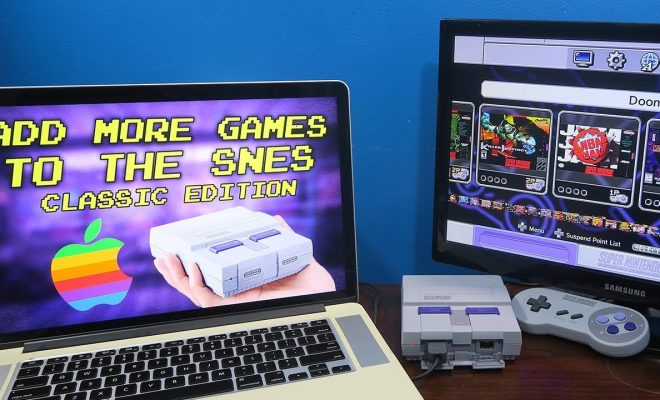
The Super Nintendo Entertainment System (SNES) Classic is the perfect device for gamers who love retro gaming. It’s a miniature version of the classic SNES console, which features 21 built-in games including classics like Super Mario World, The Legend of Zelda: A Link to the Past and Donkey Kong Country. However, if you’re looking for ways to add more games to your SNES Classic, here’s a guide to help you get started.

1. Install Hackchi2:

This is a software tool that allows you to add more games to your SNES Classic. To start, you need to download and install it on your PC. Once you’ve installed Hackchi2, connect your SNES Classic to your computer using the USB cable that came with it.

2. Back up your SNES Classic:

Before you add any new games to your SNES Classic, it’s essential to create a backup of the system’s original files. If anything goes wrong during the modification process, you can always restore your console to its original settings.

3. Add the games to the Hackchi2 library:

Next, you need to add the games you want to install to the Hackchi2 library. To do this, click on the “Add More Games” button in the main Hackchi2 window. This will open a file browser window that you can use to select the ROM files for the games you want to add. Make sure the ROMs are in .sfc, .smc or .zip format.

4. Customize your games:

Once you’ve added your games to the Hackchi2 library, you can customize them by uploading cover art, selecting the number of players and applying other features like cheats and save states.

5. Sync your games:

After customizing your games, click on the “Sync” button in the bottom right of your Hackchi2 window. This will transfer the games to your SNES Classic.

6. Enjoy your new games:

Congratulations! You’ve successfully added new games to your SNES Classic. You can now disconnect it from your computer and enjoy your favorite retro games from the comfort of your couch.

In conclusion, adding games to your SNES Classic is a great way to expand your retro gaming experience. With Hackchi2, you can easily and safely add more games to your device, customizing them to your liking. Follow these steps, and you’ll be able to play your favorite classic games in no time. Happy gaming!


Previous Article

How to Fix It When a Windows ...

Next Article

Using Facebook Emojis and Smileys

Matthew Lynch

Related articles More from author

  • Digital & Mobile Technology

    How to Fix a Windows 10 Kernel Power Error in 5 Easy Steps

    August 5, 2023
    By Matthew Lynch
  • Digital & Mobile Technology

    What Is a Lightning Connector?

    June 1, 2023
    By Matthew Lynch
  • Digital & Mobile Technology

    The Best Gaming Motherboards

    June 6, 2023
    By Matthew Lynch
  • Digital & Mobile Technology

    Why You Should Overclock Your RAM (It’s Easy!)

    May 29, 2023
    By Matthew Lynch
  • Digital & Mobile Technology

    New to Procreate? Here Are Tips to Start Using Layers

    June 23, 2023
    By Matthew Lynch
  • Digital & Mobile Technology

    Best SSH Clients for Mac

    June 22, 2023
    By Matthew Lynch

Search

Login & Registration

  • Register
  • Log in
  • Entries feed
  • Comments feed
  • WordPress.org

Newsletter

Signup for The Tech Edvocate Newsletter and have the latest in EdTech news and opinion delivered to your email address!

About Us

Since technology is not going anywhere and does more good than harm, adapting is the best course of action. That is where The Tech Edvocate comes in. We plan to cover the PreK-12 and Higher Education EdTech sectors and provide our readers with the latest news and opinion on the subject. From time to time, I will invite other voices to weigh in on important issues in EdTech. We hope to provide a well-rounded, multi-faceted look at the past, present, the future of EdTech in the US and internationally.

We started this journey back in June 2016, and we plan to continue it for many more years to come. I hope that you will join us in this discussion of the past, present and future of EdTech and lend your own insight to the issues that are discussed.

Newsletter

Signup for The Tech Edvocate Newsletter and have the latest in EdTech news and opinion delivered to your email address!

Contact Us

The Tech Edvocate
910 Goddin Street
Richmond, VA 23231
(601) 630-5238
[email protected]

Copyright © 2025 Matthew Lynch. All rights reserved.