
The Tech Edvocate

Top Menu

  • Advertisement
  • Apps
  • Home Page
  • Home Page Five (No Sidebar)
  • Home Page Four
  • Home Page Three
  • Home Page Two
  • Home Tech2
  • Icons [No Sidebar]
  • Left Sidbear Page
  • Lynch Educational Consulting
  • My Account
  • My Speaking Page
  • Newsletter Sign Up Confirmation
  • Newsletter Unsubscription
  • Our Brands
  • Page Example
  • Privacy Policy
  • Protected Content
  • Register
  • Request a Product Review
  • Shop
  • Shortcodes Examples
  • Signup
  • Start Here
    • Governance
    • Careers
    • Contact Us
  • Terms and Conditions
  • The Edvocate
  • The Tech Edvocate Product Guide
  • Topics
  • Write For Us
  • Advertise

Main Menu

  • Start Here
    • Our Brands
    • Governance
      • Lynch Educational Consulting, LLC.
      • Dr. Lynch’s Personal Website
      • Careers
    • Write For Us
    • The Tech Edvocate Product Guide
    • Contact Us
    • Books
    • Edupedia
    • Post a Job
    • The Edvocate Podcast
    • Terms and Conditions
    • Privacy Policy
  • Topics
    • Assistive Technology
    • Child Development Tech
    • Early Childhood & K-12 EdTech
    • EdTech Futures
    • EdTech News
    • EdTech Policy & Reform
    • EdTech Startups & Businesses
    • Higher Education EdTech
    • Online Learning & eLearning
    • Parent & Family Tech
    • Personalized Learning
    • Product Reviews
  • Advertise
  • Tech Edvocate Awards
  • The Edvocate
  • Pedagogue
  • School Ratings

logo

The Tech Edvocate

  • Start Here
    • Our Brands
    • Governance
      • Lynch Educational Consulting, LLC.
      • Dr. Lynch’s Personal Website
        • My Speaking Page
      • Careers
    • Write For Us
    • The Tech Edvocate Product Guide
    • Contact Us
    • Books
    • Edupedia
    • Post a Job
    • The Edvocate Podcast
    • Terms and Conditions
    • Privacy Policy
  • Topics
    • Assistive Technology
    • Child Development Tech
    • Early Childhood & K-12 EdTech
    • EdTech Futures
    • EdTech News
    • EdTech Policy & Reform
    • EdTech Startups & Businesses
    • Higher Education EdTech
    • Online Learning & eLearning
    • Parent & Family Tech
    • Personalized Learning
    • Product Reviews
  • Advertise
  • Tech Edvocate Awards
  • The Edvocate
  • Pedagogue
  • School Ratings
  • Ramp’s Staggering $60 Billion Valuation: 8 Reasons Why Investors Are Piling In

  • Uncovering the Cost: Why This AI Startup’s Collapse Is a Troubling Sign for Tech

  • The Silent Crisis: Why Your Next Console Will Cost a Fortune

  • Advisers urged to steer clear of ‘hyperscale’ AI models

  • The Quiet Crisis: Is AI in Education Creating an ‘Illusion of Learning’?

  • 84% of Ransomware Attacks Use AI: This Is How Your Own Systems Are Turning Against You

  • The Staggering Truth About Healthcare Cyberattacks: 76.6 Million Records Exposed in 2026

  • This Crucial Deadline For Rogue AI Is Much Closer Than You Think

  • This RNA Breakthrough Could Rewrite Alzheimer’s Treatment

  • This One Thing Is Silently Crushing US Consumer Inflation — And Your Wallet

How To
Home›How To›How to Activate HBO Go on PC or Mac

How to Activate HBO Go on PC or Mac
By Matthew Lynch
March 22, 2024
0
Spread the love

With the rapid growth of digital streaming platforms, watching your favorite shows and movies has become more accessible than ever before. HBO Go is one such platform that offers a wide range of content, ranging from classics like “Game of Thrones” to the latest blockbuster movies. Accessing HBO Go on your PC or Mac is easy, and this article will guide you through the complete process of activating HBO Go on your device.

Step 1: Check Your Subscription

Before you can activate HBO Go on your PC or Mac, ensure that you have an active subscription that includes access to HBO. This may be through your cable or satellite provider, a streaming service, or even a standalone HBO subscription.

Step 2: Visit the HBO Go Website

Open your preferred web browser on your PC or Mac, and visit the official HBO Go website (https://play.hbogo.com/). Here you can easily access all streaming content available on the platform.

Step 3: Sign In

On the HBO Go website, click “Sign In” located at the top-right corner of the page. You’ll be prompted to select your TV provider from a list. Choose the provider that matches your subscription and proceed with entering your account credentials.

Step 4: Find Activation Code

Once signed in successfully, you’ll be asked for an activation code. Do not close or refresh this page as it may generate a new code and cause issues during activation.

Step 5: Open Another Web Browser Window or Tab

Without closing or refreshing the existing window with the activation code visible, open another web browser window or tab and go to hbogo.com/activate.

Step 6: Enter Activation Code

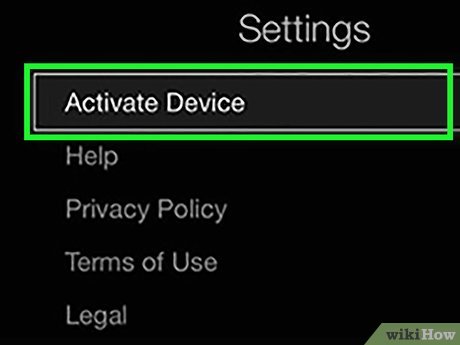
Now, input the activation code displayed in the original window into the text field on hbogo.com/activate and click “Activate Device.” This will link your account with your device and grant you access to HBO Go.

Step 7: Browse Content

With your HBO Go account activated on your PC or Mac, you can now browse and stream exclusive content, including popular TV series, documentaries, movies, and more.

Step 8: Manage Devices (Optional)

To manage the devices connected to your HBO Go account, you can visit the “Settings” menu on the platform and select the “Manage Devices” option. From there, you can view and remove any linked devices as necessary.

By following these simple steps, you’ll be able to activate HBO Go on your PC or Mac and enjoy hours of premium content at your fingertips. Happy streaming!


Previous Article

3 Ways to Add Tradelines to Your ...

Next Article

Do I Have a Crush Quiz

Matthew Lynch

Related articles More from author

  • How To

    5 Ways to Solve a Sudoku

    November 10, 2023
    By Matthew Lynch
  • How To

    How to Sanitize a Toothbrush: 10 Steps

    December 20, 2023
    By Matthew Lynch
  • How To

    3 Ways to Make Crushed Ice

    October 30, 2023
    By Matthew Lynch
  • How To

    How to Set a Victor Rat Trap: 14 Steps

    April 1, 2024
    By Matthew Lynch
  • How To

    How to Dress Like a Baby for Halloween

    October 18, 2023
    By Matthew Lynch
  • How To

    3 Ways to Take MSM for Hair Growth

    October 19, 2023
    By Matthew Lynch

Search

Login & Registration

  • Log in
  • Entries feed
  • Comments feed
  • WordPress.org

Newsletter

Signup for The Tech Edvocate Newsletter and have the latest in EdTech news and opinion delivered to your email address!

About Us

Since technology is not going anywhere and does more good than harm, adapting is the best course of action. That is where The Tech Edvocate comes in. We plan to cover the PreK-12 and Higher Education EdTech sectors and provide our readers with the latest news and opinion on the subject. From time to time, I will invite other voices to weigh in on important issues in EdTech. We hope to provide a well-rounded, multi-faceted look at the past, present, the future of EdTech in the US and internationally.

We started this journey back in June 2016, and we plan to continue it for many more years to come. I hope that you will join us in this discussion of the past, present and future of EdTech and lend your own insight to the issues that are discussed.

Newsletter

Signup for The Tech Edvocate Newsletter and have the latest in EdTech news and opinion delivered to your email address!

Contact Us

The Tech Edvocate
910 Goddin Street
Richmond, VA 23231
(601) 630-5238
[email protected]

Copyright © 2026 Matthew Lynch. All rights reserved.