The Tech Edvocate

Top Menu

  • Advertisement
  • Apps
  • Home Page
  • Home Page Five (No Sidebar)
  • Home Page Four
  • Home Page Three
  • Home Page Two
  • Home Tech2
  • Icons [No Sidebar]
  • Left Sidbear Page
  • Lynch Educational Consulting
  • My Account
  • My Speaking Page
  • Newsletter Sign Up Confirmation
  • Newsletter Unsubscription
  • Our Brands
  • Page Example
  • Privacy Policy
  • Protected Content
  • Register
  • Request a Product Review
  • Shop
  • Shortcodes Examples
  • Signup
  • Start Here
    • Governance
    • Careers
    • Contact Us
  • Terms and Conditions
  • The Edvocate
  • The Tech Edvocate Product Guide
  • Topics
  • Write For Us
  • Advertise

Main Menu

  • Start Here
    • Our Brands
    • Governance
      • Lynch Educational Consulting, LLC.
      • Dr. Lynch’s Personal Website
      • Careers
    • Write For Us
    • The Tech Edvocate Product Guide
    • Contact Us
    • Books
    • Edupedia
    • Post a Job
    • The Edvocate Podcast
    • Terms and Conditions
    • Privacy Policy
  • Topics
    • Assistive Technology
    • Child Development Tech
    • Early Childhood & K-12 EdTech
    • EdTech Futures
    • EdTech News
    • EdTech Policy & Reform
    • EdTech Startups & Businesses
    • Higher Education EdTech
    • Online Learning & eLearning
    • Parent & Family Tech
    • Personalized Learning
    • Product Reviews
  • Advertise
  • Tech Edvocate Awards
  • The Edvocate
  • Pedagogue
  • School Ratings

logo

The Tech Edvocate

  • Start Here
    • Our Brands
    • Governance
      • Lynch Educational Consulting, LLC.
      • Dr. Lynch’s Personal Website
        • My Speaking Page
      • Careers
    • Write For Us
    • The Tech Edvocate Product Guide
    • Contact Us
    • Books
    • Edupedia
    • Post a Job
    • The Edvocate Podcast
    • Terms and Conditions
    • Privacy Policy
  • Topics
    • Assistive Technology
    • Child Development Tech
    • Early Childhood & K-12 EdTech
    • EdTech Futures
    • EdTech News
    • EdTech Policy & Reform
    • EdTech Startups & Businesses
    • Higher Education EdTech
    • Online Learning & eLearning
    • Parent & Family Tech
    • Personalized Learning
    • Product Reviews
  • Advertise
  • Tech Edvocate Awards
  • The Edvocate
  • Pedagogue
  • School Ratings
  • Čím sa líšia televízne herné formáty od tradičných živých stolov

  • The Astonishing Truth: Why Micro-Credentials Are Crushing Traditional Degrees in Today’s Job Hunt

  • This One Skill Boosts Graduate Salaries By 94% — And Most Grads Don’t Have It

  • Rozdiel medzi okamžitou výhrou a videomatom v hernom rozhraní

  • Why 94% of Employers Are Paying More for This One Qualification

  • The Brutal Truth: 10 Minutes With AI Could Destroy Your Persistence

  • This One AI Study Could Shatter Everything We Thought We Knew About Learning

  • The Brutal Truth: 10 Minutes With AI Can Cripple Your Persistence

  • Phia vs. Other Shopping Apps: A Comparison of Affiliate Practices

  • The Billionaire’s Daughter, a Scandal, and the Bombshell That Shook Affiliate Marketing Ethics

Digital & Mobile Technology
Home›Digital & Mobile Technology›How to Access the Application Data Folder

How to Access the Application Data Folder
By Matthew Lynch
May 17, 2023
0
Spread the love

As you use different applications on your computer, you may find it necessary to access the application data folder. This folder contains important information that is used by various programs to store user preferences, configuration settings, cached data, and other essential files.

In this article, we’ll discuss how you can access the application data folder on your Windows computer.

What is the Application Data Folder?

The Application Data folder is a directory on your computer’s hard drive that stores data used by different software applications. This folder can be used by both the operating system and the installed applications. It includes the data aspects of the entire program from user settings to temporary files, making it an essential component of most applications.

Where is the Application Data Folder Located on Your Computer?

Typically, the location of the application data folder varies depending on your Windows version. The folder location was previously different in Windows Vista and Windows XP, although Microsoft has standardised the location for Windows 7, 8, and 10 as follows;

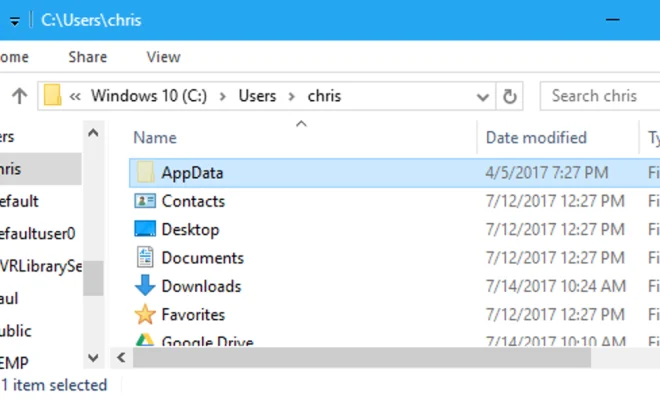
%appdata%, which is the standard location for storing user-specific data. The folder is located in the user profile and has the following path: C:\Users\[Username]\AppData\Roaming

%localappdata%, which is where an application stores non-roaming data for a user. This folder is also located in the user profile and has the following path: C:\Users\[Username]\AppData\Local

How to Access the Application Data Folder on Windows:

Accessing your application data folder on your computer may require some set of tasks depending on your Windows version. To access the application data folder for the first time, you may need to enable the “Show hidden files and folders” option on Windows Explorer. Here’s a detailed guide on how to do it;

Windows 7 and 10:
1. First, click on the Start button or Windows icon located in the lower-left corner of your screen.

2. Search for “Folder Options” and select it from the results.

3. In the Folder Options window, click on the “View” tab.

4. Scroll down to the “Hidden files and folders” section and select “Show hidden files, folders, and drives”.

5. Click on “Apply” and then click on “OK” to close the window.

6. You can now access the Application Data folder by opening Windows Explorer and typing %appdata% or %localappdata% into the address bar.

Windows 8:

1. Open Windows Explorer by pressing the “Windows key + E” shortcut.

2. Click on the “View” tab at the top of the window.

3. Check the box labelled “Hidden items” in the “Show/hide” section.

4. You can now access the Application Data folder by opening the “C:” drive on your system and navigating to the folder path mentioned above.

Conclusion

The application data folder is an important storage location for application software to store their vital data. Accessing the folder in Windows may require enabling hidden files and folders, and going through its respective folder path. By applying this straightforward guide mentioned above, you can navigate and open the application data folder with ease on your computer


Previous Article

How to Access Microsoft Exchange in Linux

Next Article

How to Access the Clipboard on Your ...

Matthew Lynch

Related articles More from author

  • Digital & Mobile Technology

    Websites to Help You Keep Up With Fashion Trends

    June 23, 2023
    By Matthew Lynch
  • Digital & Mobile Technology

    The Pros and Cons of Getting a Keyboard Cover for Your MacBook

    June 14, 2023
    By Matthew Lynch
  • Digital & Mobile Technology

    How Digital Learning Is Moving Classes Out Of The Classroom

    November 9, 2021
    By Matthew Lynch
  • Digital & Mobile Technology

    Will a Car Power Inverter Drain the Battery?

    July 4, 2023
    By Matthew Lynch
  • Digital & Mobile Technology

    How to Watch Movies on iPhone

    June 4, 2023
    By Matthew Lynch
  • Digital & Mobile Technology

    Everything You Need to Know About the Twofish Encryption Algorithm

    June 23, 2023
    By Matthew Lynch

Search

Login & Registration

  • Log in
  • Entries feed
  • Comments feed
  • WordPress.org

Newsletter

Signup for The Tech Edvocate Newsletter and have the latest in EdTech news and opinion delivered to your email address!

About Us

Since technology is not going anywhere and does more good than harm, adapting is the best course of action. That is where The Tech Edvocate comes in. We plan to cover the PreK-12 and Higher Education EdTech sectors and provide our readers with the latest news and opinion on the subject. From time to time, I will invite other voices to weigh in on important issues in EdTech. We hope to provide a well-rounded, multi-faceted look at the past, present, the future of EdTech in the US and internationally.

We started this journey back in June 2016, and we plan to continue it for many more years to come. I hope that you will join us in this discussion of the past, present and future of EdTech and lend your own insight to the issues that are discussed.

Newsletter

Signup for The Tech Edvocate Newsletter and have the latest in EdTech news and opinion delivered to your email address!

Contact Us

The Tech Edvocate
910 Goddin Street
Richmond, VA 23231
(601) 630-5238
[email protected]

Copyright © 2026 Matthew Lynch. All rights reserved.