The Tech Edvocate

Top Menu

  • Advertisement
  • Apps
  • Home Page
  • Home Page Five (No Sidebar)
  • Home Page Four
  • Home Page Three
  • Home Page Two
  • Home Tech2
  • Icons [No Sidebar]
  • Left Sidbear Page
  • Lynch Educational Consulting
  • My Account
  • My Speaking Page
  • Newsletter Sign Up Confirmation
  • Newsletter Unsubscription
  • Our Brands
  • Page Example
  • Privacy Policy
  • Protected Content
  • Register
  • Request a Product Review
  • Shop
  • Shortcodes Examples
  • Signup
  • Start Here
    • Governance
    • Careers
    • Contact Us
  • Terms and Conditions
  • The Edvocate
  • The Tech Edvocate Product Guide
  • Topics
  • Write For Us
  • Advertise

Main Menu

  • Start Here
    • Our Brands
    • Governance
      • Lynch Educational Consulting, LLC.
      • Dr. Lynch’s Personal Website
      • Careers
    • Write For Us
    • The Tech Edvocate Product Guide
    • Contact Us
    • Books
    • Edupedia
    • Post a Job
    • The Edvocate Podcast
    • Terms and Conditions
    • Privacy Policy
  • Topics
    • Assistive Technology
    • Child Development Tech
    • Early Childhood & K-12 EdTech
    • EdTech Futures
    • EdTech News
    • EdTech Policy & Reform
    • EdTech Startups & Businesses
    • Higher Education EdTech
    • Online Learning & eLearning
    • Parent & Family Tech
    • Personalized Learning
    • Product Reviews
  • Advertise
  • Tech Edvocate Awards
  • The Edvocate
  • Pedagogue
  • School Ratings

logo

The Tech Edvocate

  • Start Here
    • Our Brands
    • Governance
      • Lynch Educational Consulting, LLC.
      • Dr. Lynch’s Personal Website
        • My Speaking Page
      • Careers
    • Write For Us
    • The Tech Edvocate Product Guide
    • Contact Us
    • Books
    • Edupedia
    • Post a Job
    • The Edvocate Podcast
    • Terms and Conditions
    • Privacy Policy
  • Topics
    • Assistive Technology
    • Child Development Tech
    • Early Childhood & K-12 EdTech
    • EdTech Futures
    • EdTech News
    • EdTech Policy & Reform
    • EdTech Startups & Businesses
    • Higher Education EdTech
    • Online Learning & eLearning
    • Parent & Family Tech
    • Personalized Learning
    • Product Reviews
  • Advertise
  • Tech Edvocate Awards
  • The Edvocate
  • Pedagogue
  • School Ratings
  • 100 Best Resource Management Apps

  • The Startling Truth About Viral Weight Loss Drugs You Need to Know

  • 57% Failure Rate: The Unsettling Truth About AI Financial Advice You Need to Know

  • AI’s Quiet Takeover: 179,542 Tech Layoffs 2023 Signal a Troubling Future

  • The Billion-Dollar Race: Why U.S. Tech Giants Are Scrambling for Israeli Startups

  • The Secret Way Activision Blizzard May Be Exploiting Kids for Millions

  • This One AI Change Could Cost You Thousands in Medical Bills

  • The Billion-Dollar AI Learning Boom: Why Experts Are Sounding the Alarm

  • Your Student Loans Just Got a Massive Overhaul — Here’s What It Means For Your Future

  • Identity Theft Nightmare: Johnson Investment Counsel Data Breach Exposes SSNs

Assistive Technology
Home›Assistive Technology›How Many Devices Can Connect to One Wireless Router?

How Many Devices Can Connect to One Wireless Router?
By Matthew Lynch
June 10, 2023
0
Spread the love

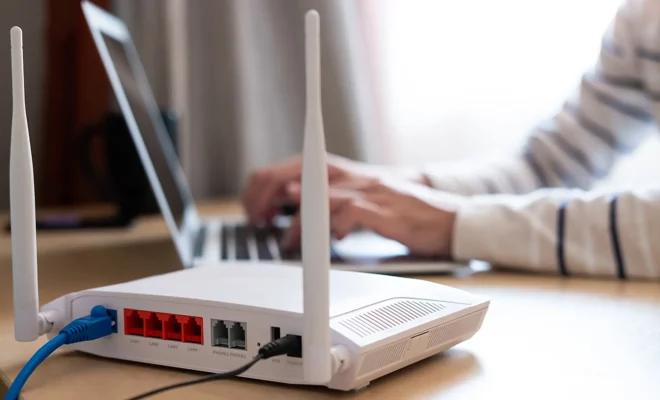
We are becoming increasingly reliant on technology and, as a result, we have more gadgets and devices to connect to the internet. In a typical household, there are smartphones, laptops, tablets, smart TVs, and gaming consoles, all vying for bandwidth of one wireless router. But how many devices can connect to one wireless router?

The number of devices that can connect to a router depends on various factors, including the router’s specifications, the network protocol being used, the frequency band, and the speed of the connection.

One of the essential things to check is the router’s maximum number of supported clients. Generally, modern routers can handle up to 250 devices at once, but it may vary depending on the router’s brand, model, and firmware. The device limit can also decrease or increase depending on the type of connections, bandwidth usage, and network activity.

Another essential factor is the Wi-Fi standard that the router follows. The most common Wi-Fi standards are 802.11n, 802.11 ac, and 802.11ax (Wi-Fi 6). Older Wi-Fi standards, including 802.11a or 802.11b, have much lower device limits and are not suitable for connecting multiple devices simultaneously.

The frequency band is also a critical factor. Most routers support the 2.4GHz and 5GHz bands, two distinct frequency ranges that allow more devices to connect to the router simultaneously. The 2.4GHz band is much slower, but it can cover more ground, whereas the 5GHz band offers faster speeds but has a limited range.

The type of devices connected also comes into play. For instance, streaming devices like Apple TV, Amazon Fire TV, and Chromecast require more bandwidth than a single laptop or smartphone. In contrast, smart home devices like light bulbs, door locks, and thermostats have minimal bandwidth requirements.

Additionally, network activity also affects the number of devices that can connect to a wireless router. If many devices are streaming, gaming, downloading, or uploading data, it can put a strain on the wireless connection, leading to lower data transfer rates and connection drops.

In conclusion, the number of devices that can connect to a wireless router depends on various factors. In most cases, modern routers can handle up to 250 devices, but the actual number can vary depending on the router’s brand, model, firmware, network activity, bandwidth usage, and Wi-Fi standard. It is essential to check the router’s specifications before buying one and consider upgrading to a better model if the current one can no longer keep up with the growing number of devices in your household. 

Previous Article

How to Use Android’s Storage Manager

Next Article

Traveling Overseas? Get AT&T’s International Plan

Matthew Lynch

Related articles More from author

  • Assistive Technology

    How to Back Up All Your Facebook Data: Download Your FB Archive

    June 11, 2023
    By Matthew Lynch
  • Assistive Technology

    How to Find, Install, and Manage Extensions in Chrome, Edge, and Vivaldi

    June 9, 2023
    By Matthew Lynch
  • Assistive Technology

    The 5 Best Ring Lights for Cameras in 2023

    June 9, 2023
    By Matthew Lynch
  • Assistive Technology

    How to Record Audio on an iPad

    June 12, 2023
    By Matthew Lynch
  • Assistive Technology

    CRC Error: What It Is and How to Fix It

    June 8, 2023
    By Matthew Lynch
  • Assistive Technology

    How the Xbox Network on Nintendo Switch Works

    June 14, 2023
    By Matthew Lynch

Search

Login & Registration

  • Log in
  • Entries feed
  • Comments feed
  • WordPress.org

Newsletter

Signup for The Tech Edvocate Newsletter and have the latest in EdTech news and opinion delivered to your email address!

About Us

Since technology is not going anywhere and does more good than harm, adapting is the best course of action. That is where The Tech Edvocate comes in. We plan to cover the PreK-12 and Higher Education EdTech sectors and provide our readers with the latest news and opinion on the subject. From time to time, I will invite other voices to weigh in on important issues in EdTech. We hope to provide a well-rounded, multi-faceted look at the past, present, the future of EdTech in the US and internationally.

We started this journey back in June 2016, and we plan to continue it for many more years to come. I hope that you will join us in this discussion of the past, present and future of EdTech and lend your own insight to the issues that are discussed.

Newsletter

Signup for The Tech Edvocate Newsletter and have the latest in EdTech news and opinion delivered to your email address!

Contact Us

The Tech Edvocate
910 Goddin Street
Richmond, VA 23231
(601) 630-5238
[email protected]

Copyright © 2026 Matthew Lynch. All rights reserved.