The Tech Edvocate

Top Menu

  • Advertisement
  • Apps
  • Home Page
  • Home Page Five (No Sidebar)
  • Home Page Four
  • Home Page Three
  • Home Page Two
  • Home Tech2
  • Icons [No Sidebar]
  • Left Sidbear Page
  • Lynch Educational Consulting
  • My Account
  • My Speaking Page
  • Newsletter Sign Up Confirmation
  • Newsletter Unsubscription
  • Our Brands
  • Page Example
  • Privacy Policy
  • Protected Content
  • Register
  • Request a Product Review
  • Shop
  • Shortcodes Examples
  • Signup
  • Start Here
    • Governance
    • Careers
    • Contact Us
  • Terms and Conditions
  • The Edvocate
  • The Tech Edvocate Product Guide
  • Topics
  • Write For Us
  • Advertise

Main Menu

  • Start Here
    • Our Brands
    • Governance
      • Lynch Educational Consulting, LLC.
      • Dr. Lynch’s Personal Website
      • Careers
    • Write For Us
    • The Tech Edvocate Product Guide
    • Contact Us
    • Books
    • Edupedia
    • Post a Job
    • The Edvocate Podcast
    • Terms and Conditions
    • Privacy Policy
  • Topics
    • Assistive Technology
    • Child Development Tech
    • Early Childhood & K-12 EdTech
    • EdTech Futures
    • EdTech News
    • EdTech Policy & Reform
    • EdTech Startups & Businesses
    • Higher Education EdTech
    • Online Learning & eLearning
    • Parent & Family Tech
    • Personalized Learning
    • Product Reviews
  • Advertise
  • Tech Edvocate Awards
  • The Edvocate
  • Pedagogue
  • School Ratings

logo

The Tech Edvocate

  • Start Here
    • Our Brands
    • Governance
      • Lynch Educational Consulting, LLC.
      • Dr. Lynch’s Personal Website
        • My Speaking Page
      • Careers
    • Write For Us
    • The Tech Edvocate Product Guide
    • Contact Us
    • Books
    • Edupedia
    • Post a Job
    • The Edvocate Podcast
    • Terms and Conditions
    • Privacy Policy
  • Topics
    • Assistive Technology
    • Child Development Tech
    • Early Childhood & K-12 EdTech
    • EdTech Futures
    • EdTech News
    • EdTech Policy & Reform
    • EdTech Startups & Businesses
    • Higher Education EdTech
    • Online Learning & eLearning
    • Parent & Family Tech
    • Personalized Learning
    • Product Reviews
  • Advertise
  • Tech Edvocate Awards
  • The Edvocate
  • Pedagogue
  • School Ratings
  • Viaim Opennote Review: The AI Note-Taker That Disappears Into Your Daily Routine

  • A Visitors Guide to Long Beach (CA), United States

  • A Visitor’s Guide to Fresno (CA), United States

  • A Visitors Guide to New Orleans (LA), United States

  • A Visitors Guide to Sacramento (CA), United States

  • A Visitors Guide to Lyon, France

  • JisuLife Ultra2 Portable Fan: A Powerful Multi-Function Cooling Solution

  • A Visitors Guide to Viña del Mar, Chile

  • A Visitors Guide to Århus, Denmark

  • A Visitors Guide to Bakersfield (CA), United States

Digital & Mobile Technology
Home›Digital & Mobile Technology›How Does the Linux Kernel Work? The Linux Kernel Anatomy Explained

How Does the Linux Kernel Work? The Linux Kernel Anatomy Explained
By Matthew Lynch
June 14, 2023
0
Spread the love

The Linux kernel is the core component of the Linux operating system, responsible for managing hardware resources and providing a foundation for the software stack that runs on top of it. It is also open source, meaning anyone can view and modify its source code. In this article, we’ll explore the anatomy of the Linux kernel, how it is organized, and how it works.

Architecture

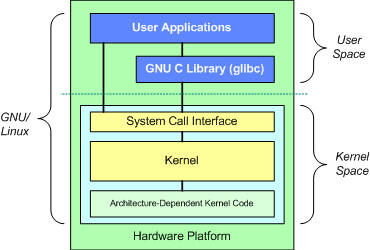
At its core, the Linux kernel is a monolithic, Unix-like operating system. The kernel is responsible for managing system resources, including memory, processors, input/output devices, and network interfaces. The kernel interacts closely with the hardware by providing hardware abstraction, hiding much of the complexity of directly interacting with the hardware from user space.

The kernel is divided into various subsystems, each responsible for a particular aspect of the system. These subsystems include the process scheduler, memory management, network stack, file system, device drivers, and security module.

Process Scheduler

The process scheduler is responsible for managing the execution of tasks on the system. It manages a queue of tasks and decides which tasks to run based on their priority, fair share, and other criteria. The process scheduler ensures that each task is given a fair amount of CPU time and prevents any one task from monopolizing the system’s resources.

Memory Management

The memory management subsystem is responsible for managing system RAM, virtual memory, and page swapping. It is responsible for allocating and deallocating memory to processes, ensuring that each process has access to the memory it needs.

Network Stack

The network stack is responsible for managing network interfaces and protocols. It provides a set of abstractions for sending and receiving data over the network, presented to the user as a simple set of network sockets.

File System

The file system subsystem manages the file systems supported by the Linux kernel. It supports many different types of file systems, including ext2, ext3, ext4, btrfs, xfs, and more. The file system subsystem provides an interface for interacting with files, directories and other file system objects.

Device Drivers

The device driver subsystem is responsible for ensuring that the operating system can interact with hardware devices like disk drives, network cards, and printers. Device drivers are responsible for handling interrupts, passing data between user space and hardware, and managing the state of the device.

Security Module

The security module subsystem is responsible for enforcing access control policies and securing system resources. It provides a standardized interface for implementing security policies, allowing administrators to configure fine-grained permissions for users and processes.

Conclusion

The Linux kernel is a complex and powerful piece of software, with a modular architecture design to stay flexible over time. Though it may seem abstract and complicated, understanding the basic anatomy of the kernel is key to both installing and using a Linux system, as well as contributing to the development of the operating system.


Previous Article

Reasons BlackBerry Failed Spectacularly—and Why They Might ...

Next Article

How to Fix Your Scanner When It’s ...

Matthew Lynch

Related articles More from author

  • Digital & Mobile Technology

    How to Fix the Mac Folder With a Question Mark Error

    July 31, 2023
    By Matthew Lynch
  • Digital & Mobile Technology

    How to Install Minecraft on Ubuntu or Any Other Linux Distribution

    April 27, 2023
    By Matthew Lynch
  • Digital & Mobile Technology

    Sites to Search for Images Shared on Twitter

    June 23, 2023
    By Matthew Lynch
  • Digital & Mobile Technology

    How to Install Google Chrome on Windows 11

    June 3, 2023
    By Matthew Lynch
  • Digital & Mobile Technology

    The Best Online Shopping Websites

    May 30, 2023
    By Matthew Lynch
  • Digital & Mobile Technology

    Top Ways to Fix Xbox App Not Opening in Windows 11

    April 14, 2023
    By Matthew Lynch

Search

Login & Registration

  • Register
  • Log in
  • Entries feed
  • Comments feed
  • WordPress.org

Newsletter

Signup for The Tech Edvocate Newsletter and have the latest in EdTech news and opinion delivered to your email address!

About Us

Since technology is not going anywhere and does more good than harm, adapting is the best course of action. That is where The Tech Edvocate comes in. We plan to cover the PreK-12 and Higher Education EdTech sectors and provide our readers with the latest news and opinion on the subject. From time to time, I will invite other voices to weigh in on important issues in EdTech. We hope to provide a well-rounded, multi-faceted look at the past, present, the future of EdTech in the US and internationally.

We started this journey back in June 2016, and we plan to continue it for many more years to come. I hope that you will join us in this discussion of the past, present and future of EdTech and lend your own insight to the issues that are discussed.

Newsletter

Signup for The Tech Edvocate Newsletter and have the latest in EdTech news and opinion delivered to your email address!

Contact Us

The Tech Edvocate
910 Goddin Street
Richmond, VA 23231
(601) 630-5238
[email protected]

Copyright © 2025 Matthew Lynch. All rights reserved.