The Tech Edvocate

Top Menu

  • Advertisement
  • Apps
  • Home Page
  • Home Page Five (No Sidebar)
  • Home Page Four
  • Home Page Three
  • Home Page Two
  • Home Tech2
  • Icons [No Sidebar]
  • Left Sidbear Page
  • Lynch Educational Consulting
  • My Account
  • My Speaking Page
  • Newsletter Sign Up Confirmation
  • Newsletter Unsubscription
  • Our Brands
  • Page Example
  • Privacy Policy
  • Protected Content
  • Register
  • Request a Product Review
  • Shop
  • Shortcodes Examples
  • Signup
  • Start Here
    • Governance
    • Careers
    • Contact Us
  • Terms and Conditions
  • The Edvocate
  • The Tech Edvocate Product Guide
  • Topics
  • Write For Us
  • Advertise

Main Menu

  • Start Here
    • Our Brands
    • Governance
      • Lynch Educational Consulting, LLC.
      • Dr. Lynch’s Personal Website
      • Careers
    • Write For Us
    • The Tech Edvocate Product Guide
    • Contact Us
    • Books
    • Edupedia
    • Post a Job
    • The Edvocate Podcast
    • Terms and Conditions
    • Privacy Policy
  • Topics
    • Assistive Technology
    • Child Development Tech
    • Early Childhood & K-12 EdTech
    • EdTech Futures
    • EdTech News
    • EdTech Policy & Reform
    • EdTech Startups & Businesses
    • Higher Education EdTech
    • Online Learning & eLearning
    • Parent & Family Tech
    • Personalized Learning
    • Product Reviews
  • Advertise
  • Tech Edvocate Awards
  • The Edvocate
  • Pedagogue
  • School Ratings

logo

The Tech Edvocate

  • Start Here
    • Our Brands
    • Governance
      • Lynch Educational Consulting, LLC.
      • Dr. Lynch’s Personal Website
        • My Speaking Page
      • Careers
    • Write For Us
    • The Tech Edvocate Product Guide
    • Contact Us
    • Books
    • Edupedia
    • Post a Job
    • The Edvocate Podcast
    • Terms and Conditions
    • Privacy Policy
  • Topics
    • Assistive Technology
    • Child Development Tech
    • Early Childhood & K-12 EdTech
    • EdTech Futures
    • EdTech News
    • EdTech Policy & Reform
    • EdTech Startups & Businesses
    • Higher Education EdTech
    • Online Learning & eLearning
    • Parent & Family Tech
    • Personalized Learning
    • Product Reviews
  • Advertise
  • Tech Edvocate Awards
  • The Edvocate
  • Pedagogue
  • School Ratings
  • Shocking: Your Smart Ring Knows When You’re Having Sex

  • The SwiftRefi Scandal: 7 Astonishing Truths About Their ‘Zero-Fee’ Refinance

  • The AION 2 Scandal: Why This Korean MMO Controversy Is Boiling Over

  • The Bombshell Truth About Gaming’s Legal Reckoning

  • Staggering: AI’s ALS Breakthrough Comes With a $5 Million Price Tag

  • The Astonishing AI Predicting Housing Trends With 98% Accuracy — Regulators Are Freaking Out

  • Your Kids’ Classrooms Are Changing: Here’s What’s Coming by 2026

  • Jaw-Dropping: Millions Face Triple Tax Bills on Forgiven Student Loans

  • Mind-Blowing: Critical Infrastructure Faces Collapse From This Overlooked Threat

  • Unsettling: AI Agents Just Hacked 7 Major Banks — Here’s What It Means For Your Money

Tech Advice
Home›Tech Advice›Hidden iPhone comic book photo filters: Where to find and how to use them

Hidden iPhone comic book photo filters: Where to find and how to use them
By Matthew Lynch
July 17, 2023
0
Spread the love

Introduction:

The iPhone is known for its high-quality camera and myriad of features that allow users to take stunning pictures. However, many people are unaware of the hidden comic book photo filters that can turn your pictures into amazing works of art. In this article, we’ll reveal where to find these hidden filters and how to use them effectively.

Finding the Hidden Comic Book Filters:

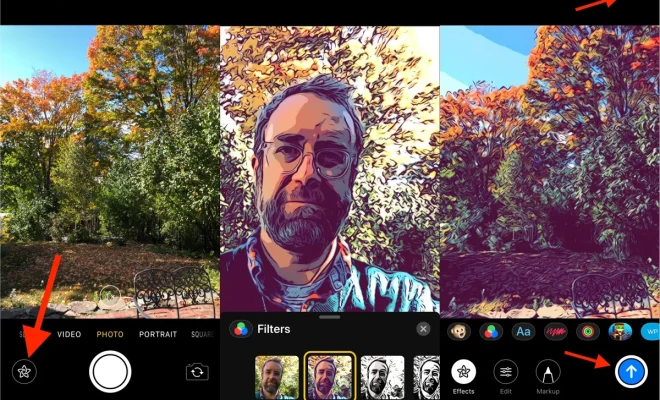
The hidden comic book filters are not located in the main Camera or Photos app, but rather in a lesser-known app called “Clips.” Clips is an Apple-developed app designed for creating short videos with various effects and captions.

To access these comic book filters, follow these steps:

1. Open the Clips app on your iPhone. If you haven’t downloaded it yet, install it from the App Store.

2. Tap on the “+” icon in the Clips main screen to create a new project.

3. In the new project window, you’ll see a live view from your camera.

4. Swipe up on the carousel located just below the camera view. This will reveal an assortment of effects, including several comic book filters.

Using the Comic Book Filters:

Once you’ve accessed the available comic book photo filters, it’s time to start taking some fun pictures that look like they came straight out of a comic.

Here’s how to apply a comic book filter while taking a photo:

1. Swipe left or right on the filter carousel in Clips until you find a desired comic book effect.

2. Frame your shot within the camera viewfinder while keeping an eye on how the effect alters your live image.

3. Make various facial expressions or pose differently until you find a look that perfectly matches your chosen effect.

4. Press and hold down on the circular red record button at the bottom of Clips for about three seconds, capturing an ersatz “photo” using the comic book effect.

5. Release the button, then tap on the small square thumbnail in the bottom-left corner to view your newly-created image.

6. To save the image to your Photos app, tap on the share arrow in the bottom-right corner and select “Save Video.”
Tip: Since you’re taking a photo using a video application, you can edit it afterward using any video editing app that supports frame-by-frame editing.

Conclusion:

While not immediately obvious, Apple’s Clips app houses several exciting comic book filters that can add a touch of creativity to your iPhone photography endeavors. By following our instructions above, you can transform ordinary photos into captivating comic-inspired visuals.


Previous Article

Honor Magic 4 Pro Brings Potent Cameras ...

Next Article

iPhone XS, XR, XS Max: Apple’s three ...

Matthew Lynch

Related articles More from author

  • Tech Advice

    Best Wireless Earbuds of 2023

    July 17, 2023
    By Matthew Lynch
  • Tech Advice

    Best Electric Cars and EVs for 2023

    July 12, 2023
    By Matthew Lynch
  • Tech Advice

    2024 Mazda2 and CX-3 Get New, Larger Infotainment in Japan

    October 3, 2023
    By Matthew Lynch
  • Tech Advice

    4 Best Ways to Use Delta SkyMiles

    October 20, 2023
    By Matthew Lynch
  • Tech Advice

    Sony UBP-X700 review: More 4K HDR Blu-ray goodness for less money

    July 14, 2023
    By Matthew Lynch
  • Tech Advice

    Best iPad Pro Cases: A Comprehensive Guide to Protecting Your Device

    August 11, 2023
    By Matthew Lynch

Search

Login & Registration

  • Log in
  • Entries feed
  • Comments feed
  • WordPress.org

Newsletter

Signup for The Tech Edvocate Newsletter and have the latest in EdTech news and opinion delivered to your email address!

About Us

Since technology is not going anywhere and does more good than harm, adapting is the best course of action. That is where The Tech Edvocate comes in. We plan to cover the PreK-12 and Higher Education EdTech sectors and provide our readers with the latest news and opinion on the subject. From time to time, I will invite other voices to weigh in on important issues in EdTech. We hope to provide a well-rounded, multi-faceted look at the past, present, the future of EdTech in the US and internationally.

We started this journey back in June 2016, and we plan to continue it for many more years to come. I hope that you will join us in this discussion of the past, present and future of EdTech and lend your own insight to the issues that are discussed.

Newsletter

Signup for The Tech Edvocate Newsletter and have the latest in EdTech news and opinion delivered to your email address!

Contact Us

The Tech Edvocate
910 Goddin Street
Richmond, VA 23231
(601) 630-5238
[email protected]

Copyright © 2026 Matthew Lynch. All rights reserved.