The Tech Edvocate

Top Menu

  • Advertisement
  • Apps
  • Home Page
  • Home Page Five (No Sidebar)
  • Home Page Four
  • Home Page Three
  • Home Page Two
  • Home Tech2
  • Icons [No Sidebar]
  • Left Sidbear Page
  • Lynch Educational Consulting
  • My Account
  • My Speaking Page
  • Newsletter Sign Up Confirmation
  • Newsletter Unsubscription
  • Our Brands
  • Page Example
  • Privacy Policy
  • Protected Content
  • Register
  • Request a Product Review
  • Shop
  • Shortcodes Examples
  • Signup
  • Start Here
    • Governance
    • Careers
    • Contact Us
  • Terms and Conditions
  • The Edvocate
  • The Tech Edvocate Product Guide
  • Topics
  • Write For Us
  • Advertise

Main Menu

  • Start Here
    • Our Brands
    • Governance
      • Lynch Educational Consulting, LLC.
      • Dr. Lynch’s Personal Website
      • Careers
    • Write For Us
    • The Tech Edvocate Product Guide
    • Contact Us
    • Books
    • Edupedia
    • Post a Job
    • The Edvocate Podcast
    • Terms and Conditions
    • Privacy Policy
  • Topics
    • Assistive Technology
    • Child Development Tech
    • Early Childhood & K-12 EdTech
    • EdTech Futures
    • EdTech News
    • EdTech Policy & Reform
    • EdTech Startups & Businesses
    • Higher Education EdTech
    • Online Learning & eLearning
    • Parent & Family Tech
    • Personalized Learning
    • Product Reviews
  • Advertise
  • Tech Edvocate Awards
  • The Edvocate
  • Pedagogue
  • School Ratings

logo

The Tech Edvocate

  • Start Here
    • Our Brands
    • Governance
      • Lynch Educational Consulting, LLC.
      • Dr. Lynch’s Personal Website
        • My Speaking Page
      • Careers
    • Write For Us
    • The Tech Edvocate Product Guide
    • Contact Us
    • Books
    • Edupedia
    • Post a Job
    • The Edvocate Podcast
    • Terms and Conditions
    • Privacy Policy
  • Topics
    • Assistive Technology
    • Child Development Tech
    • Early Childhood & K-12 EdTech
    • EdTech Futures
    • EdTech News
    • EdTech Policy & Reform
    • EdTech Startups & Businesses
    • Higher Education EdTech
    • Online Learning & eLearning
    • Parent & Family Tech
    • Personalized Learning
    • Product Reviews
  • Advertise
  • Tech Edvocate Awards
  • The Edvocate
  • Pedagogue
  • School Ratings
  • A Visitors Guide to Long Beach (CA), United States

  • A Visitor’s Guide to Fresno (CA), United States

  • A Visitors Guide to New Orleans (LA), United States

  • A Visitors Guide to Sacramento (CA), United States

  • A Visitors Guide to Lyon, France

  • JisuLife Ultra2 Portable Fan: A Powerful Multi-Function Cooling Solution

  • A Visitors Guide to Viña del Mar, Chile

  • A Visitors Guide to Århus, Denmark

  • A Visitors Guide to Bakersfield (CA), United States

  • A Visitors Guide to Aurora (CO), United States

Tech Advice
Home›Tech Advice›HDMI ARC and eARC: Audio Return Channel for beginners

HDMI ARC and eARC: Audio Return Channel for beginners
By Matthew Lynch
July 16, 2023
0
Spread the love

Understanding the world of audio and video connections can be overwhelming, even more so when you’re encountering terms like HDMI ARC and eARC. Fear not, this article will help beginners understand the basics of HDMI ARC (Audio Return Channel) and eARC (Enhanced Audio Return Channel) and how using them can greatly improve your home theater experience.

What is HDMI ARC?

HDMI (High Definition Multimedia Interface) is a widely used connection standard for connecting various audio-video devices like TVs, DVD players, gaming consoles, etc. However, HDMI cables are not only meant for video, but they also support audio transmission.

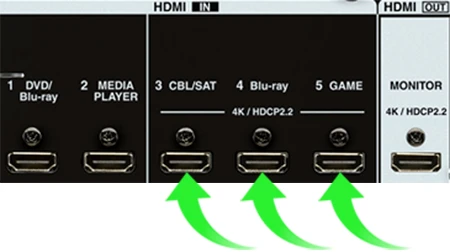
HDMI ARC is a special feature of HDMI designed to simplify the process of connecting an external sound system to your TV. Before ARC came into existence, separate cables were needed for video and audio transmission. With HDMI ARC, however, both video and audio signals can be transmitted through a single HDMI cable.

How does HDMI ARC work?

The primary purpose of HDMI ARC is to send the audio signal from the TV back to an external sound system, such as a soundbar or AV receiver. This way, there is no need for additional cables connecting these devices. For example, if you watch Netflix through your smart TV’s built-in app but want to enjoy the superior audio quality of your surround sound system or soundbar, you can simply use the HDMI ARC connection.

To establish an HDMI ARC connection between your TV and audio system:

1. Check whether your television has an HDMI port with the label “ARC” or “HDMI-ARC.”

2. Connect one end of an HDMI cable to this port.

3. Connect the other end to a similar “ARC” or “HDMI-ARC” labeled port on your external sound system.

4. Check your TV settings to ensure that you have enabled the “Audio Return Channel” feature.

What is eARC (Enhanced Audio Return Channel)?

While HDMI ARC has revolutionized our audio experience, it is not without limitations. HDMI ARC can handle up to 5.1 channel audio, which means it’s not capable of supporting the latest audio formats such as Dolby Atmos and

DTS:X. This is where HDMI eARC comes into play.
eARC is an improvement upon its predecessor, ARC, and offers support for advanced audio codecs like Dolby Atmos,

DTS:X, and uncompressed audio signals like LPCM (Linear Pulse Code Modulation). It provides higher bandwidth up to 37 Mbps and delivers superior audio quality with the convenience of a single HDMI cable.

How to use eARC?

To take advantage of eARC, you need compatible devices – your TV and external sound system must both support the eARC feature. Additionally, you’ll need an HDMI 2.1 cable to enable proper transmission of high-quality audio signals.

To connect your devices using eARC:

1. Make sure both your TV and external sound system support the “eARC” feature.

2. Connect an HDMI 2.1 cable between the “HDMI-eARC” labeled ports on your TV and external sound system.

3. Check your TV settings and enable the “Enhanced Audio Return Channel” feature.

In summary, HDMI ARC and eARC are fantastic solutions for simplifying home theater connections while ensuring excellent audio quality. Whether you require basic or advanced audio capabilities, employing an Audio Return Channel via HDMI can improve your overall viewing experience dramatically.


Previous Article

HDMI 2.0: What you need to know

Next Article

HDMI splitter vs. HDMI switch: They actually ...

Matthew Lynch

Related articles More from author

  • Tech Advice

    What to Do If Your Google TV Remote Is Not Working

    February 19, 2024
    By Matthew Lynch
  • Tech Advice

    Apple Watch 7 review: A slight upgrade compared to last year’s smartwatch

    July 17, 2023
    By Matthew Lynch
  • Tech Advice

    What Is a Contingent Annuitant?

    September 7, 2023
    By Matthew Lynch
  • Tech Advice

    Klipsch Groove Review – This Mini Bluetooth Speaker Packs Some Punch

    July 12, 2023
    By Matthew Lynch
  • Tech Advice

    How to convert DRM-protected WMAs to MP3

    July 16, 2023
    By Matthew Lynch
  • Tech Advice

    The Best Wireless Gaming Mice for 2023

    July 19, 2023
    By Matthew Lynch

Search

Login & Registration

  • Register
  • Log in
  • Entries feed
  • Comments feed
  • WordPress.org

Newsletter

Signup for The Tech Edvocate Newsletter and have the latest in EdTech news and opinion delivered to your email address!

About Us

Since technology is not going anywhere and does more good than harm, adapting is the best course of action. That is where The Tech Edvocate comes in. We plan to cover the PreK-12 and Higher Education EdTech sectors and provide our readers with the latest news and opinion on the subject. From time to time, I will invite other voices to weigh in on important issues in EdTech. We hope to provide a well-rounded, multi-faceted look at the past, present, the future of EdTech in the US and internationally.

We started this journey back in June 2016, and we plan to continue it for many more years to come. I hope that you will join us in this discussion of the past, present and future of EdTech and lend your own insight to the issues that are discussed.

Newsletter

Signup for The Tech Edvocate Newsletter and have the latest in EdTech news and opinion delivered to your email address!

Contact Us

The Tech Edvocate
910 Goddin Street
Richmond, VA 23231
(601) 630-5238
[email protected]

Copyright © 2025 Matthew Lynch. All rights reserved.