The Tech Edvocate

Top Menu

  • Advertisement
  • Apps
  • Home Page
  • Home Page Five (No Sidebar)
  • Home Page Four
  • Home Page Three
  • Home Page Two
  • Home Tech2
  • Icons [No Sidebar]
  • Left Sidbear Page
  • Lynch Educational Consulting
  • My Account
  • My Speaking Page
  • Newsletter Sign Up Confirmation
  • Newsletter Unsubscription
  • Our Brands
  • Page Example
  • Privacy Policy
  • Protected Content
  • Register
  • Request a Product Review
  • Shop
  • Shortcodes Examples
  • Signup
  • Start Here
    • Governance
    • Careers
    • Contact Us
  • Terms and Conditions
  • The Edvocate
  • The Tech Edvocate Product Guide
  • Topics
  • Write For Us
  • Advertise

Main Menu

  • Start Here
    • Our Brands
    • Governance
      • Lynch Educational Consulting, LLC.
      • Dr. Lynch’s Personal Website
      • Careers
    • Write For Us
    • The Tech Edvocate Product Guide
    • Contact Us
    • Books
    • Edupedia
    • Post a Job
    • The Edvocate Podcast
    • Terms and Conditions
    • Privacy Policy
  • Topics
    • Assistive Technology
    • Child Development Tech
    • Early Childhood & K-12 EdTech
    • EdTech Futures
    • EdTech News
    • EdTech Policy & Reform
    • EdTech Startups & Businesses
    • Higher Education EdTech
    • Online Learning & eLearning
    • Parent & Family Tech
    • Personalized Learning
    • Product Reviews
  • Advertise
  • Tech Edvocate Awards
  • The Edvocate
  • Pedagogue
  • School Ratings

logo

The Tech Edvocate

  • Start Here
    • Our Brands
    • Governance
      • Lynch Educational Consulting, LLC.
      • Dr. Lynch’s Personal Website
        • My Speaking Page
      • Careers
    • Write For Us
    • The Tech Edvocate Product Guide
    • Contact Us
    • Books
    • Edupedia
    • Post a Job
    • The Edvocate Podcast
    • Terms and Conditions
    • Privacy Policy
  • Topics
    • Assistive Technology
    • Child Development Tech
    • Early Childhood & K-12 EdTech
    • EdTech Futures
    • EdTech News
    • EdTech Policy & Reform
    • EdTech Startups & Businesses
    • Higher Education EdTech
    • Online Learning & eLearning
    • Parent & Family Tech
    • Personalized Learning
    • Product Reviews
  • Advertise
  • Tech Edvocate Awards
  • The Edvocate
  • Pedagogue
  • School Ratings
  • Navigating the Challenges of Neurodiversity Support in Schools

  • The Best European Cities for Graduates to Live and Work

  • States With the Biggest School Enrollment Drops Revealed

  • Empowering Future Innovators: The Role of STEAM Education in Tribal Communities

  • The Personal Liability of Founders in AI Misrepresentation Cases

  • The Rise of Skilled Trades: A Viable Alternative to Traditional College Degrees

  • The Rise of U.S. Youth Soccer: A New Frontier for Investment

  • The Human Element in Language Learning: A Challenge with Preply

  • What Can Healthcare Engagement Learn From Sports Betting?

  • Addressing the Rise of Fatigue: Expert Insights from Patrice Bonfiglio

Tech Advice
Home›Tech Advice›Google Meet Now Supports Custom Video Call Backgrounds

Google Meet Now Supports Custom Video Call Backgrounds
By Matthew Lynch
July 24, 2023
0
Spread the love

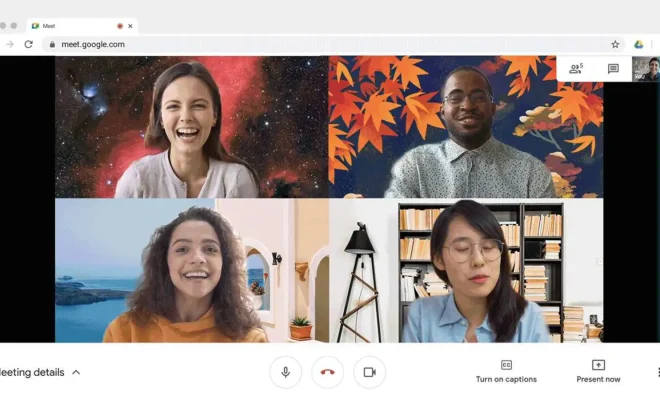
The world is increasingly relying on virtual communication, particularly since the onset of the COVID-19 pandemic. As we continue to navigate the digital landscape, video conferencing platforms must evolve to keep up with our changing needs and preferences. Recently, Google Meet announced an exciting new feature: custom video call backgrounds.

This function grants users greater freedom and creativity when participating in virtual meetings. Whether you’re working from home or attending an online class, you can now customize your visual environment to enhance the experience and keep things engaging.

Why Custom Backgrounds Matter

Over the past year, most people have become familiar with video calls and conducting remote meetings. In doing so, they have realized the importance of presenting a professional appearance on camera. A cluttered or distracting background can compromise the quality of communication during a virtual meeting.

Custom backgrounds can also serve as conversation starters or icebreakers by showcasing your personality, interests, or sense of humor in a creative way. With Google Meet’s new feature, simply select your preferred background image or upload your own to showcase a unique visual atmosphere.

How to Access Custom Backgrounds on Google Meet

To change your video call background on Google Meet, follow these simple steps:

1. Begin by joining a video call or creating a new meeting.

2. Click on the ‘More options’ button (three vertical dots) at the bottom right corner of your screen.

3. Choose ‘Change background’ from the options menu.

4. You will now see a variety of stock images provided by Google that you can use as your background.

5. If you prefer to use a custom image, click on the ‘+’ icon to upload an image from your device.

Note that custom backgrounds are not currently available on mobile devices or with certain older browsers – you must use either Chrome version 84 (or higher) or Firefox for custom backgrounds to function properly.

Conclusion

The addition of custom backgrounds is a welcome feature that allows for increased personalization and engagement during video calls. Whether you’re speaking with colleagues, classmates, or friends, this dynamic tool can help inject creativity and fun into your virtual meetings. So why not explore the possibilities and start crafting your own custom video call backgrounds today?


Previous Article

Lumosity vs. Elevate: Battle of the Brain-Training ...

Next Article

Max Streaming Service Review: A Wealth of ...

Matthew Lynch

Related articles More from author

  • Tech Advice

    How Much Do Gas Tax Holidays Really Save Drivers, Anyway?

    July 11, 2023
    By Matthew Lynch
  • Tech Advice

    Best Cheaper Rivals to Apple AirPods Max for 2023: Sony, Bose, AirPods Pro 2 and More

    July 17, 2023
    By Matthew Lynch
  • Tech Advice

    Kenmore 25132 Review: A Kickass Clothes Washer Hides Behind This Dull Exterior

    July 12, 2023
    By Matthew Lynch
  • Tech Advice

    Nintendo 2DS XL review: Nintendo’s 2DS XL handheld deserves a big hand

    July 12, 2023
    By Matthew Lynch
  • Tech Advice

    Best OTA DVR for Cord Cutting

    July 16, 2023
    By Matthew Lynch
  • Tech Advice

    Dehydrating Foods Without a Dehydrator: Utilizing Your Oven

    July 9, 2023
    By Matthew Lynch

Search

Login & Registration

  • Log in
  • Entries feed
  • Comments feed
  • WordPress.org

Newsletter

Signup for The Tech Edvocate Newsletter and have the latest in EdTech news and opinion delivered to your email address!

About Us

Since technology is not going anywhere and does more good than harm, adapting is the best course of action. That is where The Tech Edvocate comes in. We plan to cover the PreK-12 and Higher Education EdTech sectors and provide our readers with the latest news and opinion on the subject. From time to time, I will invite other voices to weigh in on important issues in EdTech. We hope to provide a well-rounded, multi-faceted look at the past, present, the future of EdTech in the US and internationally.

We started this journey back in June 2016, and we plan to continue it for many more years to come. I hope that you will join us in this discussion of the past, present and future of EdTech and lend your own insight to the issues that are discussed.

Newsletter

Signup for The Tech Edvocate Newsletter and have the latest in EdTech news and opinion delivered to your email address!

Contact Us

The Tech Edvocate
910 Goddin Street
Richmond, VA 23231
(601) 630-5238
[email protected]

Copyright © 2026 Matthew Lynch. All rights reserved.