The Tech Edvocate

Top Menu

  • Advertisement
  • Apps
  • Home Page
  • Home Page Five (No Sidebar)
  • Home Page Four
  • Home Page Three
  • Home Page Two
  • Home Tech2
  • Icons [No Sidebar]
  • Left Sidbear Page
  • Lynch Educational Consulting
  • My Account
  • My Speaking Page
  • Newsletter Sign Up Confirmation
  • Newsletter Unsubscription
  • Our Brands
  • Page Example
  • Privacy Policy
  • Protected Content
  • Register
  • Request a Product Review
  • Shop
  • Shortcodes Examples
  • Signup
  • Start Here
    • Governance
    • Careers
    • Contact Us
  • Terms and Conditions
  • The Edvocate
  • The Tech Edvocate Product Guide
  • Topics
  • Write For Us
  • Advertise

Main Menu

  • Start Here
    • Our Brands
    • Governance
      • Lynch Educational Consulting, LLC.
      • Dr. Lynch’s Personal Website
      • Careers
    • Write For Us
    • The Tech Edvocate Product Guide
    • Contact Us
    • Books
    • Edupedia
    • Post a Job
    • The Edvocate Podcast
    • Terms and Conditions
    • Privacy Policy
  • Topics
    • Assistive Technology
    • Child Development Tech
    • Early Childhood & K-12 EdTech
    • EdTech Futures
    • EdTech News
    • EdTech Policy & Reform
    • EdTech Startups & Businesses
    • Higher Education EdTech
    • Online Learning & eLearning
    • Parent & Family Tech
    • Personalized Learning
    • Product Reviews
  • Advertise
  • Tech Edvocate Awards
  • The Edvocate
  • Pedagogue
  • School Ratings

logo

The Tech Edvocate

  • Start Here
    • Our Brands
    • Governance
      • Lynch Educational Consulting, LLC.
      • Dr. Lynch’s Personal Website
        • My Speaking Page
      • Careers
    • Write For Us
    • The Tech Edvocate Product Guide
    • Contact Us
    • Books
    • Edupedia
    • Post a Job
    • The Edvocate Podcast
    • Terms and Conditions
    • Privacy Policy
  • Topics
    • Assistive Technology
    • Child Development Tech
    • Early Childhood & K-12 EdTech
    • EdTech Futures
    • EdTech News
    • EdTech Policy & Reform
    • EdTech Startups & Businesses
    • Higher Education EdTech
    • Online Learning & eLearning
    • Parent & Family Tech
    • Personalized Learning
    • Product Reviews
  • Advertise
  • Tech Edvocate Awards
  • The Edvocate
  • Pedagogue
  • School Ratings
  • A Visitor’s Guide to Fresno (CA), United States

  • A Visitors Guide to New Orleans (LA), United States

  • A Visitors Guide to Sacramento (CA), United States

  • A Visitors Guide to Lyon, France

  • JisuLife Ultra2 Portable Fan: A Powerful Multi-Function Cooling Solution

  • A Visitors Guide to Viña del Mar, Chile

  • A Visitors Guide to Århus, Denmark

  • A Visitors Guide to Bakersfield (CA), United States

  • A Visitors Guide to Aurora (CO), United States

  • A Visitor’s Guide to Toledo (OH), United States

Digital & Mobile Technology
Home›Digital & Mobile Technology›Fix Physxloader.dll Is Missing or Not Found Errors

Fix Physxloader.dll Is Missing or Not Found Errors
By Matthew Lynch
July 14, 2023
0
Spread the love

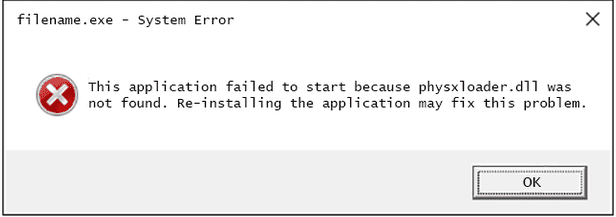
PhysXLoader.dll is a dynamic link library (DLL) file that is associated with the NVIDIA PhysX software and is used in various video games and applications. If you receive an error message that “PhysXLoader.dll is missing” or “PhysXLoader.dll not found” when trying to launch a program, it can be frustrating and prevent you from using the program. Here are some steps you can take to fix the issue:

Reinstall the program:

The first thing you can try is to reinstall the program that is giving you the error message. This is because the DLL file may have been deleted or corrupted during the installation process, causing the error message to appear. Uninstall the program and then download the latest version from the manufacturer’s website and install it again.

Update your drivers:

If reinstalling the program doesn’t work, you can try updating your drivers. PhysXLoader.dll is often associated with NVIDIA graphics cards, so updating your graphics card drivers may help resolve the issue. You can download the latest drivers from the NVIDIA website.

Run a system scan:

It’s possible that your computer has malware or viruses that are causing the error message. Run a full system scan using your antivirus software to check for any malware or viruses on your computer.

Manually install the DLL file:

If the above steps don’t work, you can try manually installing the DLL file. You can download the DLL file from various websites online, but it’s important to be cautious when downloading from third-party sites. Make sure you download the file from a reputable source and scan it for viruses before extracting it and placing it in the correct location on your computer.

Use a DLL fixer tool:

Another option is to use a DLL fixer tool. These tools can scan your computer for missing or corrupted DLL files and automatically replace them with the correct version. However, it’s important to be careful when using these tools and only download them from reputable sources.

In conclusion, if you receive an error message that “PhysXLoader.dll is missing” or “PhysXLoader.dll not found”, there are several steps you can take to fix the issue. Try reinstalling the program, updating your drivers, running a system scan, manually installing the DLL file, or using a DLL fixer tool. With some patience and persistence, you should be able to resolve the issue and get back to using your programs as normal.

Previous Article

How to Get a Free Zoho Mail ...

Next Article

Overview of the NT Loader (NTLDR)

Matthew Lynch

Related articles More from author

  • Digital & Mobile Technology

    Latest Microsoft Office Service Packs

    June 15, 2023
    By Matthew Lynch
  • Digital & Mobile Technology

    Best Samsung Phone

    April 11, 2023
    By Matthew Lynch
  • Digital & Mobile Technology

    21:9 Ultrawide Monitors: How Wide Is Too Wide?

    June 23, 2023
    By Matthew Lynch
  • Digital & Mobile Technology

    Learn How to Create a Yahoo Mail Account

    May 31, 2023
    By Matthew Lynch
  • Digital & Mobile Technology

    iPhone or iPad Won’t Connect to Wi-Fi? Fixes

    September 7, 2023
    By Matthew Lynch
  • Digital & Mobile Technology

    How to Preview Your Website on Different Devices Using Google Chrome

    August 3, 2023
    By Matthew Lynch

Search

Login & Registration

  • Register
  • Log in
  • Entries feed
  • Comments feed
  • WordPress.org

Newsletter

Signup for The Tech Edvocate Newsletter and have the latest in EdTech news and opinion delivered to your email address!

About Us

Since technology is not going anywhere and does more good than harm, adapting is the best course of action. That is where The Tech Edvocate comes in. We plan to cover the PreK-12 and Higher Education EdTech sectors and provide our readers with the latest news and opinion on the subject. From time to time, I will invite other voices to weigh in on important issues in EdTech. We hope to provide a well-rounded, multi-faceted look at the past, present, the future of EdTech in the US and internationally.

We started this journey back in June 2016, and we plan to continue it for many more years to come. I hope that you will join us in this discussion of the past, present and future of EdTech and lend your own insight to the issues that are discussed.

Newsletter

Signup for The Tech Edvocate Newsletter and have the latest in EdTech news and opinion delivered to your email address!

Contact Us

The Tech Edvocate
910 Goddin Street
Richmond, VA 23231
(601) 630-5238
[email protected]

Copyright © 2025 Matthew Lynch. All rights reserved.