The Tech Edvocate

Top Menu

  • Advertisement
  • Apps
  • Home Page
  • Home Page Five (No Sidebar)
  • Home Page Four
  • Home Page Three
  • Home Page Two
  • Home Tech2
  • Icons [No Sidebar]
  • Left Sidbear Page
  • Lynch Educational Consulting
  • My Account
  • My Speaking Page
  • Newsletter Sign Up Confirmation
  • Newsletter Unsubscription
  • Our Brands
  • Page Example
  • Privacy Policy
  • Protected Content
  • Register
  • Request a Product Review
  • Shop
  • Shortcodes Examples
  • Signup
  • Start Here
    • Governance
    • Careers
    • Contact Us
  • Terms and Conditions
  • The Edvocate
  • The Tech Edvocate Product Guide
  • Topics
  • Write For Us
  • Advertise

Main Menu

  • Start Here
    • Our Brands
    • Governance
      • Lynch Educational Consulting, LLC.
      • Dr. Lynch’s Personal Website
      • Careers
    • Write For Us
    • The Tech Edvocate Product Guide
    • Contact Us
    • Books
    • Edupedia
    • Post a Job
    • The Edvocate Podcast
    • Terms and Conditions
    • Privacy Policy
  • Topics
    • Assistive Technology
    • Child Development Tech
    • Early Childhood & K-12 EdTech
    • EdTech Futures
    • EdTech News
    • EdTech Policy & Reform
    • EdTech Startups & Businesses
    • Higher Education EdTech
    • Online Learning & eLearning
    • Parent & Family Tech
    • Personalized Learning
    • Product Reviews
  • Advertise
  • Tech Edvocate Awards
  • The Edvocate
  • Pedagogue
  • School Ratings

logo

The Tech Edvocate

  • Start Here
    • Our Brands
    • Governance
      • Lynch Educational Consulting, LLC.
      • Dr. Lynch’s Personal Website
        • My Speaking Page
      • Careers
    • Write For Us
    • The Tech Edvocate Product Guide
    • Contact Us
    • Books
    • Edupedia
    • Post a Job
    • The Edvocate Podcast
    • Terms and Conditions
    • Privacy Policy
  • Topics
    • Assistive Technology
    • Child Development Tech
    • Early Childhood & K-12 EdTech
    • EdTech Futures
    • EdTech News
    • EdTech Policy & Reform
    • EdTech Startups & Businesses
    • Higher Education EdTech
    • Online Learning & eLearning
    • Parent & Family Tech
    • Personalized Learning
    • Product Reviews
  • Advertise
  • Tech Edvocate Awards
  • The Edvocate
  • Pedagogue
  • School Ratings
  • A Visitor’s Guide to Nashville-Davidson (TN), United States

  • A Visitors Guide to Portland (OR), United States

  • 7 Men’s Bruno Marc Shoes That Are the Perfect Christmas Gift

  • A Visitors Guide to Oklahoma City (OK), United States

  • A Visitor’s Guide to Tucson, Arizona, United States

  • A Visitor’s Guide to Hamilton, Canada

  • Beware of Fiverr: You Might Get Scammed

  • The Future of Artificial Intelligence: Navigating the Next Frontier

  • Best Home Backup Generators for 2026

  • Online Learning Platforms: Transforming Education in the Digital Age

Digital & Mobile Technology
Home›Digital & Mobile Technology›Fitbit Troubleshooting For Six Common Problems

Fitbit Troubleshooting For Six Common Problems
By Matthew Lynch
June 10, 2023
0
Spread the love

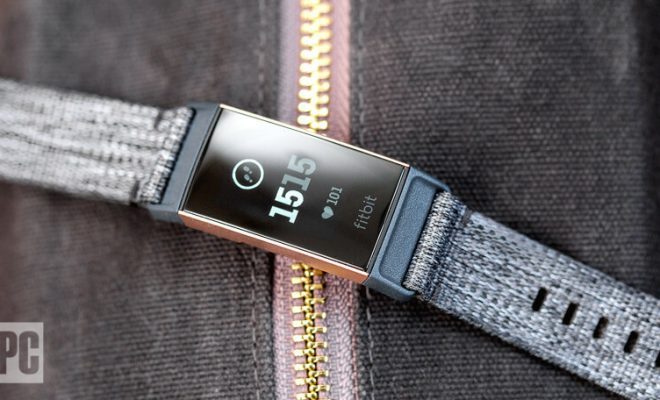
Fitbit is a popular brand that produces wearable devices such as smartwatches and fitness trackers. These devices provide users with essential health and fitness data, making them a must-have for individuals who are conscious about their overall wellness. However, like all devices, Fitbit gadgets can experience problems from time to time. Here’s a list of six common Fitbit problems and how to troubleshoot them:

  1. Syncing problems

One of the most prevalent issues encountered by Fitbit users is syncing. Users may find that their fitness data is not syncing with their smartphone or desktop app, making it impossible for them to track their progress. To troubleshoot this issue, try the following:

– Ensure that the device is within Bluetooth range of the smartphone or desktop.

– Check if the Bluetooth connection is turned on (and not in airplane mode).

– Restart both the phone and Fitbit device.

– Ensure the Fitbit app is up to date.

  1. Charging problems

Another common issue that Fitbit users experience is charging problems. The device may refuse to charge, take too long to charge or fail to hold a charge. Here’s how to troubleshoot this issue:

– Ensure that the charging cable is firmly attached to the Fitbit device.

– Make sure that the charging cable is not damaged or frayed.

– Restart the device while it’s on the charger.

  1. Inaccurate tracking

If your Fitbit device records inaccurate data, it can be frustrating. Inaccurate tracking may occur if the device is not properly worn, or there’s a software issue. Here’s how to troubleshoot the problem:

– Ensure the device is properly strapped onto your wrist.

– Check that the device is on the correct setting (e.g., running, walking or biking).

– Restart the device to clear any software glitches.

  1. Display Issues

A faulty display can make it challenging to read your data, and it’s a standard problem for Fitbit users. To troubleshoot display issues:

– Check whether the device is on the right mode, i.e. power saving mode, night mode, or screen wake.

– Make sure that the device’s sensors are clean.

– Restart the device to clear any software glitches.

  1. Bluetooth issues

If you can’t connect the Fitbit device to your smartphone, it may be due to Bluetooth issues. To troubleshoot Bluetooth issues:

– Make sure that Bluetooth is enabled on both devices.

– Restart both the Fitbit device and the smartphone.

– Try unpairing both devices and then pairing them again.

  1. PIN lockouts

If you’ve created a PIN lock and forgotten it, you may be locked out of your Fitbit device. To troubleshoot this issue:

– Open the Fitbit app on your smartphone and click on the Forgot PIN option.

– Ensure the device battery is adequately charged.

Conclusion

Fitbit devices are reliable and can provide individuals with vital health and fitness data. However, as with any device, they are prone to problems. The above troubleshooting solutions will help you resolve the common issues encountered by Fitbit users. In cases where these solutions don’t work, contact Fitbit customer support for further assistance.


Previous Article

What’s The Difference? LED vs. LCD TVs

Next Article

How to Speed up Video on an ...

Matthew Lynch

Related articles More from author

  • Digital & Mobile Technology

    How to Hide Your TV Wires Without Cutting Into Your Walls

    April 26, 2023
    By Matthew Lynch
  • Digital & Mobile Technology

    How to Use Android 6.0’s Built-in File Manager

    May 30, 2023
    By Matthew Lynch
  • Digital & Mobile Technology

    What is a Smart Grid?

    March 19, 2023
    By Matthew Lynch
  • Digital & Mobile Technology

    The Difference Between Converting HDMI to DisplayPort and DisplayPort to HDMI

    June 6, 2023
    By Matthew Lynch
  • Digital & Mobile Technology

    How to Remove Junk Files From Windows 11

    June 24, 2023
    By Matthew Lynch
  • Digital & Mobile Technology

    Use the Google Sheets MEDIAN Function

    June 30, 2023
    By Matthew Lynch

Search

Login & Registration

  • Register
  • Log in
  • Entries feed
  • Comments feed
  • WordPress.org

Newsletter

Signup for The Tech Edvocate Newsletter and have the latest in EdTech news and opinion delivered to your email address!

About Us

Since technology is not going anywhere and does more good than harm, adapting is the best course of action. That is where The Tech Edvocate comes in. We plan to cover the PreK-12 and Higher Education EdTech sectors and provide our readers with the latest news and opinion on the subject. From time to time, I will invite other voices to weigh in on important issues in EdTech. We hope to provide a well-rounded, multi-faceted look at the past, present, the future of EdTech in the US and internationally.

We started this journey back in June 2016, and we plan to continue it for many more years to come. I hope that you will join us in this discussion of the past, present and future of EdTech and lend your own insight to the issues that are discussed.

Newsletter

Signup for The Tech Edvocate Newsletter and have the latest in EdTech news and opinion delivered to your email address!

Contact Us

The Tech Edvocate
910 Goddin Street
Richmond, VA 23231
(601) 630-5238
[email protected]

Copyright © 2025 Matthew Lynch. All rights reserved.