The Tech Edvocate

Top Menu

  • Advertisement
  • Apps
  • Home Page
  • Home Page Five (No Sidebar)
  • Home Page Four
  • Home Page Three
  • Home Page Two
  • Home Tech2
  • Icons [No Sidebar]
  • Left Sidbear Page
  • Lynch Educational Consulting
  • My Account
  • My Speaking Page
  • Newsletter Sign Up Confirmation
  • Newsletter Unsubscription
  • Our Brands
  • Page Example
  • Privacy Policy
  • Protected Content
  • Register
  • Request a Product Review
  • Shop
  • Shortcodes Examples
  • Signup
  • Start Here
    • Governance
    • Careers
    • Contact Us
  • Terms and Conditions
  • The Edvocate
  • The Tech Edvocate Product Guide
  • Topics
  • Write For Us
  • Advertise

Main Menu

  • Start Here
    • Our Brands
    • Governance
      • Lynch Educational Consulting, LLC.
      • Dr. Lynch’s Personal Website
      • Careers
    • Write For Us
    • The Tech Edvocate Product Guide
    • Contact Us
    • Books
    • Edupedia
    • Post a Job
    • The Edvocate Podcast
    • Terms and Conditions
    • Privacy Policy
  • Topics
    • Assistive Technology
    • Child Development Tech
    • Early Childhood & K-12 EdTech
    • EdTech Futures
    • EdTech News
    • EdTech Policy & Reform
    • EdTech Startups & Businesses
    • Higher Education EdTech
    • Online Learning & eLearning
    • Parent & Family Tech
    • Personalized Learning
    • Product Reviews
  • Advertise
  • Tech Edvocate Awards
  • The Edvocate
  • Pedagogue
  • School Ratings

logo

The Tech Edvocate

  • Start Here
    • Our Brands
    • Governance
      • Lynch Educational Consulting, LLC.
      • Dr. Lynch’s Personal Website
        • My Speaking Page
      • Careers
    • Write For Us
    • The Tech Edvocate Product Guide
    • Contact Us
    • Books
    • Edupedia
    • Post a Job
    • The Edvocate Podcast
    • Terms and Conditions
    • Privacy Policy
  • Topics
    • Assistive Technology
    • Child Development Tech
    • Early Childhood & K-12 EdTech
    • EdTech Futures
    • EdTech News
    • EdTech Policy & Reform
    • EdTech Startups & Businesses
    • Higher Education EdTech
    • Online Learning & eLearning
    • Parent & Family Tech
    • Personalized Learning
    • Product Reviews
  • Advertise
  • Tech Edvocate Awards
  • The Edvocate
  • Pedagogue
  • School Ratings
  • A Visitors Guide to Santa Maria, Brazil

  • Uncovering the Truth: This Salmonella Outbreak Sprouts Warning You Can’t Ignore

  • This One Flaw Just Melted an RTX 5090 — What Happens Next?

  • This Startup Just Raised $40 Million to Revolutionize Women’s Health

  • This AI Coding Startup Just Tripled Its Value to $5 Billion Overnight

  • The Blood Of Dawnwalker: 10 Burning Questions After Its Console Demo Scandal

  • Gamers vs. Critics: Why Wolverine Game Reviews Are Sparking a Culture War

  • AI-Generated Content Is Flooding Social Media, Research Shows

  • Florida’s Latest Education Scandal: The Climate Change Curriculum You Won’t Believe

  • Millions Face a Brutal Student Loan Payment Hike — What You MUST Do Now

Tech Advice
Home›Tech Advice›Find local stations (and unused frequencies) with Radio-Locator

Find local stations (and unused frequencies) with Radio-Locator
By Matthew Lynch
July 4, 2023
0
Spread the love

Introduction:

In today’s fast-paced world, radio continues to be a reliable source of information and entertainment. Whether you’re tuning in for your favorite talk show, catching the news, or listening to music, finding local stations and unused frequencies can be challenging. Radio-Locator is a powerful tool designed specifically to help you search and discover stations and frequencies in your area. In this article, we’ll guide you through using Radio-Locator to find local stations and unused frequencies.

What is Radio-Locator?

Radio-Locator is a comprehensive search engine designed to help users find local radio stations and identify unused frequencies. The platform utilizes information from various sources, including the Federal Communications Commission (FCC), station websites, and user-contributed data to provide accurate results.

Finding Local Stations with Radio-Locator:

1. Access the Radio-Locator website:

To begin, visit the Radio-Locator website at www.radio-locator.com.

2. Enter your location:

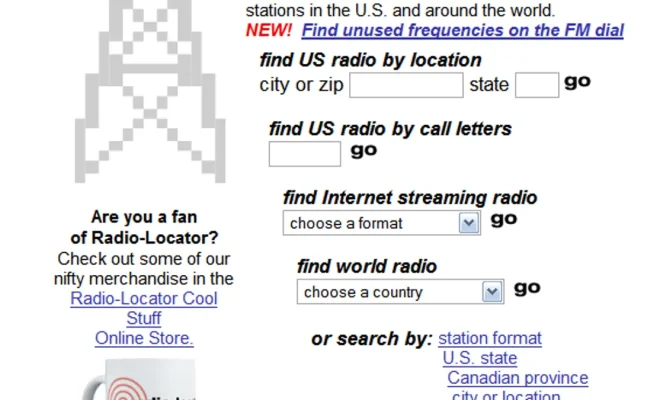
On the homepage, enter your city or zip code in the search bar. You can also find specific station information by entering its call letters or frequency.

3. Browse your results:

Once you’ve submitted your search query, Radio-Locator will generate a list of available stations in your vicinity. Information provided includes station call signs, frequencies, formats, coverage maps, and website links where available.

4. Filter results:

You can narrow down your results by using the format filters on the left side of the page. Select your preferred format (e.g., news, music genres) to easily locate specific types of stations.

Finding Unused Frequencies with Radio-Locator:

While searching for local stations based on city or zip code will lead you directly to a list of available stations in your area, it’s possible that some communities have unused frequencies
awaiting new broadcasters.

1. Click on “Find Empty Channels”:

To find these unused frequencies, go back to the homepage and click on the “Find Empty Channels” tab.

2. Provide information:

Enter your city or zip code; then, specify a distance radius in miles. This will allow Radio-Locator to scan for any open channels within your desired range.

3. Review results:

After submitting your search, Radio-Locator will list all available unused frequencies within your specified area. You can check FCC guidelines for further details about utilizing these open channels.

Conclusion:

Radio-Locator is an invaluable resource for finding local stations and determining unused frequencies in your area. With its user-friendly interface and comprehensive search results, you can stay connected to local radio programming and potentially explore broadcasting opportunities of your own. Don’t just settle for preset stations – utilize Radio-Locator to access a world of radio content right at your fingertips.


Previous Article

The misunderstood funeral tech that’s illegal in ...

Next Article

Find and save user manuals with ManualsLib

Matthew Lynch

Related articles More from author

  • Tech Advice

    2024 Hyundai Palisade SE 4dr Front-Wheel Drive SUV: Trim Details, Reviews, Prices, Specs, and Incentives

    August 21, 2023
    By Matthew Lynch
  • Tech Advice

    Roomy Cars: Everything You Need To Know

    August 20, 2023
    By Matthew Lynch
  • Tech Advice

    Your iPhone 13 Might Not Need a Case All Day Long

    July 15, 2023
    By Matthew Lynch
  • Tech Advice

    What is OLED and what can it do for your TV?

    July 24, 2023
    By Matthew Lynch
  • Tech Advice

    84-Month Car Loan: Is It Worth It?

    August 17, 2023
    By Matthew Lynch
  • Tech Advice

    The Best Innerspring Mattresses: Top Choices for Quality Sleep

    July 7, 2023
    By Matthew Lynch

Search

Login & Registration

  • Log in
  • Entries feed
  • Comments feed
  • WordPress.org

Newsletter

Signup for The Tech Edvocate Newsletter and have the latest in EdTech news and opinion delivered to your email address!

About Us

Since technology is not going anywhere and does more good than harm, adapting is the best course of action. That is where The Tech Edvocate comes in. We plan to cover the PreK-12 and Higher Education EdTech sectors and provide our readers with the latest news and opinion on the subject. From time to time, I will invite other voices to weigh in on important issues in EdTech. We hope to provide a well-rounded, multi-faceted look at the past, present, the future of EdTech in the US and internationally.

We started this journey back in June 2016, and we plan to continue it for many more years to come. I hope that you will join us in this discussion of the past, present and future of EdTech and lend your own insight to the issues that are discussed.

Newsletter

Signup for The Tech Edvocate Newsletter and have the latest in EdTech news and opinion delivered to your email address!

Contact Us

The Tech Edvocate
910 Goddin Street
Richmond, VA 23231
(601) 630-5238
[email protected]

Copyright © 2026 Matthew Lynch. All rights reserved.