The Tech Edvocate

Top Menu

  • Advertisement
  • Apps
  • Home Page
  • Home Page Five (No Sidebar)
  • Home Page Four
  • Home Page Three
  • Home Page Two
  • Home Tech2
  • Icons [No Sidebar]
  • Left Sidbear Page
  • Lynch Educational Consulting
  • My Account
  • My Speaking Page
  • Newsletter Sign Up Confirmation
  • Newsletter Unsubscription
  • Our Brands
  • Page Example
  • Privacy Policy
  • Protected Content
  • Register
  • Request a Product Review
  • Shop
  • Shortcodes Examples
  • Signup
  • Start Here
    • Governance
    • Careers
    • Contact Us
  • Terms and Conditions
  • The Edvocate
  • The Tech Edvocate Product Guide
  • Topics
  • Write For Us
  • Advertise

Main Menu

  • Start Here
    • Our Brands
    • Governance
      • Lynch Educational Consulting, LLC.
      • Dr. Lynch’s Personal Website
      • Careers
    • Write For Us
    • The Tech Edvocate Product Guide
    • Contact Us
    • Books
    • Edupedia
    • Post a Job
    • The Edvocate Podcast
    • Terms and Conditions
    • Privacy Policy
  • Topics
    • Assistive Technology
    • Child Development Tech
    • Early Childhood & K-12 EdTech
    • EdTech Futures
    • EdTech News
    • EdTech Policy & Reform
    • EdTech Startups & Businesses
    • Higher Education EdTech
    • Online Learning & eLearning
    • Parent & Family Tech
    • Personalized Learning
    • Product Reviews
  • Advertise
  • Tech Edvocate Awards
  • The Edvocate
  • Pedagogue
  • School Ratings

logo

The Tech Edvocate

  • Start Here
    • Our Brands
    • Governance
      • Lynch Educational Consulting, LLC.
      • Dr. Lynch’s Personal Website
        • My Speaking Page
      • Careers
    • Write For Us
    • The Tech Edvocate Product Guide
    • Contact Us
    • Books
    • Edupedia
    • Post a Job
    • The Edvocate Podcast
    • Terms and Conditions
    • Privacy Policy
  • Topics
    • Assistive Technology
    • Child Development Tech
    • Early Childhood & K-12 EdTech
    • EdTech Futures
    • EdTech News
    • EdTech Policy & Reform
    • EdTech Startups & Businesses
    • Higher Education EdTech
    • Online Learning & eLearning
    • Parent & Family Tech
    • Personalized Learning
    • Product Reviews
  • Advertise
  • Tech Edvocate Awards
  • The Edvocate
  • Pedagogue
  • School Ratings
  • How Sequel Slots Retain Familiar Features While Updating Play

  • Filtre poskytovateľov a rozpoznateľnosť herných kolekcií v kasínach

  • Razvoj iskanja in filtrov v vse obsežnejših katalogih kazino iger

  • Cinematic Intros Meet Familiar Reel Based Slot Play

  • Eventyrmotiver giver bonussekvenser retning og sammenhæng

  • Sådan former lydoplevelsen forskellige casinospil

  • Kameraføring former oplevelsen af roulette og blackjack på stream

  • Fra enkle browserbaserede casinospil til digitale formater med flere muligheder

  • Fra oldtidens fortællinger til nutidens spiltemaer

  • Čím sa líšia televízne herné formáty od tradičných živých stolov

Digital & Mobile Technology
Home›Digital & Mobile Technology›Download Regions for SimCity 4

Download Regions for SimCity 4

By Matthew Lynch
July 24, 2023
0
Spread the love


SimCity 4 is a city-building simulation game that allows players to create and manage their own virtual cities. One of the great features of the game is the ability to download custom regions created by other players. These regions can offer a unique and varied experience for players, and there are many different regions available for download. In this article, we will explore how to download regions for SimCity 4.

Step 1: Find a Region to Download

The first step in downloading a region for SimCity 4 is to find one that you like. There are many websites and forums dedicated to SimCity 4 where players share their custom regions. Some popular websites include Simtropolis, SC4Devotion, and Mod DB. Browse through these sites and find a region that you like.

Step 2: Download the Region

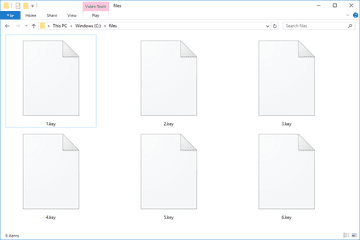
Once you have found a region that you want to download, click on the download link. The file will usually be in a .zip or .rar format. Save the file to your computer.

Step 3: Extract the Files

After you have downloaded the region, you will need to extract the files. Right-click on the downloaded file and select “Extract All” or use a program like WinZip or 7-Zip to extract the files.

Step 4: Install the Region

The next step is to install the region in SimCity 4. Open the SimCity 4 game and click on “Region” from the main menu. Select “Load Region” and navigate to the folder where you extracted the downloaded files. Select the folder with the name of the region and click “Ok.” The region will now be loaded and ready to play.

Step 5: Enjoy Your New Region

Congratulations! You have successfully downloaded and installed a new region for SimCity 4. Explore your new city and see what unique challenges and opportunities it offers.

In conclusion, downloading regions for SimCity 4 is a great way to add variety and excitement to the game. With so many different regions available, there is something for everyone. Follow these steps and start exploring new cities today!


Previous Article

How to Add Contacts Automatically in Yahoo ...

Next Article

How to Change the Default ‘From’ Address ...

Matthew Lynch

Related articles More from author

  • Digital & Mobile Technology

    Scanner Resolution and Color Depth

    July 31, 2023
    By Matthew Lynch
  • Digital & Mobile Technology

    What is the Software Development Life Cycle Model (SDLC)?

    May 11, 2023
    By Matthew Lynch
  • Digital & Mobile Technology

    What is a Straight-Through Cable?

    April 23, 2023
    By Matthew Lynch
  • Digital & Mobile Technology

    Best Virtual Machine Apps for Mac (Great for Running Windows)

    June 23, 2023
    By Matthew Lynch
  • Digital & Mobile Technology

    What Is a CMOS Image Sensor?

    July 14, 2023
    By Matthew Lynch
  • Digital & Mobile Technology

    What Is Stitcher and How Does It Work?

    June 15, 2023
    By Matthew Lynch

Search

Login & Registration

  • Log in
  • Entries feed
  • Comments feed
  • WordPress.org

Newsletter

Signup for The Tech Edvocate Newsletter and have the latest in EdTech news and opinion delivered to your email address!

About Us

Since technology is not going anywhere and does more good than harm, adapting is the best course of action. That is where The Tech Edvocate comes in. We plan to cover the PreK-12 and Higher Education EdTech sectors and provide our readers with the latest news and opinion on the subject. From time to time, I will invite other voices to weigh in on important issues in EdTech. We hope to provide a well-rounded, multi-faceted look at the past, present, the future of EdTech in the US and internationally.

We started this journey back in June 2016, and we plan to continue it for many more years to come. I hope that you will join us in this discussion of the past, present and future of EdTech and lend your own insight to the issues that are discussed.

Newsletter

Signup for The Tech Edvocate Newsletter and have the latest in EdTech news and opinion delivered to your email address!

Contact Us

The Tech Edvocate
910 Goddin Street
Richmond, VA 23231
(601) 630-5238
[email protected]

Copyright © 2026 Matthew Lynch. All rights reserved.