The Tech Edvocate

Top Menu

  • Advertisement
  • Apps
  • Home Page
  • Home Page Five (No Sidebar)
  • Home Page Four
  • Home Page Three
  • Home Page Two
  • Home Tech2
  • Icons [No Sidebar]
  • Left Sidbear Page
  • Lynch Educational Consulting
  • My Account
  • My Speaking Page
  • Newsletter Sign Up Confirmation
  • Newsletter Unsubscription
  • Our Brands
  • Page Example
  • Privacy Policy
  • Protected Content
  • Register
  • Request a Product Review
  • Shop
  • Shortcodes Examples
  • Signup
  • Start Here
    • Governance
    • Careers
    • Contact Us
  • Terms and Conditions
  • The Edvocate
  • The Tech Edvocate Product Guide
  • Topics
  • Write For Us
  • Advertise

Main Menu

  • Start Here
    • Our Brands
    • Governance
      • Lynch Educational Consulting, LLC.
      • Dr. Lynch’s Personal Website
      • Careers
    • Write For Us
    • The Tech Edvocate Product Guide
    • Contact Us
    • Books
    • Edupedia
    • Post a Job
    • The Edvocate Podcast
    • Terms and Conditions
    • Privacy Policy
  • Topics
    • Assistive Technology
    • Child Development Tech
    • Early Childhood & K-12 EdTech
    • EdTech Futures
    • EdTech News
    • EdTech Policy & Reform
    • EdTech Startups & Businesses
    • Higher Education EdTech
    • Online Learning & eLearning
    • Parent & Family Tech
    • Personalized Learning
    • Product Reviews
  • Advertise
  • Tech Edvocate Awards
  • The Edvocate
  • Pedagogue
  • School Ratings

logo

The Tech Edvocate

  • Start Here
    • Our Brands
    • Governance
      • Lynch Educational Consulting, LLC.
      • Dr. Lynch’s Personal Website
        • My Speaking Page
      • Careers
    • Write For Us
    • The Tech Edvocate Product Guide
    • Contact Us
    • Books
    • Edupedia
    • Post a Job
    • The Edvocate Podcast
    • Terms and Conditions
    • Privacy Policy
  • Topics
    • Assistive Technology
    • Child Development Tech
    • Early Childhood & K-12 EdTech
    • EdTech Futures
    • EdTech News
    • EdTech Policy & Reform
    • EdTech Startups & Businesses
    • Higher Education EdTech
    • Online Learning & eLearning
    • Parent & Family Tech
    • Personalized Learning
    • Product Reviews
  • Advertise
  • Tech Edvocate Awards
  • The Edvocate
  • Pedagogue
  • School Ratings
  • A Visitor’s Guide to Fresno (CA), United States

  • A Visitors Guide to New Orleans (LA), United States

  • A Visitors Guide to Sacramento (CA), United States

  • A Visitors Guide to Lyon, France

  • JisuLife Ultra2 Portable Fan: A Powerful Multi-Function Cooling Solution

  • A Visitors Guide to Viña del Mar, Chile

  • A Visitors Guide to Århus, Denmark

  • A Visitors Guide to Bakersfield (CA), United States

  • A Visitors Guide to Aurora (CO), United States

  • A Visitor’s Guide to Toledo (OH), United States

Tech Advice
Home›Tech Advice›Connect Your Nintendo Switch Joy-Cons to Your iPad and iPhone

Connect Your Nintendo Switch Joy-Cons to Your iPad and iPhone
By Matthew Lynch
July 17, 2023
0
Spread the love

Introduction:

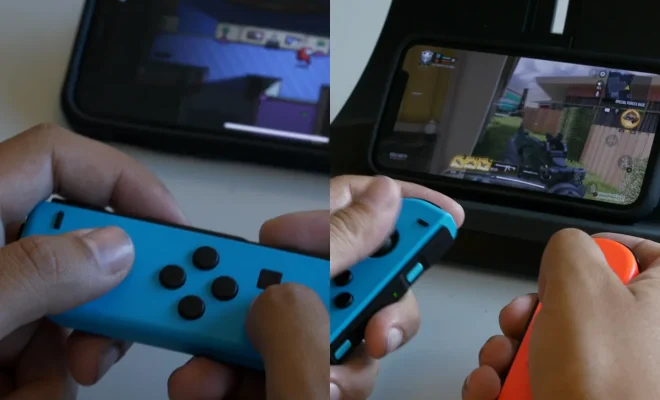
Nintendo Switch Joy-Cons are versatile controllers that have quickly become a favorite among gamers. The detachable and portable design of these controllers allows for a wide array of gaming possibilities. But did you know that you can connect your Nintendo Switch Joy-Cons to your iPad or iPhone? Yes, it is possible! In this article, we will guide you through the steps on how to make this connection, so you can use your Joy-Cons with your iOS devices.

Steps to Connect Your Nintendo Switch Joy-Cons to Your iPad and iPhone:

1. Update your iOS device to the latest version:

Before attempting to connect the Joy-Cons, ensure that your iPad or iPhone is running the latest version of iOS. Go to Settings > General > Software Update and follow the on-screen instructions to update if required.

2. Enable Bluetooth on your iOS device:

Navigate to Settings > Bluetooth on your iPad or iPhone and make sure that Bluetooth is enabled.

3. Put the Joy-Con into pairing mode:

To pair a single Joy-Con, first ensure that it is detached from the Nintendo Switch console. Press and hold the small circular button located on the side of the controller where it attaches to the console (next to the SL and SR buttons). The LED lights will start blinking, indicating that the controller is in pairing mode.

4. Pairing the Joy-Con with your iOS device:

On your iPad or iPhone’s Bluetooth settings screen, locate and tap on “Joy-Con” under “Other Devices.” This will initiate the pairing process, and once successfully paired, the LED light on the Joy-Con will stay solid.

5. Start playing!

Now that your Nintendo Switch Joy-Con is connected to your iOS device, you can start using it with compatible games and applications. Keep in mind that not all games will support external controllers, but many popular titles do!

Conclusion:

Connecting a Nintendo Switch Joy-Con to your iPad or iPhone opens up a new world of gaming possibilities on your iOS devices. It’s a simple process that can be done in minutes and results in an immersive and comfortable gaming experience. So, go ahead and enjoy playing your favorite games with your Joy-Cons on your iOS devices today!

Previous Article

How to count steps with your Apple ...

Next Article

Confused about locked vs. unlocked phones? Ask ...

Matthew Lynch

Related articles More from author

  • Tech Advice

    SSH tip: Send commands remotely

    July 14, 2023
    By Matthew Lynch
  • Tech Advice

    Stop Using the Wrong Pans When Baking: A Guide to Choosing the Right Bakeware

    July 10, 2023
    By Matthew Lynch
  • Tech Advice

    Breeo X Series 24 vs. Solo Stove Yukon: 2 Premium Smokeless Fire Pits Compared

    July 14, 2023
    By Matthew Lynch
  • Tech Advice

    Lenovo Yoga 7i (14-inch, Gen 7) Review: Excellent 2-in-1 for Less

    July 14, 2023
    By Matthew Lynch
  • Tech Advice

    Fridge Face-Off: French Door vs. Side-by-Side – The Better Buy

    July 9, 2023
    By Matthew Lynch
  • Tech Advice

    6 Best Fixes for Reactions Not Working in Facebook Messenger

    February 20, 2024
    By Matthew Lynch

Search

Login & Registration

  • Register
  • Log in
  • Entries feed
  • Comments feed
  • WordPress.org

Newsletter

Signup for The Tech Edvocate Newsletter and have the latest in EdTech news and opinion delivered to your email address!

About Us

Since technology is not going anywhere and does more good than harm, adapting is the best course of action. That is where The Tech Edvocate comes in. We plan to cover the PreK-12 and Higher Education EdTech sectors and provide our readers with the latest news and opinion on the subject. From time to time, I will invite other voices to weigh in on important issues in EdTech. We hope to provide a well-rounded, multi-faceted look at the past, present, the future of EdTech in the US and internationally.

We started this journey back in June 2016, and we plan to continue it for many more years to come. I hope that you will join us in this discussion of the past, present and future of EdTech and lend your own insight to the issues that are discussed.

Newsletter

Signup for The Tech Edvocate Newsletter and have the latest in EdTech news and opinion delivered to your email address!

Contact Us

The Tech Edvocate
910 Goddin Street
Richmond, VA 23231
(601) 630-5238
[email protected]

Copyright © 2025 Matthew Lynch. All rights reserved.