The Tech Edvocate

Top Menu

  • Advertisement
  • Apps
  • Home Page
  • Home Page Five (No Sidebar)
  • Home Page Four
  • Home Page Three
  • Home Page Two
  • Home Tech2
  • Icons [No Sidebar]
  • Left Sidbear Page
  • Lynch Educational Consulting
  • My Account
  • My Speaking Page
  • Newsletter Sign Up Confirmation
  • Newsletter Unsubscription
  • Our Brands
  • Page Example
  • Privacy Policy
  • Protected Content
  • Register
  • Request a Product Review
  • Shop
  • Shortcodes Examples
  • Signup
  • Start Here
    • Governance
    • Careers
    • Contact Us
  • Terms and Conditions
  • The Edvocate
  • The Tech Edvocate Product Guide
  • Topics
  • Write For Us
  • Advertise

Main Menu

  • Start Here
    • Our Brands
    • Governance
      • Lynch Educational Consulting, LLC.
      • Dr. Lynch’s Personal Website
      • Careers
    • Write For Us
    • The Tech Edvocate Product Guide
    • Contact Us
    • Books
    • Edupedia
    • Post a Job
    • The Edvocate Podcast
    • Terms and Conditions
    • Privacy Policy
  • Topics
    • Assistive Technology
    • Child Development Tech
    • Early Childhood & K-12 EdTech
    • EdTech Futures
    • EdTech News
    • EdTech Policy & Reform
    • EdTech Startups & Businesses
    • Higher Education EdTech
    • Online Learning & eLearning
    • Parent & Family Tech
    • Personalized Learning
    • Product Reviews
  • Advertise
  • Tech Edvocate Awards
  • The Edvocate
  • Pedagogue
  • School Ratings

logo

The Tech Edvocate

  • Start Here
    • Our Brands
    • Governance
      • Lynch Educational Consulting, LLC.
      • Dr. Lynch’s Personal Website
        • My Speaking Page
      • Careers
    • Write For Us
    • The Tech Edvocate Product Guide
    • Contact Us
    • Books
    • Edupedia
    • Post a Job
    • The Edvocate Podcast
    • Terms and Conditions
    • Privacy Policy
  • Topics
    • Assistive Technology
    • Child Development Tech
    • Early Childhood & K-12 EdTech
    • EdTech Futures
    • EdTech News
    • EdTech Policy & Reform
    • EdTech Startups & Businesses
    • Higher Education EdTech
    • Online Learning & eLearning
    • Parent & Family Tech
    • Personalized Learning
    • Product Reviews
  • Advertise
  • Tech Edvocate Awards
  • The Edvocate
  • Pedagogue
  • School Ratings
  • A Visitors Guide to Long Beach (CA), United States

  • A Visitor’s Guide to Fresno (CA), United States

  • A Visitors Guide to New Orleans (LA), United States

  • A Visitors Guide to Sacramento (CA), United States

  • A Visitors Guide to Lyon, France

  • JisuLife Ultra2 Portable Fan: A Powerful Multi-Function Cooling Solution

  • A Visitors Guide to Viña del Mar, Chile

  • A Visitors Guide to Århus, Denmark

  • A Visitors Guide to Bakersfield (CA), United States

  • A Visitors Guide to Aurora (CO), United States

Best of the Best Lists
Home›Best of the Best Lists›Best iPad tips and tricks: 6 features you didn’t even know existed

Best iPad tips and tricks: 6 features you didn’t even know existed
By Matthew Lynch
March 6, 2024
0
Spread the love

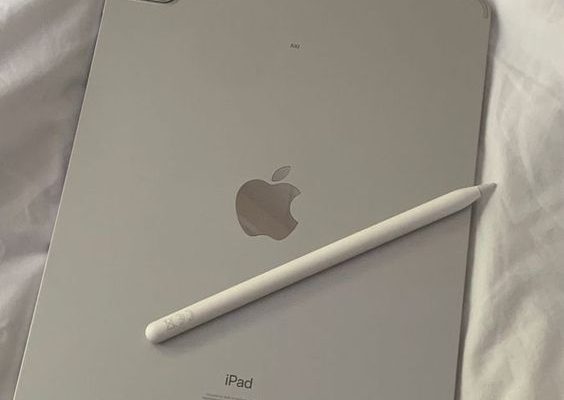
The iPad is not just a beautiful piece of technology but also a trove of hidden gems that can enhance your user experience. Here are 6 tips and tricks for your iPad that you might have been unaware of:

1.Quick Note with Apple Pencil: If you have an Apple Pencil, you can quickly jot down notes without unlocking your iPad. Just tap the lock screen with your Pencil, and a note will open instantly for you to start writing.

2.Split View for Multitasking: Work on two apps simultaneously by dragging one app to either edge of the screen to create a split view. This feature allows you to multitask effortlessly.

3.Shake to Undo Typing Errors: Made a mistake while typing? Simply shake your iPad, and you’ll get the option to undo your last action. It’s like having a magic eraser at your fingertips.

4.Drag & Drop Between Apps: Use the power of drag and drop for moving files or photos between apps. Open the apps in Split View and simply drag the file from one app and drop it into another.

5.Silent Siri: If you’re in a quiet environment and don’t want Siri to speak out loud, go to Settings > Siri & Search > Voice Feedback, and select “Control with Ring Switch.” Now, as long as your ring switch is set to silent, Siri will obey the silence too.

6.Hidden Touchpad: Turn your keyboard into a touchpad by placing two fingers on it. You can then move around text easily, select chunks of text or navigate through lines smoothly without tapping on the display repeatedly.

While these features only scratch the surface of what iPads can do, they are sure to provide users with enhanced efficiency and enjoyment. Whether you’re a new iPad user or have been using one for years, these tips can help unveil the true potential of your device.


Previous Article

10 Best Songs on The Ballad of ...

Next Article

15 Best Miniseries on Netflix Right Now

Matthew Lynch

Related articles More from author

  • Best of the Best Lists

    The Best Antivirus Software: Keeping Your Digital Life Secure

    September 1, 2023
    By Matthew Lynch
  • Best of the Best Lists

    Best Tablets for Everyday Use

    November 24, 2024
    By Matthew Lynch
  • Best of the Best Lists

    Best Orthopedic Surgeons

    August 26, 2023
    By Matthew Lynch
  • Best of the Best Lists

    Best Whole Home Battery Backups

    November 12, 2024
    By Matthew Lynch
  • Best of the Best Lists

    Best OnePlus Open Deals: Save Up to $1,200 on a Sleek, New Foldable Phone with Trade-In

    February 1, 2024
    By Matthew Lynch
  • Best of the Best Lists

    9 Best Baby Shampoo and Washes

    August 28, 2023
    By Matthew Lynch

Search

Login & Registration

  • Register
  • Log in
  • Entries feed
  • Comments feed
  • WordPress.org

Newsletter

Signup for The Tech Edvocate Newsletter and have the latest in EdTech news and opinion delivered to your email address!

About Us

Since technology is not going anywhere and does more good than harm, adapting is the best course of action. That is where The Tech Edvocate comes in. We plan to cover the PreK-12 and Higher Education EdTech sectors and provide our readers with the latest news and opinion on the subject. From time to time, I will invite other voices to weigh in on important issues in EdTech. We hope to provide a well-rounded, multi-faceted look at the past, present, the future of EdTech in the US and internationally.

We started this journey back in June 2016, and we plan to continue it for many more years to come. I hope that you will join us in this discussion of the past, present and future of EdTech and lend your own insight to the issues that are discussed.

Newsletter

Signup for The Tech Edvocate Newsletter and have the latest in EdTech news and opinion delivered to your email address!

Contact Us

The Tech Edvocate
910 Goddin Street
Richmond, VA 23231
(601) 630-5238
[email protected]

Copyright © 2025 Matthew Lynch. All rights reserved.