The Tech Edvocate

Top Menu

  • Advertisement
  • Apps
  • Home Page
  • Home Page Five (No Sidebar)
  • Home Page Four
  • Home Page Three
  • Home Page Two
  • Home Tech2
  • Icons [No Sidebar]
  • Left Sidbear Page
  • Lynch Educational Consulting
  • My Account
  • My Speaking Page
  • Newsletter Sign Up Confirmation
  • Newsletter Unsubscription
  • Our Brands
  • Page Example
  • Privacy Policy
  • Protected Content
  • Register
  • Request a Product Review
  • Shop
  • Shortcodes Examples
  • Signup
  • Start Here
    • Governance
    • Careers
    • Contact Us
  • Terms and Conditions
  • The Edvocate
  • The Tech Edvocate Product Guide
  • Topics
  • Write For Us
  • Advertise

Main Menu

  • Start Here
    • Our Brands
    • Governance
      • Lynch Educational Consulting, LLC.
      • Dr. Lynch’s Personal Website
      • Careers
    • Write For Us
    • The Tech Edvocate Product Guide
    • Contact Us
    • Books
    • Edupedia
    • Post a Job
    • The Edvocate Podcast
    • Terms and Conditions
    • Privacy Policy
  • Topics
    • Assistive Technology
    • Child Development Tech
    • Early Childhood & K-12 EdTech
    • EdTech Futures
    • EdTech News
    • EdTech Policy & Reform
    • EdTech Startups & Businesses
    • Higher Education EdTech
    • Online Learning & eLearning
    • Parent & Family Tech
    • Personalized Learning
    • Product Reviews
  • Advertise
  • Tech Edvocate Awards
  • The Edvocate
  • Pedagogue
  • School Ratings

logo

The Tech Edvocate

  • Start Here
    • Our Brands
    • Governance
      • Lynch Educational Consulting, LLC.
      • Dr. Lynch’s Personal Website
        • My Speaking Page
      • Careers
    • Write For Us
    • The Tech Edvocate Product Guide
    • Contact Us
    • Books
    • Edupedia
    • Post a Job
    • The Edvocate Podcast
    • Terms and Conditions
    • Privacy Policy
  • Topics
    • Assistive Technology
    • Child Development Tech
    • Early Childhood & K-12 EdTech
    • EdTech Futures
    • EdTech News
    • EdTech Policy & Reform
    • EdTech Startups & Businesses
    • Higher Education EdTech
    • Online Learning & eLearning
    • Parent & Family Tech
    • Personalized Learning
    • Product Reviews
  • Advertise
  • Tech Edvocate Awards
  • The Edvocate
  • Pedagogue
  • School Ratings
  • A Visitor’s Guide to Fresno (CA), United States

  • A Visitors Guide to New Orleans (LA), United States

  • A Visitors Guide to Sacramento (CA), United States

  • A Visitors Guide to Lyon, France

  • JisuLife Ultra2 Portable Fan: A Powerful Multi-Function Cooling Solution

  • A Visitors Guide to Viña del Mar, Chile

  • A Visitors Guide to Århus, Denmark

  • A Visitors Guide to Bakersfield (CA), United States

  • A Visitors Guide to Aurora (CO), United States

  • A Visitor’s Guide to Toledo (OH), United States

Digital & Mobile Technology
Home›Digital & Mobile Technology›Best iPad Drawing Apps to Try

Best iPad Drawing Apps to Try
By Matthew Lynch
April 11, 2023
0
Spread the love

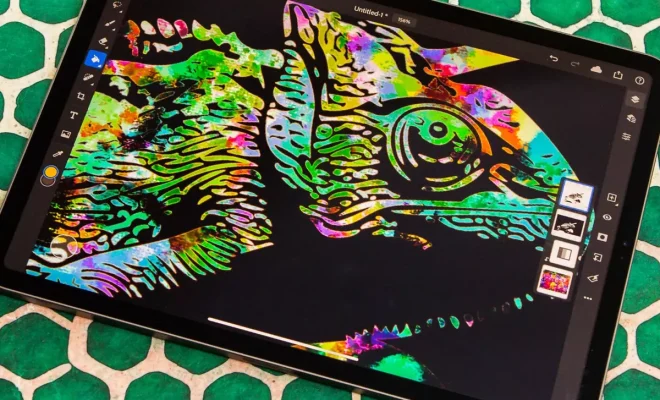
If you’re an artist or someone who loves to draw, an iPad can be an excellent device for you. With its large touchscreen, the iPad can offer you the best digital drawing experience available. It offers pressure-sensitive styluses, and some apps come with different brushes to provide various effects. Here are some of the best iPad drawing apps to try:

1. Procreate

One of the most well-known drawing apps for the iPad is Procreate. This app has been around for years and has become a go-to for artists who prefer to create digital art. It offers a variety of brushes, from watercolor to acrylics, and has features that allow you to adjust opacity and flow. Procreate also allows you to import photos, which can be useful for tracing.

2. Adobe Fresco

Adobe Fresco is another popular drawing app that provides you with natural media brushes, including watercolors, oils, and pastels. It has a unique “live brushes” feature that allows you to create stunning paintings that feel natural. For instance, when you draw with watercolor brushes, you can see the colors bleed together, giving you a realistic painting experience.

3. Sketchbook

Another famous drawing app for iPad is Sketchbook. It’s a free app that comes with some tools, and you can subscribe for more features. Sketchbook is excellent for sketching and drawing, and you can create up to 250 layers in your artwork. It also has a feature that allows you to mirror your work in real-time, providing you with easy symmetry.

4. Concepts

Concepts is an excellent drawing app that emphasizes precision and symmetry. Its interface is not the same as the other drawing apps, but don’t let that put you off. It provides you with infinite canvas, vector tools, and layers, and you can create your palettes.

5. ArtRage

ArtRage is an all-in-one painting software that offers you various painting tools, including oil paints, watercolors, and pastels. You can control the amount of paint on the brush and the pressure on the canvas. It also offers various textures that simulate real canvas, which can be useful for artists who want to achieve a traditional look in their paintings.

6. Tayasui Sketches Pro

Tayasui Sketches Pro is an intuitive and straightforward drawing app with various brushes and tools. It’s perfect for creating quick sketches or making a more detailed work of art. It has a user-friendly interface and provides you with options to adjust brush pressure and size. It also has a zoom feature that allows you to work on details by zooming in and out of the canvas.

Conclusion

There are tons of drawing apps available for the iPad, and choosing one can become an overwhelming task. Nevertheless, with this list, you can take some of the guesswork out and figure out which app works best for your drawing style. Whether you prefer natural media brushes or vector tools, there’s something here for everyone. Overall, if you’re looking to start drawing digitally, get an iPad and try out some of these apps.


Previous Article

Best Home Theater Systems

Next Article

Best Handheld Gaming Consoles for Emulation

Matthew Lynch

Related articles More from author

  • Digital & Mobile Technology

    How to Transfer Ownership of a Google Doc

    June 30, 2023
    By Matthew Lynch
  • Digital & Mobile Technology

    What Is a GSI on Android and How Is It Different to a Custom ROM?

    June 23, 2023
    By Matthew Lynch
  • Digital & Mobile Technology

    What Is the Mr. Krabs Meme? Examples

    June 23, 2023
    By Matthew Lynch
  • Digital & Mobile Technology

    Best Speakerphone  for Working From Home

    April 11, 2023
    By Matthew Lynch
  • Best of the Best ListsDigital & Mobile Technology

    The Best Web Browsers for Android

    June 6, 2023
    By Matthew Lynch
  • Digital & Mobile Technology

    How to Create Custom Scenes for Philips Hue Smart Lights

    May 27, 2023
    By Matthew Lynch

Search

Login & Registration

  • Register
  • Log in
  • Entries feed
  • Comments feed
  • WordPress.org

Newsletter

Signup for The Tech Edvocate Newsletter and have the latest in EdTech news and opinion delivered to your email address!

About Us

Since technology is not going anywhere and does more good than harm, adapting is the best course of action. That is where The Tech Edvocate comes in. We plan to cover the PreK-12 and Higher Education EdTech sectors and provide our readers with the latest news and opinion on the subject. From time to time, I will invite other voices to weigh in on important issues in EdTech. We hope to provide a well-rounded, multi-faceted look at the past, present, the future of EdTech in the US and internationally.

We started this journey back in June 2016, and we plan to continue it for many more years to come. I hope that you will join us in this discussion of the past, present and future of EdTech and lend your own insight to the issues that are discussed.

Newsletter

Signup for The Tech Edvocate Newsletter and have the latest in EdTech news and opinion delivered to your email address!

Contact Us

The Tech Edvocate
910 Goddin Street
Richmond, VA 23231
(601) 630-5238
[email protected]

Copyright © 2025 Matthew Lynch. All rights reserved.