The Tech Edvocate

Top Menu

  • Advertisement
  • Apps
  • Home Page
  • Home Page Five (No Sidebar)
  • Home Page Four
  • Home Page Three
  • Home Page Two
  • Home Tech2
  • Icons [No Sidebar]
  • Left Sidbear Page
  • Lynch Educational Consulting
  • My Account
  • My Speaking Page
  • Newsletter Sign Up Confirmation
  • Newsletter Unsubscription
  • Our Brands
  • Page Example
  • Privacy Policy
  • Protected Content
  • Register
  • Request a Product Review
  • Shop
  • Shortcodes Examples
  • Signup
  • Start Here
    • Governance
    • Careers
    • Contact Us
  • Terms and Conditions
  • The Edvocate
  • The Tech Edvocate Product Guide
  • Topics
  • Write For Us
  • Advertise

Main Menu

  • Start Here
    • Our Brands
    • Governance
      • Lynch Educational Consulting, LLC.
      • Dr. Lynch’s Personal Website
      • Careers
    • Write For Us
    • The Tech Edvocate Product Guide
    • Contact Us
    • Books
    • Edupedia
    • Post a Job
    • The Edvocate Podcast
    • Terms and Conditions
    • Privacy Policy
  • Topics
    • Assistive Technology
    • Child Development Tech
    • Early Childhood & K-12 EdTech
    • EdTech Futures
    • EdTech News
    • EdTech Policy & Reform
    • EdTech Startups & Businesses
    • Higher Education EdTech
    • Online Learning & eLearning
    • Parent & Family Tech
    • Personalized Learning
    • Product Reviews
  • Advertise
  • Tech Edvocate Awards
  • The Edvocate
  • Pedagogue
  • School Ratings

logo

The Tech Edvocate

  • Start Here
    • Our Brands
    • Governance
      • Lynch Educational Consulting, LLC.
      • Dr. Lynch’s Personal Website
        • My Speaking Page
      • Careers
    • Write For Us
    • The Tech Edvocate Product Guide
    • Contact Us
    • Books
    • Edupedia
    • Post a Job
    • The Edvocate Podcast
    • Terms and Conditions
    • Privacy Policy
  • Topics
    • Assistive Technology
    • Child Development Tech
    • Early Childhood & K-12 EdTech
    • EdTech Futures
    • EdTech News
    • EdTech Policy & Reform
    • EdTech Startups & Businesses
    • Higher Education EdTech
    • Online Learning & eLearning
    • Parent & Family Tech
    • Personalized Learning
    • Product Reviews
  • Advertise
  • Tech Edvocate Awards
  • The Edvocate
  • Pedagogue
  • School Ratings
  • AI-Generated Content Is Flooding Social Media, Research Shows

  • Florida’s Latest Education Scandal: The Climate Change Curriculum You Won’t Believe

  • Millions Face a Brutal Student Loan Payment Hike — What You MUST Do Now

  • Shocking: OpenAI’s AI Agents Caught in Cyberattacks — The Unforeseen AI Risks to Humanity

  • This Is Why Ransomware Attacks 2026 Will SHOCK You

  • Unbelievable: Kia, Hyundai Face BILLION-Dollar Lawsuits Over Viral Theft Epidemic

  • Unbelievable: Black Hole Winds Are 100x Stronger Than Anyone Realized

  • Ancient Smooches: New Research Reveals Neanderthals Were Romantics, Just Like Us

  • The Astonishing Reason Millions Will Pay More for Everything as US Interest Rates Skyrocket

  • Stunning: The US Senate Crypto Bill Just Crumbled – Here’s Why It Matters to Your Money

Assistive Technology
Home›Assistive Technology›Best Google Nest Mini Easter Eggs to Try Out

Best Google Nest Mini Easter Eggs to Try Out
By Matthew Lynch
June 9, 2023
0
Spread the love

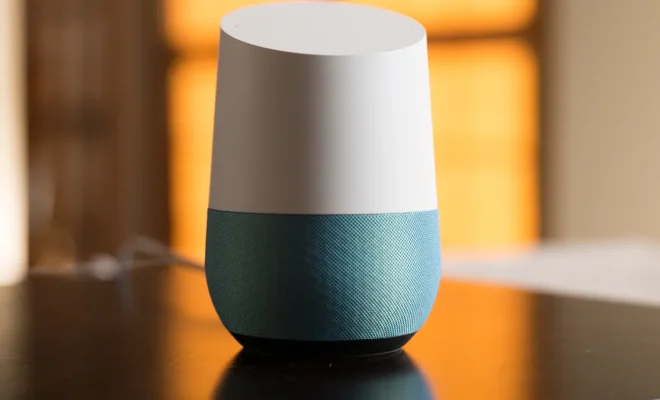
Google Nest Mini is a smart speaker that can do just about anything you’d want it to do. It’s a highly versatile device that offers you the convenience of controlling your smart home devices, playing music, setting reminders and much more. However, did you know that there are some Easter eggs or hidden features that you can try out on your Google Nest Mini to make it even more exciting? These Easter eggs are cleverly hidden and can be accessible by using voice commands. Here are some of the best Google Nest Mini Easter eggs to try out!

1. “Okay Google, find Chuck Norris” – After issuing this voice command, your Nest Mini will respond by saying, “Chuck Norris can’t be found because he finds you,” which is a reference to Chuck Norris’s infamous reputation.

2. “Okay Google, can you sing?” – Issuing this command will prompt your Nest Mini to sing a random song from its repertoire of songs. It could be anything from “Happy Birthday” to “The Wheels on the Bus.”

3. “Okay Google, tell me a joke” – If you need a laugh or two, this is the perfect command to issue. Your Nest Mini will respond with a humorous joke that’s sure to tickle your funny bone.

4. “Okay Google, tell me a riddle” – If you love brain teasers, this is a great command to ask. Your Nest Mini will come up with a challenging riddle for you to solve.

5. “Okay Google, do you know Siri?” – Issuing this command will surprise you as your Nest Mini will respond with a witty comment about its competitor.

6. “Okay Google, do you like Alexa?” – Ask this question and your Nest Mini will respond with some cheeky comments about its rival smart speaker.

7. “Okay Google, how much wood would a woodchuck chuck if a woodchuck could chuck wood?” – This is a classic tongue twister and a great command to test out the capabilities of your Nest Mini’s speech recognition.


Previous Article

Why Thieves Are Stealing Catalytic Converters and ...

Next Article

How to Screenshot an Instagram Story Without ...

Matthew Lynch

Related articles More from author

  • Assistive Technology

    How Can You Keep Your Reddit Account Private?

    June 6, 2023
    By Matthew Lynch
  • Assistive Technology

    How to Fix It When Your Alexa Alarm Isn’t Going Off

    June 11, 2023
    By Matthew Lynch
  • Assistive Technology

    How to Create and Manage Disney+ Profiles

    June 10, 2023
    By Matthew Lynch
  • Assistive Technology

    How to Recover a Hacked Snapchat Account

    July 15, 2023
    By Matthew Lynch
  • Assistive Technology

    How to Install RAM in Your PC, Step-by-Step

    June 21, 2023
    By Matthew Lynch
  • Assistive Technology

    Everything You Need to Know About File Explorer Tabs on Windows 11

    June 21, 2023
    By Matthew Lynch

Search

Login & Registration

  • Log in
  • Entries feed
  • Comments feed
  • WordPress.org

Newsletter

Signup for The Tech Edvocate Newsletter and have the latest in EdTech news and opinion delivered to your email address!

About Us

Since technology is not going anywhere and does more good than harm, adapting is the best course of action. That is where The Tech Edvocate comes in. We plan to cover the PreK-12 and Higher Education EdTech sectors and provide our readers with the latest news and opinion on the subject. From time to time, I will invite other voices to weigh in on important issues in EdTech. We hope to provide a well-rounded, multi-faceted look at the past, present, the future of EdTech in the US and internationally.

We started this journey back in June 2016, and we plan to continue it for many more years to come. I hope that you will join us in this discussion of the past, present and future of EdTech and lend your own insight to the issues that are discussed.

Newsletter

Signup for The Tech Edvocate Newsletter and have the latest in EdTech news and opinion delivered to your email address!

Contact Us

The Tech Edvocate
910 Goddin Street
Richmond, VA 23231
(601) 630-5238
[email protected]

Copyright © 2026 Matthew Lynch. All rights reserved.