The Tech Edvocate

Top Menu

  • Advertisement
  • Apps
  • Home Page
  • Home Page Five (No Sidebar)
  • Home Page Four
  • Home Page Three
  • Home Page Two
  • Home Tech2
  • Icons [No Sidebar]
  • Left Sidbear Page
  • Lynch Educational Consulting
  • My Account
  • My Speaking Page
  • Newsletter Sign Up Confirmation
  • Newsletter Unsubscription
  • Our Brands
  • Page Example
  • Privacy Policy
  • Protected Content
  • Register
  • Request a Product Review
  • Shop
  • Shortcodes Examples
  • Signup
  • Start Here
    • Governance
    • Careers
    • Contact Us
  • Terms and Conditions
  • The Edvocate
  • The Tech Edvocate Product Guide
  • Topics
  • Write For Us
  • Advertise

Main Menu

  • Start Here
    • Our Brands
    • Governance
      • Lynch Educational Consulting, LLC.
      • Dr. Lynch’s Personal Website
      • Careers
    • Write For Us
    • The Tech Edvocate Product Guide
    • Contact Us
    • Books
    • Edupedia
    • Post a Job
    • The Edvocate Podcast
    • Terms and Conditions
    • Privacy Policy
  • Topics
    • Assistive Technology
    • Child Development Tech
    • Early Childhood & K-12 EdTech
    • EdTech Futures
    • EdTech News
    • EdTech Policy & Reform
    • EdTech Startups & Businesses
    • Higher Education EdTech
    • Online Learning & eLearning
    • Parent & Family Tech
    • Personalized Learning
    • Product Reviews
  • Advertise
  • Tech Edvocate Awards
  • The Edvocate
  • Pedagogue
  • School Ratings

logo

The Tech Edvocate

  • Start Here
    • Our Brands
    • Governance
      • Lynch Educational Consulting, LLC.
      • Dr. Lynch’s Personal Website
        • My Speaking Page
      • Careers
    • Write For Us
    • The Tech Edvocate Product Guide
    • Contact Us
    • Books
    • Edupedia
    • Post a Job
    • The Edvocate Podcast
    • Terms and Conditions
    • Privacy Policy
  • Topics
    • Assistive Technology
    • Child Development Tech
    • Early Childhood & K-12 EdTech
    • EdTech Futures
    • EdTech News
    • EdTech Policy & Reform
    • EdTech Startups & Businesses
    • Higher Education EdTech
    • Online Learning & eLearning
    • Parent & Family Tech
    • Personalized Learning
    • Product Reviews
  • Advertise
  • Tech Edvocate Awards
  • The Edvocate
  • Pedagogue
  • School Ratings
  • JisuLife Ultra2 Portable Fan: A Powerful Multi-Function Cooling Solution

  • A Visitors Guide to Viña del Mar, Chile

  • A Visitors Guide to Århus, Denmark

  • A Visitors Guide to Bakersfield (CA), United States

  • A Visitors Guide to Aurora (CO), United States

  • A Visitor’s Guide to Toledo (OH), United States

  • A Visitors Guide to Cincinnati (OH), United States

  • The MagicEagle Cam 5: Revolutionizing Wildlife Monitoring with Smart 4G Technology

  • A Visitors Guide to Pittsburgh (PA), United States

  • A Visitors Guide to Colorado Springs (CO), United States

Digital & Mobile Technology
Home›Digital & Mobile Technology›Awesome Start Pages for Easier Shortcuts in New Tab or Homepage

Awesome Start Pages for Easier Shortcuts in New Tab or Homepage
By Matthew Lynch
June 22, 2023
0
Spread the love

In today’s fast-paced world, everyone is trying to save time and boost productivity. One excellent way to achieve this is by using an awesome start page that mirrors your interests and tasks.

Most people have a specific routine of opening a new tab or homepage every time they use their internet browsers. By taking advantage of start pages, you can avoid wasting time by having all your regular shortcuts in one place.

Here are the best awesome start pages for better shortcuts in new tab or homepage :

1. Speed Dial 2

Speed Dial 2 is a popular start page that provides quick and easy access to your favorite sites, bookmarks, and apps. You can add as many sites as you want to the dashboard and categorize them under different tabs.

Another excellent feature is the ability to customize your start page with free wallpapers or your uploaded photos. It is also possible to display bookmarks or open a few tabs all at once when you start your browsing experience.

2. Momentum

Momentum is a sleek, beautifully designed custom start page that displays stunning images and a to-do list. It functions as a personal dashboard that can keep you in tune with the most important things in your life.

Momentum has a striking interface that provides a daily inspirational quote and weather updates for your current location. With the free version, you can add up to five background photos and integrated links to your favorite websites.

3. Start.me

Start.me is an impressive start page app that lets you personalize your homepage effortlessly. Once you sign up for a free account, you can create different pages for various themes, including work, hobbies, and travel.

You can also customize the theme and colors of each page, creating a beautiful layout that gets you excited to work. Start.me supports RSS feeds and news headlines, making it possible for you to stay updated with current affairs.

4. MyFaves

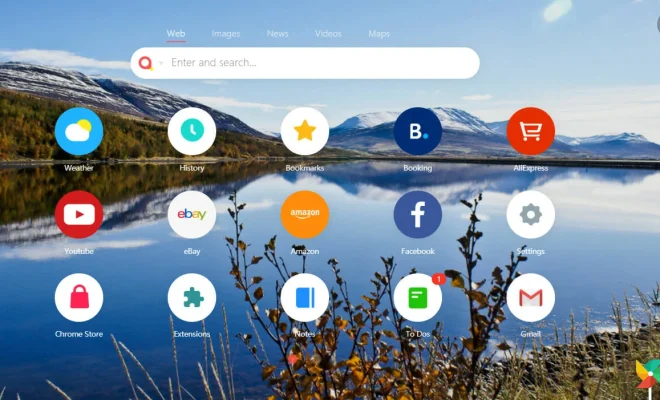
MyFaves is a beautiful, minimalistic personal start page. This start page features customizable small tiles with icons and text that you can rearrange and organize as you desire.

The tiles provide quick access to your favorite sites, apps, and bookmarks, without any ads, content suggestions, or browser history. You can also access the webstore, where you can download apps that sync with MyFaves.

In conclusion, choosing a start page boils down to personal preference, but rest assured that all of the four options mentioned above are excellent in boosting productivity and saving time. Take your time, experiment, and find your perfect start page!


Previous Article

What Are the Amazon Echo Frames and ...

Next Article

Is Trip.com a Legitimate Travel Business?

Matthew Lynch

Related articles More from author

  • Digital & Mobile Technology

    Should You Buy a Tablet or a Laptop?

    June 7, 2023
    By Matthew Lynch
  • Digital & Mobile Technology

    The 6 Best Security Camera Apps for iPhone (2023)

    June 10, 2023
    By Matthew Lynch
  • Digital & Mobile Technology

    How to Emulate Nintendo 3DS Games on Android

    June 26, 2023
    By Matthew Lynch
  • Digital & Mobile Technology

    What Is Mail Privacy Protection in macOS and iOS?

    August 5, 2023
    By Matthew Lynch
  • Digital & Mobile Technology

    What to Do When Google Home Won’t Connect to Wi-Fi

    June 8, 2023
    By Matthew Lynch
  • Digital & Mobile Technology

    How to Turn On Bluetooth in Windows 11

    June 4, 2023
    By Matthew Lynch

Search

Login & Registration

  • Register
  • Log in
  • Entries feed
  • Comments feed
  • WordPress.org

Newsletter

Signup for The Tech Edvocate Newsletter and have the latest in EdTech news and opinion delivered to your email address!

About Us

Since technology is not going anywhere and does more good than harm, adapting is the best course of action. That is where The Tech Edvocate comes in. We plan to cover the PreK-12 and Higher Education EdTech sectors and provide our readers with the latest news and opinion on the subject. From time to time, I will invite other voices to weigh in on important issues in EdTech. We hope to provide a well-rounded, multi-faceted look at the past, present, the future of EdTech in the US and internationally.

We started this journey back in June 2016, and we plan to continue it for many more years to come. I hope that you will join us in this discussion of the past, present and future of EdTech and lend your own insight to the issues that are discussed.

Newsletter

Signup for The Tech Edvocate Newsletter and have the latest in EdTech news and opinion delivered to your email address!

Contact Us

The Tech Edvocate
910 Goddin Street
Richmond, VA 23231
(601) 630-5238
[email protected]

Copyright © 2025 Matthew Lynch. All rights reserved.