The Tech Edvocate

Top Menu

  • Advertisement
  • Apps
  • Home Page
  • Home Page Five (No Sidebar)
  • Home Page Four
  • Home Page Three
  • Home Page Two
  • Home Tech2
  • Icons [No Sidebar]
  • Left Sidbear Page
  • Lynch Educational Consulting
  • My Account
  • My Speaking Page
  • Newsletter Sign Up Confirmation
  • Newsletter Unsubscription
  • Our Brands
  • Page Example
  • Privacy Policy
  • Protected Content
  • Register
  • Request a Product Review
  • Shop
  • Shortcodes Examples
  • Signup
  • Start Here
    • Governance
    • Careers
    • Contact Us
  • Terms and Conditions
  • The Edvocate
  • The Tech Edvocate Product Guide
  • Topics
  • Write For Us
  • Advertise

Main Menu

  • Start Here
    • Our Brands
    • Governance
      • Lynch Educational Consulting, LLC.
      • Dr. Lynch’s Personal Website
      • Careers
    • Write For Us
    • The Tech Edvocate Product Guide
    • Contact Us
    • Books
    • Edupedia
    • Post a Job
    • The Edvocate Podcast
    • Terms and Conditions
    • Privacy Policy
  • Topics
    • Assistive Technology
    • Child Development Tech
    • Early Childhood & K-12 EdTech
    • EdTech Futures
    • EdTech News
    • EdTech Policy & Reform
    • EdTech Startups & Businesses
    • Higher Education EdTech
    • Online Learning & eLearning
    • Parent & Family Tech
    • Personalized Learning
    • Product Reviews
  • Advertise
  • Tech Edvocate Awards
  • The Edvocate
  • Pedagogue
  • School Ratings

logo

The Tech Edvocate

  • Start Here
    • Our Brands
    • Governance
      • Lynch Educational Consulting, LLC.
      • Dr. Lynch’s Personal Website
        • My Speaking Page
      • Careers
    • Write For Us
    • The Tech Edvocate Product Guide
    • Contact Us
    • Books
    • Edupedia
    • Post a Job
    • The Edvocate Podcast
    • Terms and Conditions
    • Privacy Policy
  • Topics
    • Assistive Technology
    • Child Development Tech
    • Early Childhood & K-12 EdTech
    • EdTech Futures
    • EdTech News
    • EdTech Policy & Reform
    • EdTech Startups & Businesses
    • Higher Education EdTech
    • Online Learning & eLearning
    • Parent & Family Tech
    • Personalized Learning
    • Product Reviews
  • Advertise
  • Tech Edvocate Awards
  • The Edvocate
  • Pedagogue
  • School Ratings
  • Viaim Opennote Review: The AI Note-Taker That Disappears Into Your Daily Routine

  • A Visitors Guide to Long Beach (CA), United States

  • A Visitor’s Guide to Fresno (CA), United States

  • A Visitors Guide to New Orleans (LA), United States

  • A Visitors Guide to Sacramento (CA), United States

  • A Visitors Guide to Lyon, France

  • JisuLife Ultra2 Portable Fan: A Powerful Multi-Function Cooling Solution

  • A Visitors Guide to Viña del Mar, Chile

  • A Visitors Guide to Århus, Denmark

  • A Visitors Guide to Bakersfield (CA), United States

Digital & Mobile Technology
Home›Digital & Mobile Technology›Are Mechanical Keyboards Better for Typing?

Are Mechanical Keyboards Better for Typing?
By Matthew Lynch
June 11, 2023
0
Spread the love

When it comes to typing, the keyboard is one of the most important factors that can make or break your typing experience. While there are many types of keyboards available in the market, mechanical keyboards have become increasingly popular lately, thanks to their unique features and benefits. But are mechanical keyboards really better for typing? Let’s take a closer look.

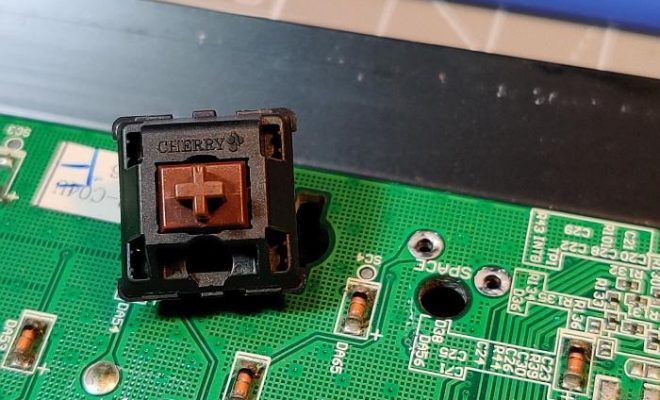
Mechanical keyboards are known for their tactile feedback, which means you can feel and hear every key press as you type. This is because mechanical keyboards use switches that are designed to register every press with a distinct tactile bump or click sound. This not only enhances the typing experience but also helps you to type accurately and faster.

Another advantage of mechanical keyboards is their durability. Unlike membrane keyboards that have a rubber dome under each keycap, mechanical keyboards use individual switches that can withstand as many as 50 million presses. This means you can use mechanical keyboards for a longer time without experiencing any wear and tear.

Mechanical keyboards have also been found to reduce the risk of developing typing-related injuries such as Carpal Tunnel Syndrome. This is because mechanical keyboards require less force to actuate a key press, which helps to reduce the strain on your fingers and wrists. As a result, you can type for longer hours without experiencing any discomfort or pain.

Additionally, mechanical keyboards are highly customizable. You can replace the keycaps to suit your typing preference, choose from a variety of switch types, and even adjust the actuation force to your liking. This allows you to create a highly personalized typing experience that is tailored to your needs.

However, there are some downsides to mechanical keyboards. They tend to be more expensive than membrane keyboards, and their clicky sound may not be ideal for quiet working environments or shared spaces. Moreover, some people may find the tactile feedback to be too distracting or tiring, especially when typing for extended periods.

In conclusion, mechanical keyboards are generally better for typing due to their tactile feedback, durability, and ergonomic design. However, they are not suitable for everyone and may not be suitable for all working environments. Ultimately, the best keyboard for you will depend on your personal preference, typing style, and budget.

Previous Article

How to Use the iPhone’s Compass and ...

Next Article

Why Do Car Speakers Blow Out?

Matthew Lynch

Related articles More from author

  • Digital & Mobile Technology

    What Is an ATM Jackpotting Attack and How Does It Work?

    June 12, 2023
    By Matthew Lynch
  • Digital & Mobile Technology

    DIY Projects to Turn a Broken Monitor Into Something New

    June 26, 2023
    By Matthew Lynch
  • Digital & Mobile Technology

    Adult Animated Shows to Watch on Netflix

    June 21, 2023
    By Matthew Lynch
  • Digital & Mobile Technology

    Best Free Online Landscape and Garden Design Tools

    August 5, 2023
    By Matthew Lynch
  • Digital & Mobile Technology

    What is Sketchup (and How Do I Use It)?

    May 11, 2023
    By Matthew Lynch
  • Digital & Mobile Technology

    How to Reset the Root Password in Linux

    May 4, 2023
    By Matthew Lynch

Search

Login & Registration

  • Register
  • Log in
  • Entries feed
  • Comments feed
  • WordPress.org

Newsletter

Signup for The Tech Edvocate Newsletter and have the latest in EdTech news and opinion delivered to your email address!

About Us

Since technology is not going anywhere and does more good than harm, adapting is the best course of action. That is where The Tech Edvocate comes in. We plan to cover the PreK-12 and Higher Education EdTech sectors and provide our readers with the latest news and opinion on the subject. From time to time, I will invite other voices to weigh in on important issues in EdTech. We hope to provide a well-rounded, multi-faceted look at the past, present, the future of EdTech in the US and internationally.

We started this journey back in June 2016, and we plan to continue it for many more years to come. I hope that you will join us in this discussion of the past, present and future of EdTech and lend your own insight to the issues that are discussed.

Newsletter

Signup for The Tech Edvocate Newsletter and have the latest in EdTech news and opinion delivered to your email address!

Contact Us

The Tech Edvocate
910 Goddin Street
Richmond, VA 23231
(601) 630-5238
[email protected]

Copyright © 2025 Matthew Lynch. All rights reserved.