The Tech Edvocate

Top Menu

  • Advertisement
  • Apps
  • Home Page
  • Home Page Five (No Sidebar)
  • Home Page Four
  • Home Page Three
  • Home Page Two
  • Home Tech2
  • Icons [No Sidebar]
  • Left Sidbear Page
  • Lynch Educational Consulting
  • My Account
  • My Speaking Page
  • Newsletter Sign Up Confirmation
  • Newsletter Unsubscription
  • Our Brands
  • Page Example
  • Privacy Policy
  • Protected Content
  • Register
  • Request a Product Review
  • Shop
  • Shortcodes Examples
  • Signup
  • Start Here
    • Governance
    • Careers
    • Contact Us
  • Terms and Conditions
  • The Edvocate
  • The Tech Edvocate Product Guide
  • Topics
  • Write For Us
  • Advertise

Main Menu

  • Start Here
    • Our Brands
    • Governance
      • Lynch Educational Consulting, LLC.
      • Dr. Lynch’s Personal Website
      • Careers
    • Write For Us
    • The Tech Edvocate Product Guide
    • Contact Us
    • Books
    • Edupedia
    • Post a Job
    • The Edvocate Podcast
    • Terms and Conditions
    • Privacy Policy
  • Topics
    • Assistive Technology
    • Child Development Tech
    • Early Childhood & K-12 EdTech
    • EdTech Futures
    • EdTech News
    • EdTech Policy & Reform
    • EdTech Startups & Businesses
    • Higher Education EdTech
    • Online Learning & eLearning
    • Parent & Family Tech
    • Personalized Learning
    • Product Reviews
  • Advertise
  • Tech Edvocate Awards
  • The Edvocate
  • Pedagogue
  • School Ratings

logo

The Tech Edvocate

  • Start Here
    • Our Brands
    • Governance
      • Lynch Educational Consulting, LLC.
      • Dr. Lynch’s Personal Website
        • My Speaking Page
      • Careers
    • Write For Us
    • The Tech Edvocate Product Guide
    • Contact Us
    • Books
    • Edupedia
    • Post a Job
    • The Edvocate Podcast
    • Terms and Conditions
    • Privacy Policy
  • Topics
    • Assistive Technology
    • Child Development Tech
    • Early Childhood & K-12 EdTech
    • EdTech Futures
    • EdTech News
    • EdTech Policy & Reform
    • EdTech Startups & Businesses
    • Higher Education EdTech
    • Online Learning & eLearning
    • Parent & Family Tech
    • Personalized Learning
    • Product Reviews
  • Advertise
  • Tech Edvocate Awards
  • The Edvocate
  • Pedagogue
  • School Ratings
  • The Brutal Truth: 8 Lies Scammers Tell About Your Student Loans

  • New Student Loan Rules: The Shocking Truth About 2026 Relief Programs

  • New Repayment Plan Changes Trigger Student Loan Scam Epidemic

  • Why Millions Are Ditching Degrees for This One Skill-Boosting Secret

  • The Quiet Revolution: How Micro-Credentials Are Reshaping Tech Careers

  • Why 96% of Employers Are Now Demanding Micro-Credentials

  • This One Incident Exposed How Vulnerable Your Student Data Really Is

  • The Brutal Truth About EdTech Security: 10 Solutions to Prevent Another Canvas LMS Disaster

  • The Billion-User Data Heist: Why Your Child’s School Data Is Under Attack

  • This Crucial Mistake Is Killing Your Tech Career (It’s Not What You Think)

Tech Advice
Home›Tech Advice›Apple’s M2 MacBook Air Only Has 4 Ports. Here’s What They Do

Apple’s M2 MacBook Air Only Has 4 Ports. Here’s What They Do
By Matthew Lynch
July 13, 2023
0
Spread the love

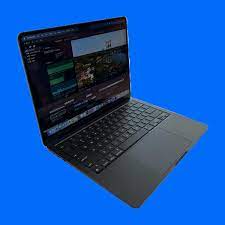
Apple has excelled at creating three new versions of their popular MacBook devices: the MacBook Pro, MacBook Air, and MacBook. As part of their continuous effort to provide users with sleek, portable, and powerful machines, Apple introduced the M2 MacBook Air. This breakthrough device only has four ports – but don’t let that fool you; these four ports pack a punch.

1. Thunderbolt 4/USB 4 Port:
One of the major upgrades found in the M2 MacBook Air is the addition of a Thunderbolt 4 port. With this powerful port, users can enjoy data transfer speeds up to 40 Gbps (twice as fast as Thunderbolt 3), which significantly reduces the time spent transferring large files or syncing devices. Furthermore, Thunderbolt 4 allows for connecting with USB 4 devices, ensuring compatibility with a wide range of peripherals. Additionally, it delivers power to external devices (up to 100W) and supports daisy-chaining up to six devices, thereby improving convenience and productivity.

2. USB-C Port:

The M2 MacBook Air also features a USB-C port, which is an increasingly common connection type on most modern devices. This versatile port boasts fast data transfer speeds (up to 10 Gbps) and can deliver power up to 100W for charging laptops or other devices. It is also essential for connecting various peripherals such as external hard drives, keyboard, or even an iPad for file integration.

3. SDXC Card Reader:

Recognizing that professional photographers and content creators require quick and efficient access to their media files, Apple has included an SDXC card reader in the M2 MacBook Air. This enables seamless access to camera files on an SD card without requiring any additional adapters or cables.

4. 3.5mm Headphone Jack:

Lastly, despite its slim and minimalist design, the M2 MacBook Air has not excluded the 3.5mm headphone jack. This long-standing port remains on the device, allowing users to easily connect wired headphones or external speakers to enjoy their multimedia or video conference calls.

In conclusion, while the M2 MacBook Air may only have four ports, it offers users a versatile, efficient, and powerful experience. Each port serves a specific purpose, catering to various professional and personal needs without compromising Apple’s commitment to providing cutting-edge technology and sleek designs. The M2 MacBook Air is undoubtedly an excellent choice for anyone seeking both power and portability in their next laptop.


Previous Article

MacBook Air M2 vs. MacBook Air M1: ...

Next Article

Apple’s MacBook Pro Touch Bar is gone. ...

Matthew Lynch

Related articles More from author

  • Tech Advice

    Great Deals on a new 2024 Acura Integra A-Spec Tech Package 4dr Hatchback at The Autoblog Smart Buy Program

    August 21, 2023
    By Matthew Lynch
  • Tech Advice

    PS5 and Xbox Series X backward compatibility: What you need to know

    July 17, 2023
    By Matthew Lynch
  • Tech Advice

    4 Best 3-Month CD Rates for Savvy Investors

    October 20, 2023
    By Matthew Lynch
  • Tech Advice

    How Long Do Brakes Last?

    August 19, 2023
    By Matthew Lynch
  • Tech Advice

    Best Car Warranty: Quick Comparison Guide

    August 17, 2023
    By Matthew Lynch
  • Tech Advice

    Home Warranty of America (HWA) Review 2023

    August 9, 2023
    By Matthew Lynch

Search

Login & Registration

  • Log in
  • Entries feed
  • Comments feed
  • WordPress.org

Newsletter

Signup for The Tech Edvocate Newsletter and have the latest in EdTech news and opinion delivered to your email address!

About Us

Since technology is not going anywhere and does more good than harm, adapting is the best course of action. That is where The Tech Edvocate comes in. We plan to cover the PreK-12 and Higher Education EdTech sectors and provide our readers with the latest news and opinion on the subject. From time to time, I will invite other voices to weigh in on important issues in EdTech. We hope to provide a well-rounded, multi-faceted look at the past, present, the future of EdTech in the US and internationally.

We started this journey back in June 2016, and we plan to continue it for many more years to come. I hope that you will join us in this discussion of the past, present and future of EdTech and lend your own insight to the issues that are discussed.

Newsletter

Signup for The Tech Edvocate Newsletter and have the latest in EdTech news and opinion delivered to your email address!

Contact Us

The Tech Edvocate
910 Goddin Street
Richmond, VA 23231
(601) 630-5238
[email protected]

Copyright © 2026 Matthew Lynch. All rights reserved.