The Tech Edvocate

Top Menu

  • Advertisement
  • Apps
  • Home Page
  • Home Page Five (No Sidebar)
  • Home Page Four
  • Home Page Three
  • Home Page Two
  • Home Tech2
  • Icons [No Sidebar]
  • Left Sidbear Page
  • Lynch Educational Consulting
  • My Account
  • My Speaking Page
  • Newsletter Sign Up Confirmation
  • Newsletter Unsubscription
  • Our Brands
  • Page Example
  • Privacy Policy
  • Protected Content
  • Register
  • Request a Product Review
  • Shop
  • Shortcodes Examples
  • Signup
  • Start Here
    • Governance
    • Careers
    • Contact Us
  • Terms and Conditions
  • The Edvocate
  • The Tech Edvocate Product Guide
  • Topics
  • Write For Us
  • Advertise

Main Menu

  • Start Here
    • Our Brands
    • Governance
      • Lynch Educational Consulting, LLC.
      • Dr. Lynch’s Personal Website
      • Careers
    • Write For Us
    • The Tech Edvocate Product Guide
    • Contact Us
    • Books
    • Edupedia
    • Post a Job
    • The Edvocate Podcast
    • Terms and Conditions
    • Privacy Policy
  • Topics
    • Assistive Technology
    • Child Development Tech
    • Early Childhood & K-12 EdTech
    • EdTech Futures
    • EdTech News
    • EdTech Policy & Reform
    • EdTech Startups & Businesses
    • Higher Education EdTech
    • Online Learning & eLearning
    • Parent & Family Tech
    • Personalized Learning
    • Product Reviews
  • Advertise
  • Tech Edvocate Awards
  • The Edvocate
  • Pedagogue
  • School Ratings

logo

The Tech Edvocate

  • Start Here
    • Our Brands
    • Governance
      • Lynch Educational Consulting, LLC.
      • Dr. Lynch’s Personal Website
        • My Speaking Page
      • Careers
    • Write For Us
    • The Tech Edvocate Product Guide
    • Contact Us
    • Books
    • Edupedia
    • Post a Job
    • The Edvocate Podcast
    • Terms and Conditions
    • Privacy Policy
  • Topics
    • Assistive Technology
    • Child Development Tech
    • Early Childhood & K-12 EdTech
    • EdTech Futures
    • EdTech News
    • EdTech Policy & Reform
    • EdTech Startups & Businesses
    • Higher Education EdTech
    • Online Learning & eLearning
    • Parent & Family Tech
    • Personalized Learning
    • Product Reviews
  • Advertise
  • Tech Edvocate Awards
  • The Edvocate
  • Pedagogue
  • School Ratings
  • A Visitors Guide to Long Beach (CA), United States

  • A Visitor’s Guide to Fresno (CA), United States

  • A Visitors Guide to New Orleans (LA), United States

  • A Visitors Guide to Sacramento (CA), United States

  • A Visitors Guide to Lyon, France

  • JisuLife Ultra2 Portable Fan: A Powerful Multi-Function Cooling Solution

  • A Visitors Guide to Viña del Mar, Chile

  • A Visitors Guide to Århus, Denmark

  • A Visitors Guide to Bakersfield (CA), United States

  • A Visitors Guide to Aurora (CO), United States

Digital & Mobile Technology
Home›Digital & Mobile Technology›Android Auto Wireless: Everything You Need to Know

Android Auto Wireless: Everything You Need to Know
By Matthew Lynch
April 10, 2023
0
Spread the love

As technology continues to advance, car manufacturers are continuously striving to make our driving experience more convenient and safer. One of the latest innovative technologies to emerge in the automotive industry is Android Auto Wireless. This technology provides drivers with the ability to connect their Android devices to their car wirelessly, making hands-free phone calls, navigation, and music streaming possible.

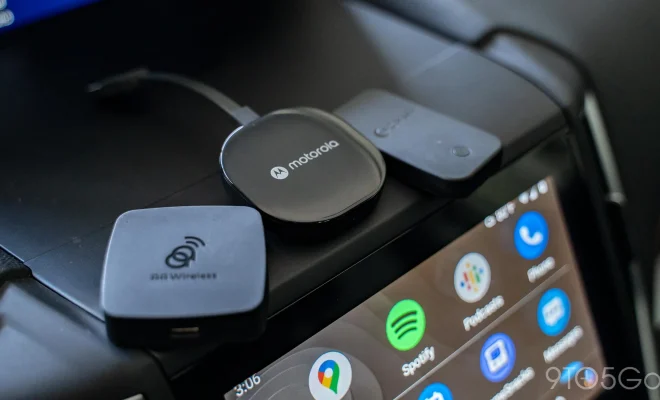
Android Auto Wireless is an upgrade to the previous Android Auto system that required a USB cable to connect. With the new wireless version, drivers can connect their Android devices to their vehicles using Bluetooth and Wi-Fi. It’s also possible to connect wirelessly through the car’s built-in Wi-Fi if it’s available.

The main advantage of Android Auto Wireless is that it eliminates the hassle of wires and cables, providing a smoother and more efficient way to connect your smartphone to your car. The technology is available in a growing number of car models and is compatible with most Android devices running Android 9.0 or higher.

To use Android Auto Wireless, drivers need to enable the wireless connectivity feature on their Android device, connect it to their car’s Bluetooth or Wi-Fi network, and mount the device in a safe and convenient location in the car. Once connected, drivers can use the Android Auto app on their device to access features such as Google Maps, messaging, phone calls, music and podcast streaming, and voice commands. Drivers can also use the car’s built-in steering wheel controls, touch screens, or voice commands to navigate through the Android Auto interface.

One notable feature of Android Auto Wireless is the Google Assistant, which provides drivers with hands-free access to many of the app’s features. With the Google Assistant, drivers can control their music, get directions, send messages, and even make phone calls without having to take their hands off the wheel.

However, it’s important to note that Android Auto Wireless is not currently available on all car models. Some vehicles may require a software upgrade or installation of a separate wireless module to enable the feature. Compatibility with specific Android devices can also vary depending on the manufacturer and model.

Overall, Android Auto Wireless is a great addition to the world of in-car infotainment. It provides drivers with a convenient and safe way to access their smartphone and stay connected while on the road. The technology is continuously evolving and becoming more widely available, making it easier for drivers to enjoy the benefits of Android Auto without having to worry about wires and cords.


Previous Article

Alternative Keyboard Layouts Explained: Should You Switch ...

Next Article

Apple Music Is Finally Available on Roku ...

Matthew Lynch

Related articles More from author

  • Digital & Mobile Technology

    How to Disable or Remove Hyper-V in Windows 11

    August 5, 2023
    By Matthew Lynch
  • Digital & Mobile Technology

    How to Find Trash on an Android Device

    May 31, 2023
    By Matthew Lynch
  • Digital & Mobile Technology

    How to Find Out If Someone Has Blocked Your Phone Number

    August 3, 2023
    By Matthew Lynch
  • Digital & Mobile Technology

    How to Turn On a Microsoft Surface Device

    June 4, 2023
    By Matthew Lynch
  • Digital & Mobile Technology

    How to Add Music to an iPhone Without Using iTunes

    June 3, 2023
    By Matthew Lynch
  • Digital & Mobile Technology

    How to Reset Android Lock Screen Password and PIN

    June 3, 2023
    By Matthew Lynch

Search

Login & Registration

  • Register
  • Log in
  • Entries feed
  • Comments feed
  • WordPress.org

Newsletter

Signup for The Tech Edvocate Newsletter and have the latest in EdTech news and opinion delivered to your email address!

About Us

Since technology is not going anywhere and does more good than harm, adapting is the best course of action. That is where The Tech Edvocate comes in. We plan to cover the PreK-12 and Higher Education EdTech sectors and provide our readers with the latest news and opinion on the subject. From time to time, I will invite other voices to weigh in on important issues in EdTech. We hope to provide a well-rounded, multi-faceted look at the past, present, the future of EdTech in the US and internationally.

We started this journey back in June 2016, and we plan to continue it for many more years to come. I hope that you will join us in this discussion of the past, present and future of EdTech and lend your own insight to the issues that are discussed.

Newsletter

Signup for The Tech Edvocate Newsletter and have the latest in EdTech news and opinion delivered to your email address!

Contact Us

The Tech Edvocate
910 Goddin Street
Richmond, VA 23231
(601) 630-5238
[email protected]

Copyright © 2025 Matthew Lynch. All rights reserved.