The Tech Edvocate

Top Menu

  • Advertisement
  • Apps
  • Home Page
  • Home Page Five (No Sidebar)
  • Home Page Four
  • Home Page Three
  • Home Page Two
  • Home Tech2
  • Icons [No Sidebar]
  • Left Sidbear Page
  • Lynch Educational Consulting
  • My Account
  • My Speaking Page
  • Newsletter Sign Up Confirmation
  • Newsletter Unsubscription
  • Our Brands
  • Page Example
  • Privacy Policy
  • Protected Content
  • Register
  • Request a Product Review
  • Shop
  • Shortcodes Examples
  • Signup
  • Start Here
    • Governance
    • Careers
    • Contact Us
  • Terms and Conditions
  • The Edvocate
  • The Tech Edvocate Product Guide
  • Topics
  • Write For Us
  • Advertise

Main Menu

  • Start Here
    • Our Brands
    • Governance
      • Lynch Educational Consulting, LLC.
      • Dr. Lynch’s Personal Website
      • Careers
    • Write For Us
    • The Tech Edvocate Product Guide
    • Contact Us
    • Books
    • Edupedia
    • Post a Job
    • The Edvocate Podcast
    • Terms and Conditions
    • Privacy Policy
  • Topics
    • Assistive Technology
    • Child Development Tech
    • Early Childhood & K-12 EdTech
    • EdTech Futures
    • EdTech News
    • EdTech Policy & Reform
    • EdTech Startups & Businesses
    • Higher Education EdTech
    • Online Learning & eLearning
    • Parent & Family Tech
    • Personalized Learning
    • Product Reviews
  • Advertise
  • Tech Edvocate Awards
  • The Edvocate
  • Pedagogue
  • School Ratings

logo

The Tech Edvocate

  • Start Here
    • Our Brands
    • Governance
      • Lynch Educational Consulting, LLC.
      • Dr. Lynch’s Personal Website
        • My Speaking Page
      • Careers
    • Write For Us
    • The Tech Edvocate Product Guide
    • Contact Us
    • Books
    • Edupedia
    • Post a Job
    • The Edvocate Podcast
    • Terms and Conditions
    • Privacy Policy
  • Topics
    • Assistive Technology
    • Child Development Tech
    • Early Childhood & K-12 EdTech
    • EdTech Futures
    • EdTech News
    • EdTech Policy & Reform
    • EdTech Startups & Businesses
    • Higher Education EdTech
    • Online Learning & eLearning
    • Parent & Family Tech
    • Personalized Learning
    • Product Reviews
  • Advertise
  • Tech Edvocate Awards
  • The Edvocate
  • Pedagogue
  • School Ratings
  • US Battery as a Service Market Shifts Toward Fleet-Based Energy

  • The Startling Truth: Why Americans Distrust AI with Their Health

  • This Crucial Deadline for Banks Is Closer Than You Think

  • Baffling: CrowdStrike’s $500 Million AI Bet Reshapes Cybersecurity

  • This Crucial Autonomous Driving Rule Could Cost You Everything

  • Baffling: Microsoft AI CEO Demands Halt to Conscious AI Development

  • O seară în ritmul tău: atmosfera divertismentului de cazinou pe internet

  • Outrageous: AppLovin Hit With Lawsuit Over AI Claims — What Investors Need to Know

  • 9 Critical Ways AI Investment Fraud Is Quietly Draining Your Bank Account

  • Is the AI Bubble Bursting? OpenAI’s Funding Woes Revealed

Digital & Mobile Technology
Home›Digital & Mobile Technology›How to Use For, While, and Do While Loops in Java With Examples

How to Use For, While, and Do While Loops in Java With Examples
By Matthew Lynch
June 12, 2023
0
Spread the love

Loops are an essential part of programming as they allow us to automate repetitive tasks. Among the different types of loops available in Java, the most commonly used ones are the for, while, and do while loops. In this article, we will explore how to use these loops in Java with examples.

The for loop in Java

The for loop is used when we want to execute a block of code repeatedly for a fixed number of times. The syntax of the for loop is as follows:

“`
for(initialization; condition; increment){
//code to be executed
}
“`

Here, initialization sets the variable value before the loop starts, the condition checks the condition before every loop iteration, and the increment increases the variable value after every iteration.

Let’s see an example to understand it better:

“`
//Print numbers from 1 to 10 using for loop
for(int i=1; i<=10; i++){
System.out.println(i);
}
“`

This for loop initializes the integer variable i to 1, checks the condition if i is less than or equal to 10, and increments i by 1 after each iteration. The code inside the loop prints the current value of i.

The while loop in Java

The while loop is used when we want to execute a block of code repeatedly as long as a condition is true. The syntax of the while loop is as follows:

“`
while(condition){
//code to be executed
}
“`

Here, the code block will continue to execute until the condition becomes false.

Let’s see an example to understand it better:

“`
//Print numbers from 1 to 10 using while loop
int i=1;
while(i<=10){
System.out.println(i);
i++;
}
“`

Here, the variable i is initialized to 1 and the code inside the while loop prints the value of i and increments it by 1 after each iteration. The while loop continues to execute until i is less than or equal to 10.

The do while loop in Java

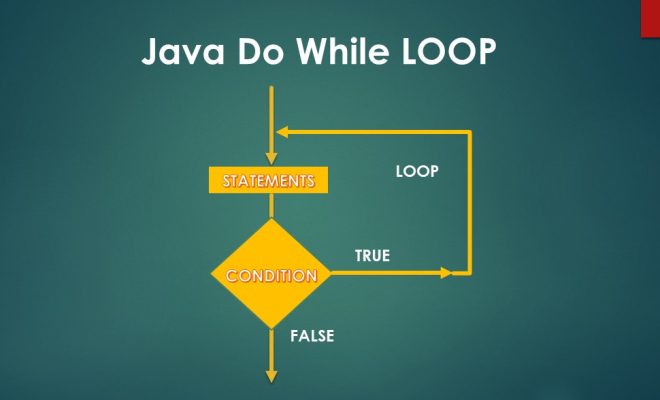
The do while loop is used when we want to execute a block of code at least once, irrespective of whether the condition is true or false. The syntax of the do while loop is as follows:

“`
do{
//code to be executed
}while(condition);
“`

Here, the code block will execute at least once before checking the condition. If the condition is true, the code block will execute again.

Let’s see an example to understand it better:

“`
//Print numbers from 1 to 10 using do while loop
int i=1;
do{
System.out.println(i);
i++;
}while(i<=10);
“`

Here, the variable i is initialized to 1 and the code inside the loop prints the value of i and increments it by 1 after each iteration. Since the condition is checked after executing the code block, the loop executes at least once even if i is greater than 10.

Conclusion

In conclusion, for, while, and do while loops are essential constructs in Java programming. It’s crucial to understand their syntax and working to use them appropriately in our code. By using loops, we can write more efficient code that eliminates redundancy and automates repetitive tasks.


Previous Article

Did You Know Your Samsung Phone Has ...

Next Article

NTFS, FAT, exFAT: Windows 10 File Systems ...

Matthew Lynch

Related articles More from author

  • Digital & Mobile Technology

    Working With Hidden Text in Word Documents

    June 11, 2023
    By Matthew Lynch
  • Digital & Mobile Technology

    How to Create a Folder on the iPad

    July 28, 2023
    By Matthew Lynch
  • Digital & Mobile Technology

    How Does PrivadoVPN’s Free Service Compare to Its Paid-For Subscription?

    June 10, 2023
    By Matthew Lynch
  • Digital & Mobile Technology

    How to Update Your Xbox One Controllers and Series X

    June 26, 2023
    By Matthew Lynch
  • Digital & Mobile Technology

    How to Fix a Glitchy TV Screen

    June 1, 2023
    By Matthew Lynch
  • Digital & Mobile Technology

    How to Fix a Broken Charger

    June 1, 2023
    By Matthew Lynch

Search

Login & Registration

  • Log in
  • Entries feed
  • Comments feed
  • WordPress.org

Newsletter

Signup for The Tech Edvocate Newsletter and have the latest in EdTech news and opinion delivered to your email address!

About Us

Since technology is not going anywhere and does more good than harm, adapting is the best course of action. That is where The Tech Edvocate comes in. We plan to cover the PreK-12 and Higher Education EdTech sectors and provide our readers with the latest news and opinion on the subject. From time to time, I will invite other voices to weigh in on important issues in EdTech. We hope to provide a well-rounded, multi-faceted look at the past, present, the future of EdTech in the US and internationally.

We started this journey back in June 2016, and we plan to continue it for many more years to come. I hope that you will join us in this discussion of the past, present and future of EdTech and lend your own insight to the issues that are discussed.

Newsletter

Signup for The Tech Edvocate Newsletter and have the latest in EdTech news and opinion delivered to your email address!

Contact Us

The Tech Edvocate
910 Goddin Street
Richmond, VA 23231
(601) 630-5238
[email protected]

Copyright © 2026 Matthew Lynch. All rights reserved.