The Tech Edvocate

Top Menu

  • Advertisement
  • Apps
  • Home Page
  • Home Page Five (No Sidebar)
  • Home Page Four
  • Home Page Three
  • Home Page Two
  • Home Tech2
  • Icons [No Sidebar]
  • Left Sidbear Page
  • Lynch Educational Consulting
  • My Account
  • My Speaking Page
  • Newsletter Sign Up Confirmation
  • Newsletter Unsubscription
  • Our Brands
  • Page Example
  • Privacy Policy
  • Protected Content
  • Register
  • Request a Product Review
  • Shop
  • Shortcodes Examples
  • Signup
  • Start Here
    • Governance
    • Careers
    • Contact Us
  • Terms and Conditions
  • The Edvocate
  • The Tech Edvocate Product Guide
  • Topics
  • Write For Us
  • Advertise

Main Menu

  • Start Here
    • Our Brands
    • Governance
      • Lynch Educational Consulting, LLC.
      • Dr. Lynch’s Personal Website
      • Careers
    • Write For Us
    • The Tech Edvocate Product Guide
    • Contact Us
    • Books
    • Edupedia
    • Post a Job
    • The Edvocate Podcast
    • Terms and Conditions
    • Privacy Policy
  • Topics
    • Assistive Technology
    • Child Development Tech
    • Early Childhood & K-12 EdTech
    • EdTech Futures
    • EdTech News
    • EdTech Policy & Reform
    • EdTech Startups & Businesses
    • Higher Education EdTech
    • Online Learning & eLearning
    • Parent & Family Tech
    • Personalized Learning
    • Product Reviews
  • Advertise
  • Tech Edvocate Awards
  • The Edvocate
  • Pedagogue
  • School Ratings

logo

The Tech Edvocate

  • Start Here
    • Our Brands
    • Governance
      • Lynch Educational Consulting, LLC.
      • Dr. Lynch’s Personal Website
        • My Speaking Page
      • Careers
    • Write For Us
    • The Tech Edvocate Product Guide
    • Contact Us
    • Books
    • Edupedia
    • Post a Job
    • The Edvocate Podcast
    • Terms and Conditions
    • Privacy Policy
  • Topics
    • Assistive Technology
    • Child Development Tech
    • Early Childhood & K-12 EdTech
    • EdTech Futures
    • EdTech News
    • EdTech Policy & Reform
    • EdTech Startups & Businesses
    • Higher Education EdTech
    • Online Learning & eLearning
    • Parent & Family Tech
    • Personalized Learning
    • Product Reviews
  • Advertise
  • Tech Edvocate Awards
  • The Edvocate
  • Pedagogue
  • School Ratings
  • Miro vs Conceptboard for project management

  • How to use Teamwork for resource management

  • How much does Procore cost per month

  • How to organize Microsoft Planner buckets

  • Is Teamwork good for billable hours

  • Procore vs Buildertrend which is better

  • Airtable project management templates

  • Can Miro track project progress

  • How to use Basecamp for client work

  • Can Lucidchart create swimlane diagrams

Digital & Mobile Technology
Home›Digital & Mobile Technology›Chromebook vs. MacBook

Chromebook vs. MacBook
By Matthew Lynch
June 12, 2023
0
Spread the love

Chromebook Vs MacBook: Which One Is Right For You?

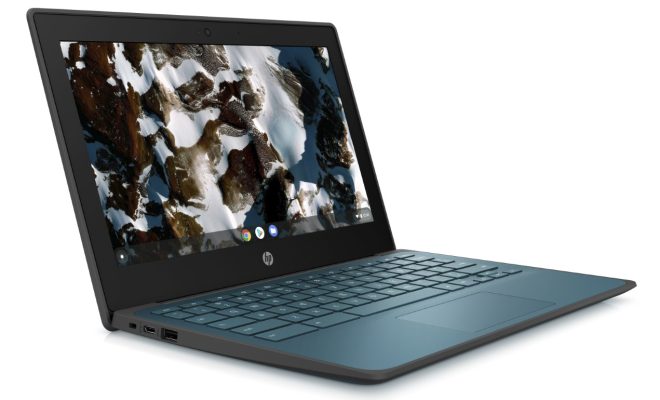
When it comes to laptops, two of the most popular choices on the market are the Chromebook and the MacBook. Both options offer their own unique features that cater to different users, so it’s important to understand the differences between the two before making a final decision.

Chromebook

Chromebooks are laptops that run on Google’s Chrome OS instead of Windows or MacOS. They are designed to be affordable and lightweight, which makes them a popular choice for students and those who don’t require powerful computing capabilities. Chromebooks typically have a long battery life and are easier to maintain due to the lack of traditional software installations.

Pros:

– Affordable: Chromebooks tend to be much cheaper than MacBooks, with some models starting as low as $150. This makes them an attractive option for those on a tight budget.
– Lightweight: Chromebooks are designed to be portable, so they are generally lighter and thinner than most MacBook models.
– Long Battery Life: Chromebooks typically have a longer battery life than MacBooks, with some models lasting up to 12 hours on a single charge.

Cons:

– Limited Compatibility: Chromebooks are limited in the applications they can run, as most require an internet connection and access to the Google Play Store. This can be a major downfall for users who require specialized software.
– Limited Storage: Chromebooks tend to have less internal storage than MacBooks, with most models maxing out at 64GB.
– Limited Customization: Chromebooks don’t offer a lot of customization options, which can be frustrating for users who prefer to tailor their device to their specific needs.

MacBook

MacBooks are laptops made by Apple that run on MacOS. They are known for their sleek design, powerful computing capabilities, and high price point. MacBooks are popular amongst creative professionals and those who need a device that can handle demanding tasks.

Pros:

– Powerful: MacBooks are equipped with powerful processors and graphics cards, which makes them ideal for professionals who need a device that can handle intensive tasks like video editing and graphic design.
– High Storage: MacBooks typically come with a lot of internal storage, with some models offering up to 2TB of storage space.
– Customizable: MacOS offers a lot of customization options, allowing users to tailor their device to their specific needs.

Cons:

– Expensive: MacBooks are known for their high price points, with the most basic model starting at $1,299.
– Limited Battery Life: MacBooks tend to have a shorter battery life than Chromebooks, with most models lasting around 8-10 hours on a single charge.
– Limited Compatibility: MacOS is not as widely used as Windows, so some software applications may not be compatible with the operating system.

Conclusion

When it comes down to choosing between a Chromebook and a MacBook, it really depends on what you’re looking for in a laptop. If you need a device for basic tasks like browsing the internet, checking email, and watching videos, then a Chromebook may be the best option due to its affordability, portability, and long battery life. However, if you require a device that can handle intensive tasks like video editing, graphic design, or programming, then a MacBook may be the better choice due to its powerful computing capabilities and high storage options. Ultimately, it’s important to consider your needs, budget, and personal preferences before making a final decision.


Previous Article

How to Schedule the Blue Light Filter ...

Next Article

Ways to Play Video Games in Your ...

Matthew Lynch

Related articles More from author

  • Digital & Mobile Technology

    Find Traditional Fonts for Certificates

    June 12, 2023
    By Matthew Lynch
  • Digital & Mobile Technology

    Bits Per Second Explained

    June 12, 2023
    By Matthew Lynch
  • Digital & Mobile Technology

    How to Print Postcards in Word

    May 2, 2023
    By Matthew Lynch
  • Digital & Mobile Technology

    Stage Manager on the iPad: What Is It and Is It Any Good?

    August 3, 2023
    By Matthew Lynch
  • Digital & Mobile Technology

    Your Android Phone or Tablet Won’t Turn On? Ways to Fix

    July 4, 2023
    By Matthew Lynch
  • Digital & Mobile Technology

    How Do Hill Descent Control Systems Work?

    June 13, 2023
    By Matthew Lynch

Search

Login & Registration

  • Log in
  • Entries feed
  • Comments feed
  • WordPress.org

Newsletter

Signup for The Tech Edvocate Newsletter and have the latest in EdTech news and opinion delivered to your email address!

About Us

Since technology is not going anywhere and does more good than harm, adapting is the best course of action. That is where The Tech Edvocate comes in. We plan to cover the PreK-12 and Higher Education EdTech sectors and provide our readers with the latest news and opinion on the subject. From time to time, I will invite other voices to weigh in on important issues in EdTech. We hope to provide a well-rounded, multi-faceted look at the past, present, the future of EdTech in the US and internationally.

We started this journey back in June 2016, and we plan to continue it for many more years to come. I hope that you will join us in this discussion of the past, present and future of EdTech and lend your own insight to the issues that are discussed.

Newsletter

Signup for The Tech Edvocate Newsletter and have the latest in EdTech news and opinion delivered to your email address!

Contact Us

The Tech Edvocate
910 Goddin Street
Richmond, VA 23231
(601) 630-5238
[email protected]

Copyright © 2026 Matthew Lynch. All rights reserved.