The Tech Edvocate

Top Menu

  • Advertisement
  • Apps
  • Home Page
  • Home Page Five (No Sidebar)
  • Home Page Four
  • Home Page Three
  • Home Page Two
  • Home Tech2
  • Icons [No Sidebar]
  • Left Sidbear Page
  • Lynch Educational Consulting
  • My Account
  • My Speaking Page
  • Newsletter Sign Up Confirmation
  • Newsletter Unsubscription
  • Our Brands
  • Page Example
  • Privacy Policy
  • Protected Content
  • Register
  • Request a Product Review
  • Shop
  • Shortcodes Examples
  • Signup
  • Start Here
    • Governance
    • Careers
    • Contact Us
  • Terms and Conditions
  • The Edvocate
  • The Tech Edvocate Product Guide
  • Topics
  • Write For Us
  • Advertise

Main Menu

  • Start Here
    • Our Brands
    • Governance
      • Lynch Educational Consulting, LLC.
      • Dr. Lynch’s Personal Website
      • Careers
    • Write For Us
    • The Tech Edvocate Product Guide
    • Contact Us
    • Books
    • Edupedia
    • Post a Job
    • The Edvocate Podcast
    • Terms and Conditions
    • Privacy Policy
  • Topics
    • Assistive Technology
    • Child Development Tech
    • Early Childhood & K-12 EdTech
    • EdTech Futures
    • EdTech News
    • EdTech Policy & Reform
    • EdTech Startups & Businesses
    • Higher Education EdTech
    • Online Learning & eLearning
    • Parent & Family Tech
    • Personalized Learning
    • Product Reviews
  • Advertise
  • Tech Edvocate Awards
  • The Edvocate
  • Pedagogue
  • School Ratings

logo

The Tech Edvocate

  • Start Here
    • Our Brands
    • Governance
      • Lynch Educational Consulting, LLC.
      • Dr. Lynch’s Personal Website
        • My Speaking Page
      • Careers
    • Write For Us
    • The Tech Edvocate Product Guide
    • Contact Us
    • Books
    • Edupedia
    • Post a Job
    • The Edvocate Podcast
    • Terms and Conditions
    • Privacy Policy
  • Topics
    • Assistive Technology
    • Child Development Tech
    • Early Childhood & K-12 EdTech
    • EdTech Futures
    • EdTech News
    • EdTech Policy & Reform
    • EdTech Startups & Businesses
    • Higher Education EdTech
    • Online Learning & eLearning
    • Parent & Family Tech
    • Personalized Learning
    • Product Reviews
  • Advertise
  • Tech Edvocate Awards
  • The Edvocate
  • Pedagogue
  • School Ratings
  • 100 Best Apps for Active Recall

  • 100 Best Apps for Spaced Repetition

  • 100 Best Apps for Building a Second Brain

  • 100 Best Apps for Second Brain

  • A Casino Bonus Is Not Its Cash Value: How to Read Reviews Clearly

  • 100 Best Apps for Zettelkasten

  • 100 Best Apps for Bullet Journaling

  • 100 Best Apps for Getting Things Done

  • 100 Best Apps for GTD Method

  • 100 Best Apps for Overcoming Writer’s Block

Digital & Mobile Technology
Home›Digital & Mobile Technology›Computer Ports: Usage & Role in Networking

Computer Ports: Usage & Role in Networking
By Matthew Lynch
June 10, 2023
0
Spread the love

Computer ports are a critical piece of hardware that play a major role in networking. They are used to connect different peripherals, devices, and other devices to the computer or other network device. There are a variety of computer ports used for different purposes.

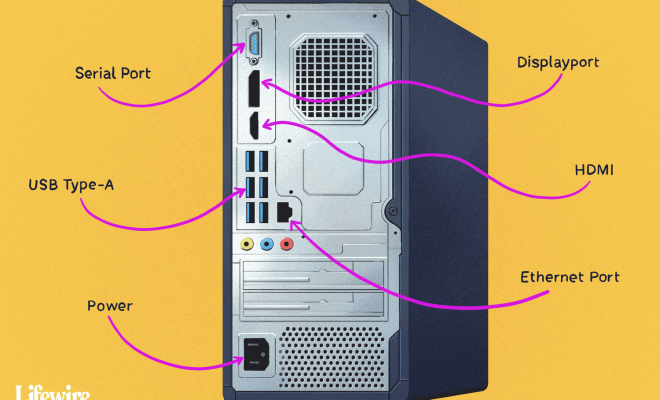
The most common computer ports include USB, Ethernet, HDMI, VGA, and DisplayPort. USB ports are used for connecting devices like cameras, printers, scanners, and other peripherals to the computer. Ethernet ports are used for connecting computers to local area networks and the internet. HDMI and VGA ports are used for connecting a computer to external displays like monitors and projectors, while DisplayPort is used for connecting high-end monitors.

Each port is created with a specific purpose in mind, and it’s important to choose the right one for your needs. When choosing a port, you should consider several factors such as the type and quantity of data to be transferred, the distance between the computer and the device being connected, and the speed of data transfer required.

In networking, computer ports play a significant role in establishing a connection between different network devices like computers, servers, routers, switches, and other peripherals. Each device on the network has a unique IP address and uses network ports to communicate with other devices. Ports are identified by their number, which defines the type of communication protocol being used.

In order for devices to connect to each other on a network, they must use compatible ports. If two devices use different ports, then they will not be able to communicate with each other. This can be a significant problem in networking, as it can cause devices to not function correctly or cause data to be corrupted.

Computer ports are also important in terms of security. They can be used to control access to a network and to limit the types of data that can be transferred. For example, some ports may be blocked in order to prevent certain types of malware from being transmitted over the network.

Overall, computer ports play a critical role in networking. They allow devices to communicate with each other and enable us to use a wide range of peripherals and other devices. It’s important to understand the different types of ports and their functions in order to choose the right one for your needs and ensure the security and reliability of your network.


Previous Article

How to Track Changes in Google Docs

Next Article

How to Use Lockdown Mode on Any ...

Matthew Lynch

Related articles More from author

  • Digital & Mobile Technology

    What Is Vudu and How Does It Work?

    June 12, 2023
    By Matthew Lynch
  • Digital & Mobile Technology

    Tips to Help You Fix the Windows 10 Blue Screen Error

    June 8, 2023
    By Matthew Lynch
  • Digital & Mobile Technology

    Best Places to Stake Algorand (ALGO)

    September 8, 2023
    By Matthew Lynch
  • Digital & Mobile Technology

    How to Download Music From Google Play to Your Phone

    June 22, 2023
    By Matthew Lynch
  • Digital & Mobile Technology

    How to Create or Remove a Contacts List on iPhone

    May 27, 2023
    By Matthew Lynch
  • Digital & Mobile Technology

    How to Fix Launchpad Problems on Your Mac

    July 31, 2023
    By Matthew Lynch

Search

Login & Registration

  • Log in
  • Entries feed
  • Comments feed
  • WordPress.org

Newsletter

Signup for The Tech Edvocate Newsletter and have the latest in EdTech news and opinion delivered to your email address!

About Us

Since technology is not going anywhere and does more good than harm, adapting is the best course of action. That is where The Tech Edvocate comes in. We plan to cover the PreK-12 and Higher Education EdTech sectors and provide our readers with the latest news and opinion on the subject. From time to time, I will invite other voices to weigh in on important issues in EdTech. We hope to provide a well-rounded, multi-faceted look at the past, present, the future of EdTech in the US and internationally.

We started this journey back in June 2016, and we plan to continue it for many more years to come. I hope that you will join us in this discussion of the past, present and future of EdTech and lend your own insight to the issues that are discussed.

Newsletter

Signup for The Tech Edvocate Newsletter and have the latest in EdTech news and opinion delivered to your email address!

Contact Us

The Tech Edvocate
910 Goddin Street
Richmond, VA 23231
(601) 630-5238
[email protected]

Copyright © 2026 Matthew Lynch. All rights reserved.